Introdução
Use this guide to replace the left driver assembly in a Sennheiser Momentum 4.
This guide requires soldering. If you're unfamiliar with soldering, review the How to Solder and Desolder Connections guide and take appropriate precautions before beginning.


-
-
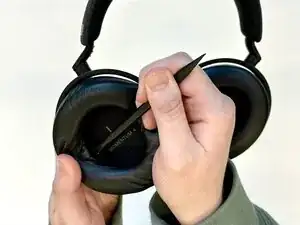
Insert a spudger into the seam between the left ear pad and driver assembly.
-
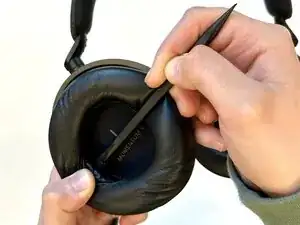
Gently pry around the perimeter of the ear pad until it fully releases.
-
Remove the left ear pad.
-
-
-
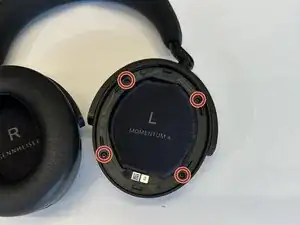
Use a Phillips #00 screwdriver to remove the four 6.5 mm screws that secure the left driver housing.
-
-
-
Insert the flat end of a spudger into the driver housing seam.
-
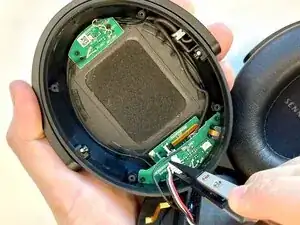
Gently pry the driver housing up and out, with care not to strain or damage the connected cables.
-
-
-
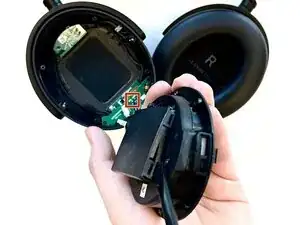
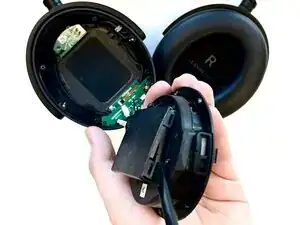
Carefully lift away the driver housing out and flip it over to reveal the battery cover.
-
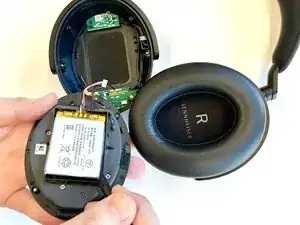
Use tweezers to pull the white battery connector directly out of the daughterboard socket.
-
-
-
Use the flat end of a spudger to pry open the retaining clips on the battery cover and remove it carefully.
-
-
-
Insert the flat end of a spudger between the lower edge of the battery and the battery housing.
-
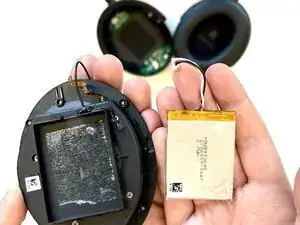
Gently lift the battery upward to release the adhesive that secures the battery.
-
Remove the battery.
-


To reassemble your device, follow the above steps in reverse order.
Take your e-waste to an R2 or e-Stewards certified recycler.
Repair didn’t go as planned? Try some basic troubleshooting or ask our Answers community for help.

Alternativ kann man das Ohrpolster auch fest anfassen und einfach abziehen
Joni -