Introdução
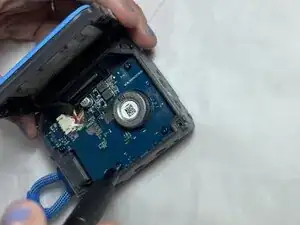
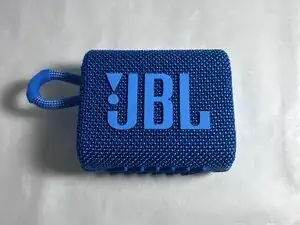
If your JBL stops turning on or won’t charge when showing no signs of working with a working charger or battery, use this guide to replace the internal motherboard.


-
-
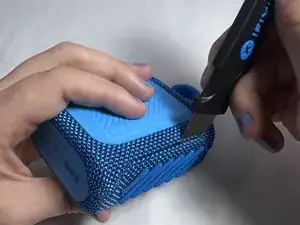
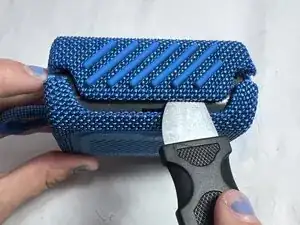
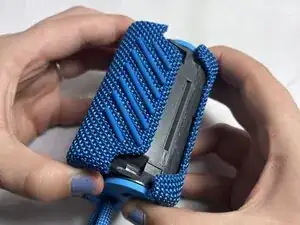
Using an iFixit Opening Pick or a Jimmy, pry along the seam between the rubber outer layer and the hard shell.
-
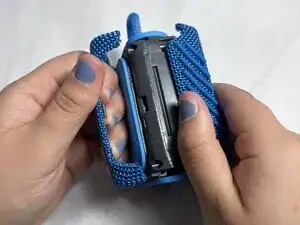
Work your way around the edges until the shell loosens and can be fully removed.
-
-
-
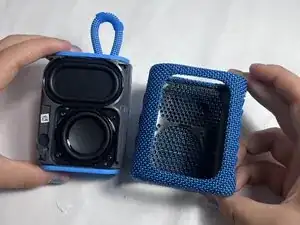
Once the shell is loosened on all sides, gently lift and remove it completely.
-
Align the new shell with the speaker’s body, making sure all edges are properly positioned.
-
Press firmly around the edges until the shell snaps securely into place.
-
-
-
Locate the internal screws underneath the outer shell.
-
Use your precision screwdriver to remove all screws securing the plastic enclosure.
-
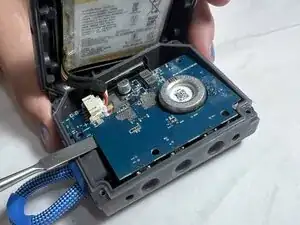
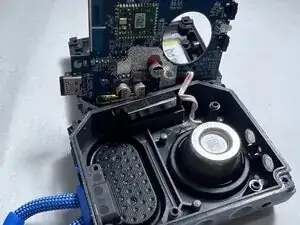
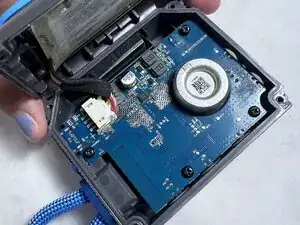
Carefully lift the casing to expose the motherboard and other internal components.
-
-
-
Unscrew the motherboard to the internal casing of the speaker.
-
Unscrew the speaker attached to the casing as well.
-
The speaker and part of the battery may be soldered onto the motherboard, proceed with caution when removing attachments
-
To reassemble your device, follow the above steps in reverse order.
Take your e-waste to an R2 or e-Stewards certified recycler.
Repair didn’t go as planned? Try some basic troubleshooting or ask our Answers community for help.