Introdução
If you have a 2018 iMac Pro, head on over to this guide as this guide will not work for your particular machine.
Note: you will need a wired, Apple-layout keyboard in order to perform this reset.
-
-
Choose Apple menu > Shut Down.
-
After your Mac shuts down, unplug the power cord.
-
Wait at least 15 seconds.
-
Plug the power cord back in.
-
Wait 5 seconds, then press the power button again to turn on your Mac.
-
-
-
Shut down your Mac.
-
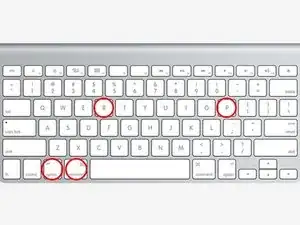
Turn it on and immediately press and hold these four keys together: Option, Command, P, and R.
-
You can release the keys after about 20 seconds, during which your Mac might appear to restart.
-
If you have done all of these resets with no luck, you can head on over to our Answers Forum and ask for more assistance there!
3 comentários
Nur zur Information: Beim "MAC" heisst das "Herunterfahren" - "AUSSCHALTEN"!!!
Tras la actualizar mi MacBook Pro 2018, al encender solo se queda en pantalla azul sin dirigirse a la pantalla de inicio ni mostrar el logotipo, a parte se enciende la touchbar pero solo muestra botones como los del volumen y la luz. Ayuda por favor.
Wanted to link the official Apple guide for NVRAM (or PRAM) and SMC resets as well, in case it's helpful to others. I always have trouble finding them from a search engine for some reason.
Reset NVRAM on your Mac
https://support.apple.com/en-us/102539
Reset the SMC of your Mac