Introdução
I had to make a separate guide for this Mac as this Mac has the new T2 chip and requires a different procedure then the other Mac Desktops.
-
-
Choose Apple menu > Shut Down.
-
After your Mac shuts down, press and hold its power button for 10 seconds.
-
Release the power button, then wait a few seconds.
-
Press the power button again to turn on your Mac.
-
-
-
Choose Apple menu > Shut Down.
-
After your Mac shuts down, unplug the power cord.
-
Wait 15 seconds.
-
Plug the power cord back in.
-
Wait 5 seconds, then press the power button again to turn on your Mac.
-
-
-
Shut down your Mac.
-
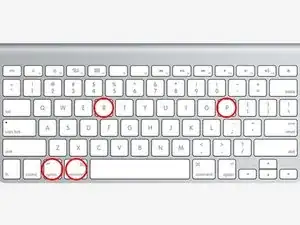
Then turn it on and immediately press and hold these four keys together: Option, Command, P, and R.
-
You can release the keys after about 20 seconds, during which your Mac might appear to restart.
-
You can release the keys after the Apple logo appears and disappears for the second time.
-
If you have tried all of these resets and still have problems, head on over to our Answers Forum!
2 comentários
one of my thunderbolt ports stopped working. I used the SMC and PRAM reset and they all worked afterwards. thanks!
Wanted to link the official Apple guide for NVRAM (or PRAM) and SMC resets as well, in case it's helpful to others. I always have trouble finding them from a search engine for some reason.
Reset NVRAM on your Mac
https://support.apple.com/en-us/102539
Reset the SMC of your Mac
After the iMac Pro shut down, I pressed and held the power button for 10 seconds. It began to power up so this didn’t seem to work.
C Adams -
What is the problem you are trying to solve by attempting to do these resets?
[deleted] -