Introdução

An unstable connection between the power source and the Garmin Nuvi 2539LMT can cause the device to not power on and work properly. 

A common issue with the Garmin Nuvi 2539LMT is a poor power connection with the automobile. This could be an issue with the power adapter, or the USB port on the actual GPS device. If the adapter cord has been replaced and/or the blue light on the adapter cord is on and power is still not being delivered to the Garmin Nuvi, then the USB port itself will need to be replaced. The purpose of this guide is to show you how to repair or replace the USB connection port in the Garmin Nuvi 2539LMT.

  1. ZeOLMMlWgERMkPAl
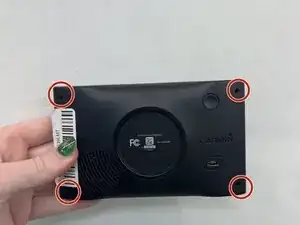
    • Remove the four 6 mm screws from the back panel using a T5 Torx screwdriver.

  2. yfqYHqNjpcuBLVwj
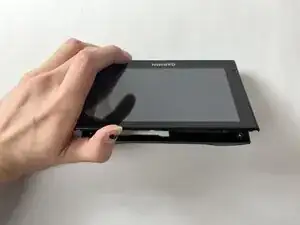
    • Pry apart the screen and back panel from a corner position, tracing the seam.

  3. prKFbuqJJ3kYXsUo
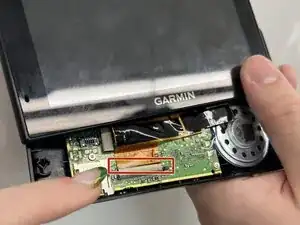
    • Use a plastic opening tool to detach the cable that is connected to the motherboard.

  4. HFKmPSFfwYLeTRnG
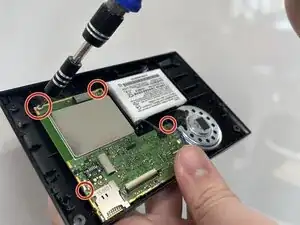
    • Remove the four 4 mm screws from the motherboard using a T5 Torx screwdriver.

  5. K2tHHvLNdCCRf4OR
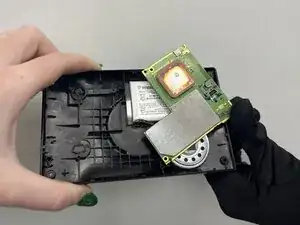
    • Flip up the motherboard.

    • Use caution; the motherboard is still connected to the battery cable.

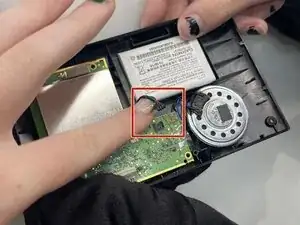
  6. hyyBEwBCMbRikHK5
    • Disconnect the battery by detaching the red and green cords.

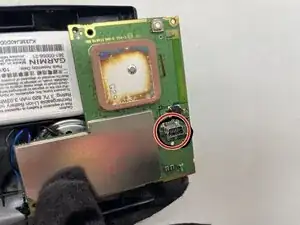
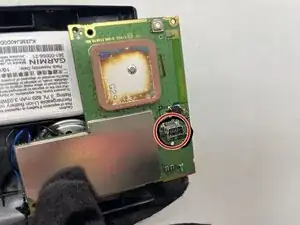
  7. d3gGFitJdQ4BZAIY
    • Remove the metal USB port from the back of the motherboard.

Conclusão

To reassemble your device, follow these instructions in reverse order.

Amelia Breese

Membro desde: 04/11/25

289 Reputação

0 comentários