Introdução
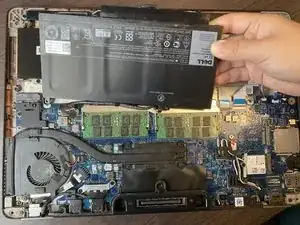
This guide introduces how to remove the battery from Dell Latitude E7470. It is always recommended to, at least, disconnect the battery before starting to repair or replace any other part inside the laptop.
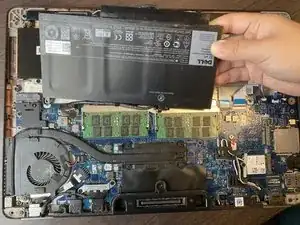
The laptop comes with different battery configurations. While this guide shows how to remove a standard capacity battery, the procedure is similar when removing the extended capacity battery.
Ferramentas

-
-
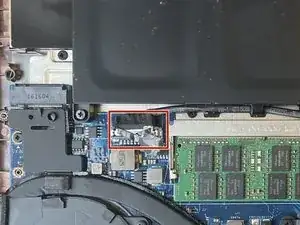
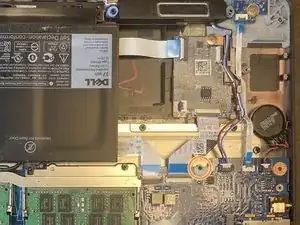
Use the pull tab on the battery connector to lift the connector straight up off its socket on the motherboard, disconnecting it.
-
-
-
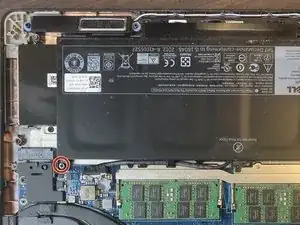
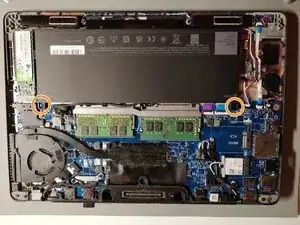
Remove the single 4 mm Phillips screw securing the bottom left corner of the battery.
-
If you are removing an extended capacity battery (see third photo), remove the Phillips screw securing the bottom right corner of the battery.
-
To reassemble your device, follow these instructions in reverse order.

2 comentários
.. these fine folks sent me the wrong battery for my laptop (completely wrong voltage - could have damaged it) and now expect me to pay for its return shipping and deal with the issues of properly shipping a lithium battery. Thanks, but no, I’ll FIXIT with a battery from another source
kim r -
I have renamed this guide "Battery removal" as it is a prerequisite (I don't know how to change that option). Then I recreated a guide for the battery replacement, with photos of the extended capacity battery, the one sold on ifixit.com (link in the guide)
Dell Latitude E7470 Battery Replacement
Hervé -
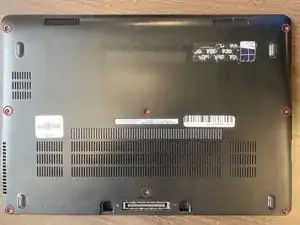
After unscrewing the 8 screws, they stay on the back cover.
Victor Ashiedu -