Introdução
There are two main reasons that you would need to replace your ram. The first one being that you want an upgrade and want your laptop to run smoother, or that your current laptop is experiencing issues such as system crashes, unexpected reboots, or memory issues. By fixing these issues or upgrading, you can significantly boost overall performance. This guide is very simple and should only take around 10 minutes.
Before you begin, ensure that the battery is unplugged and disconnected to any electricity.
Ferramentas

-
-
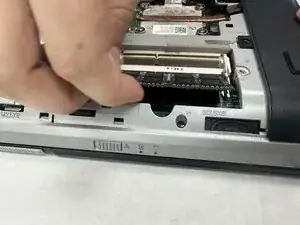
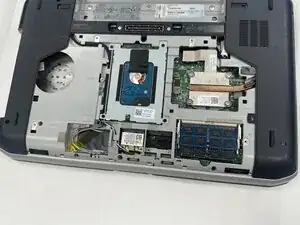
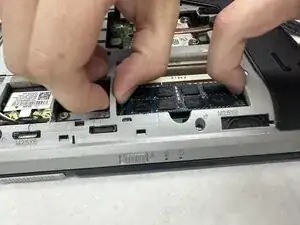
Two clips secure each RAM module in place, one on each side. Using your fingers, spread the clips away from the RAM module.
-
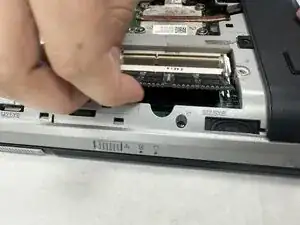
Pull the RAM module directly out of its socket.
-
Repeat the previous bullet for the other RAM module.
-
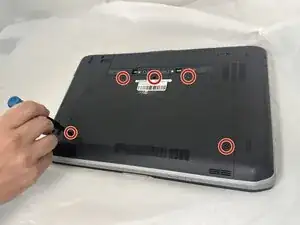
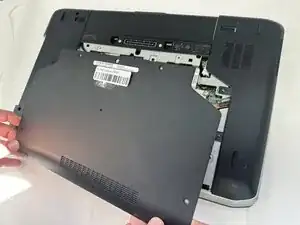
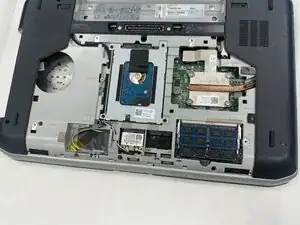
To reassemble your device, follow the above steps in reverse order.
Take your e-waste to an R2 or e-Stewards certified recycler.
Repair didn’t go as planned? Try some basic troubleshooting or ask our Answers community for help.