Introdução

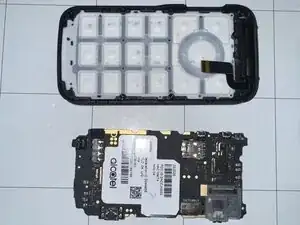
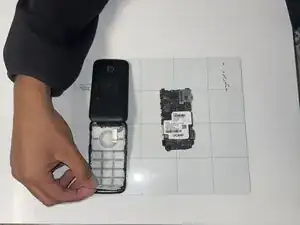
In order to replace the number pad on the Alcatel Go Flip 3 you need to follow the steps from our "motherboard replacement" guide.

  1. sv2PFTOsYVWUllS1
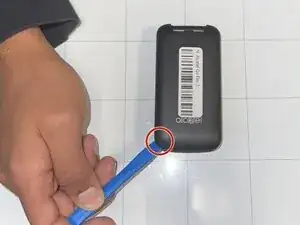
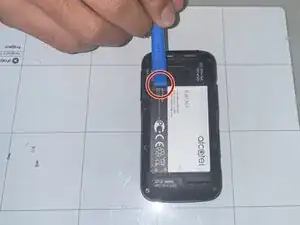
    • Place a fingernail or opening tool into the notch on the back panel of the phone.

    • Pry upwards to remove the back panel.

  2. vSE3ASgBlixRiiIp
    • Remove the battery by lifting it up from the small indent.

  3. A6SlRRrYGJZgOqFT
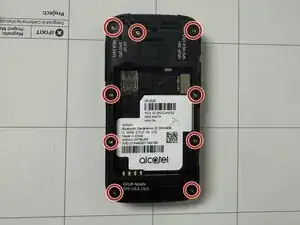
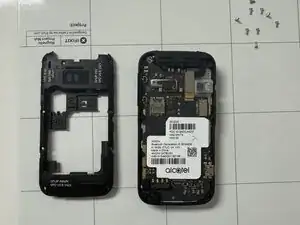
    • Remove the nine 1 mm screws from the midframe using a Phillips #00 screwdriver.

  4. Zt5R6KVR5VOwfs65
    Zt5R6KVR5VOwfs65
    a1XWN5WcGXeREBDa
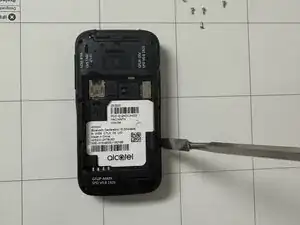
    • Use a spudger to pry the midframe away from the phone.

  5. NYe1tkY51nDUsXt4
    NYe1tkY51nDUsXt4
    1VPcFpBXEYGjcPNU
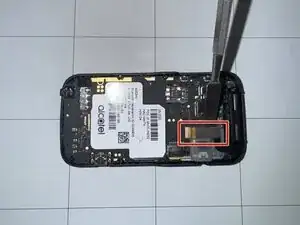
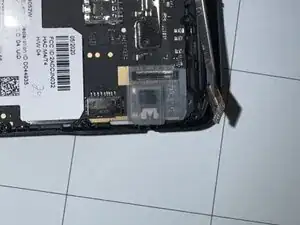
    • Use a spudger to disconnect the video cable from the motherboard.

    • Make sure not to damage the video cable when disconnecting it from the motherboard. Hold it up correctly.

  6. L5SHBEdrKQhI1P2O
    L5SHBEdrKQhI1P2O
    cEeDT2sHKDUK5o1g
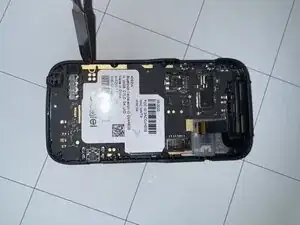
    • Use a spudger to pry the motherboard out of the phone.

  7. rSNsVqQMuDiVPOGY
    • Grab one corner of the number pad and lift up to remove it from the phone.

Conclusão

To reassemble your device, follow these instructions in reverse order.

Gustavo Cornier

Membro desde: 09/09/25

375 Reputação

0 comentários