Introdução

This guide shows how to replace the charging port on the Alcatel Go Flip 3. If your phone no longer charges or connects properly, a damaged port may be the cause. Follow these steps to safely open the device and install a new charging port

  1. sv2PFTOsYVWUllS1
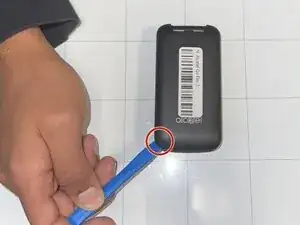
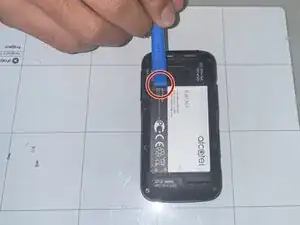
    • Place a fingernail or opening tool into the notch on the back panel of the phone.

    • Pry upwards to remove the back panel.

  2. vSE3ASgBlixRiiIp
    • Remove the battery by lifting it up from the small indent.

  3. A6SlRRrYGJZgOqFT
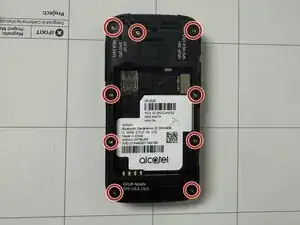
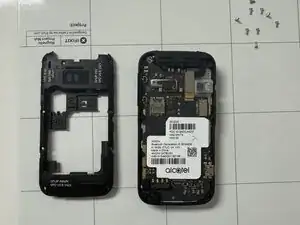
    • Remove the nine 1 mm screws from the midframe using a Phillips #00 screwdriver.

  4. Zt5R6KVR5VOwfs65
    Zt5R6KVR5VOwfs65
    a1XWN5WcGXeREBDa
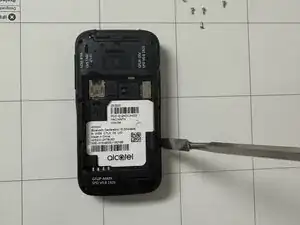
    • Use a spudger to pry the midframe away from the phone.

  5. NYe1tkY51nDUsXt4
    NYe1tkY51nDUsXt4
    1VPcFpBXEYGjcPNU
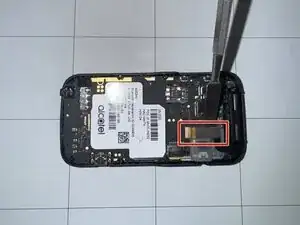
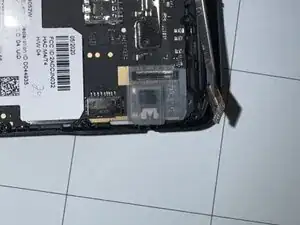
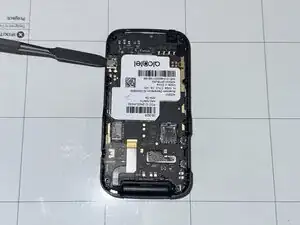
    • Use a spudger to disconnect the video cable from the motherboard.

    • Make sure not to damage the video cable when disconnecting it from the motherboard. Hold it up correctly.

  6. L5SHBEdrKQhI1P2O
    L5SHBEdrKQhI1P2O
    cEeDT2sHKDUK5o1g
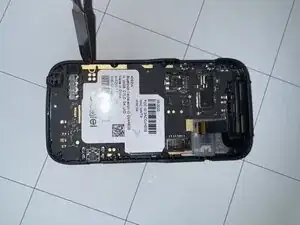
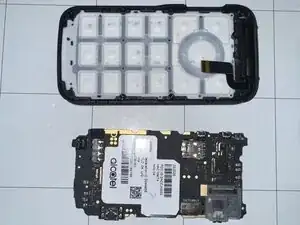
    • Use a spudger to pry the motherboard out of the phone.

  7. rTUTGFLiMKyG3qTh
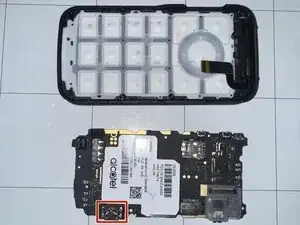
    • Desolder the charging port from the motherboard.

Conclusão

To reassemble your device, follow these instructions in reverse order.

Gustavo Cornier

Membro desde: 09/09/25

375 Reputação

0 comentários