Introdução

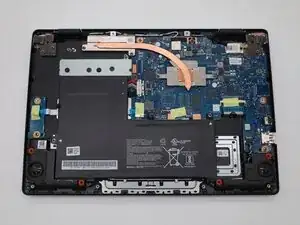
If the Acer Chromebook CBOA311-1H-C90F is unresponsive or will not turn on, then use this guide to replace the battery. Before using this guide, check that the laptop is not charging and that the charger is working. To begin replacing the battery, make sure that the computer is powered off and disconnected from any power source. If you're having issues with your Chromebook not turning on, please check our troubleshooting page.

  1. SREYX4G1Dflrp1xS
    SREYX4G1Dflrp1xS
    tBBf3PhJW3VstiIj
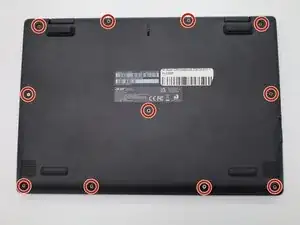
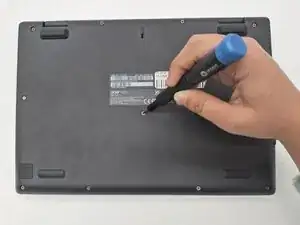
    • Turn the Chromebook over so the bottom is facing up.

    • Remove eleven 6 mm screws from the back using a Phillips #00 screwdriver.

  2. CFgVTiNbMZE6WfPM
    CFgVTiNbMZE6WfPM
    1jSRVmpsagcSNJTx
    21QMhlUpEnOJPmOD
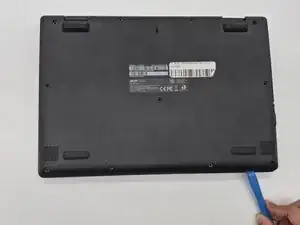
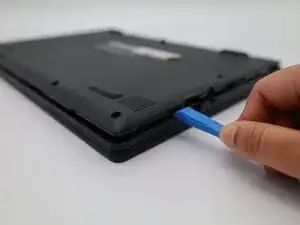
    • Use an opening tool on all sides of the computer to gently lift off the back cover.

    • You may hear a cracking noise as the cover lifts.

    • Caution: Do not work with metal tools, as they can damage internal components and cause an electric shock. 

  3. WFduFEPaRQo1PJWK
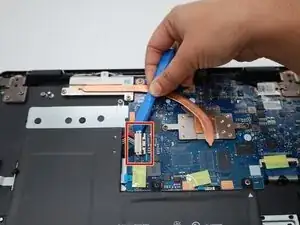
    • Use the plastic opening tool to gently lift the white power cable from the motherboard.

  4. KWRAMJVLAtKaFJfP
    KWRAMJVLAtKaFJfP
    RTNWUWYyPVMkwDGy
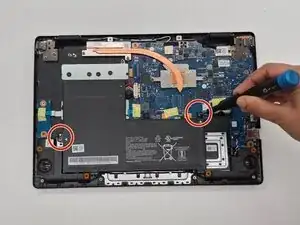
    • Use a Phillips #00 screwdriver to remove the two 3mm screws that hold the battery in place.

  5. P4FefEJYPG4YGSAR
    P4FefEJYPG4YGSAR
    2NCDvydpONyFAxij
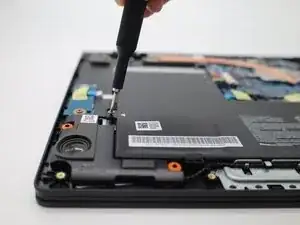
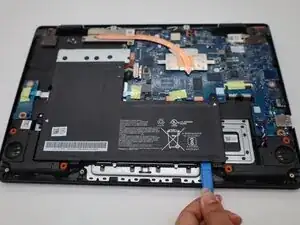
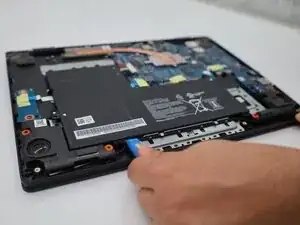
    • Use a plastic opening tool to lift the tiny locks on the bottom that hold the battery in place.

  6. tRCPZmmeNpLy6gQh
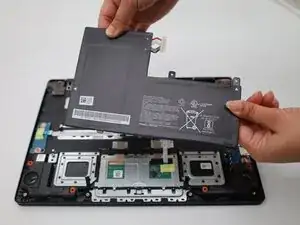
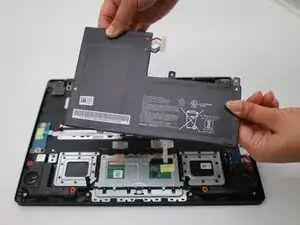
    • Gently remove the old battery and replace with a new one.

Conclusão

To reassemble your device, follow these instructions in reverse order.

Anelyz Martinez

Membro desde: 09/09/25

169 Reputação

0 comentários