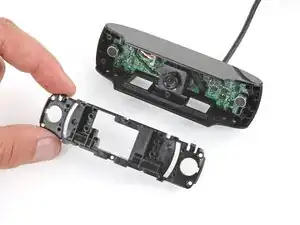
How to Open Your Logitech C920 Webcam
Estas são algumas ferramentas comuns usadas para executar trabalhos neste dispositivo. Talvez você não precise usar todas elas em cada procedimento.
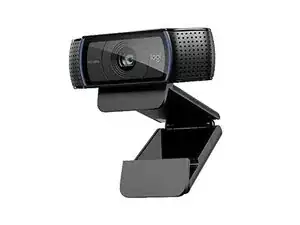
The Logitech C920 is a widely used external webcam designed for high-quality video conferencing and content creation. It features a durable polycarbonate housing with a reinforced metal-clamp hinge and a multi-element glass lens to improve clarity and longevity. Key features include Full HD 1080p video at 30 fps, H.264 hardware encoding, autofocus, and dual stereo microphones. The unit mounts with a universal clip and includes a tripod thread for stable studio setups.
The Logitech C920 can be identified by the model number (M/N VU0062). The model label is on the underside of the camera near the USB cable exit. This label lists the model (M/N), part (P/N), and serial (S/N) numbers.
Common repair-relevant faults include no video output (often caused by a damaged USB cable or failed USB controller), persistent autofocus/haze (dirty or damaged lens or autofocus actuator fault), and microphone failure (loose internal connection). Diagnose by testing the camera on another computer/port, inspecting and continuity-testing the cable, checking the lens for contamination or mechanical obstruction, and verifying microphone input in OS audio settings.
For additional troubleshooting help, visit: Visit https://support.logi.com for drivers, downloads, and support articles for C920/C920s.
Limited hardware warranty varies by region (commonly 1 year). Check Logitech support for region-specific terms.


