Introdução
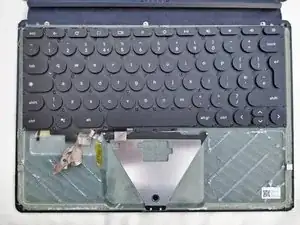
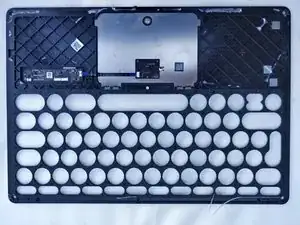
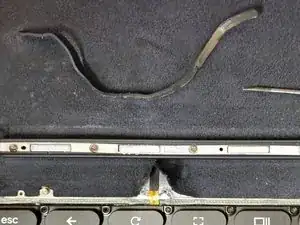
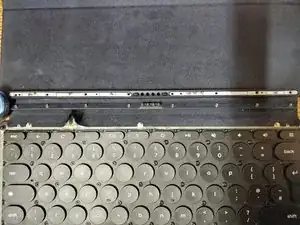
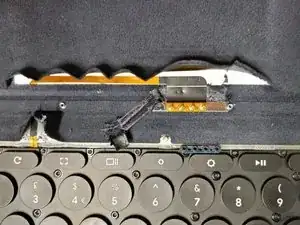
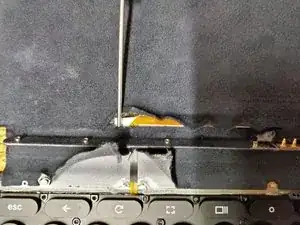
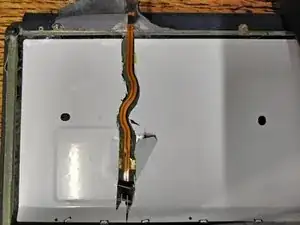
This is not a complete how-to guide, but rather some images to help you with disassembly/repair.
-
-
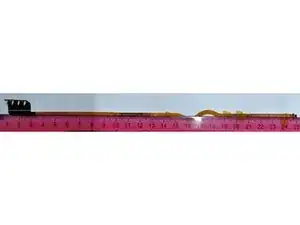
FFC dimensions
-
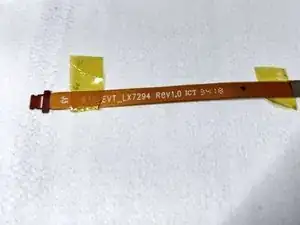
FFC identification
-
P.S. Sorry about the blank space in the images, I needed to pad the canvas to get these to upload here.
-

5 comentários
It still bums me out that we can't figure out a repair for this. At this point adding a USB C plug to it would make me happy
Mine snapped at the weak point in the hinge. You can just about see it in the last image.
Paul -
I think mine might be loose because I do get random connections but the backlit keyboard is gone. Would a USB type-c adapter be something that's possible at this point? Maybe Gemini can figure it out lol
Jona -
Sorry Jona, I've not looked into what would be needed to add a USB-C port. Perhaps you could do some research and report on anything you find?
If you're getting random connections it's likely that the cable is at least partially snapped such that not all of the copper traces are connected at all times. This happened to me shortly before it broke fully.
Paul -
Is this completely glued down?
Matthew U -
The cover plastic is glued around the edges and either side of the touchpad. No heat is required to release the glue. I found it a lot easier to separate than phone screens. The glued down felt/fabric is a lot trickier to work with.
Paul -