Introdução

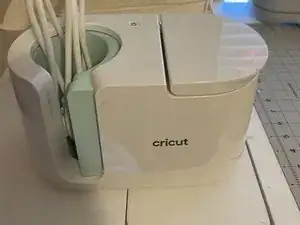
Need to take apart your mug press? Button got pressed too hard and now is askew in the machine? This is the guide for you.

  1. UEyEsZG2V4SHJfVy
    • Place your device to be taken apart on a clean flat surface with plenty of space.

  2. ssL15YY5JrNYRSCD
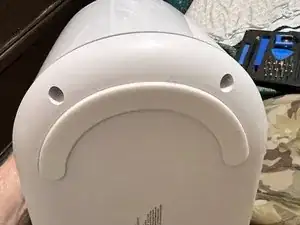
    • Remove two plastic screw covers from bottom using a pick tool.

    • remove two screws using driver.

  3. GRPI6osGD6iNYKEl
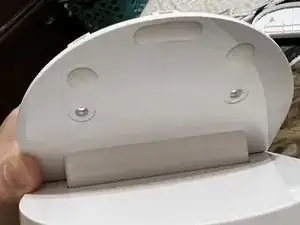
    • Remove the two rubber screw covers and stick them about one inch above the screws.

    • Remove two screws and place aside.

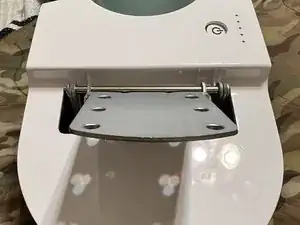
    • Press the lever flush and remove upper plastic.

  4. Z2tpLaI1cHX2FEp2
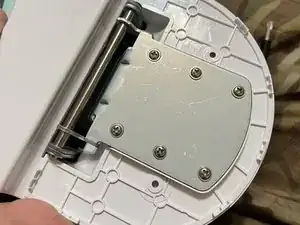
    • Remove six screws and place aside

    • Lift lever and gently remove lower plastic for lever.

  5. esm43qYdPP6UL5rS
    • Metal lever bracket needs to be in the up position.

    • Gently remove the housing careful to not damage the attached power and usb cables

  6. mmJWdsAET2EpG1ny
    mmJWdsAET2EpG1ny
    WEXvbRF4XS2AEYXP
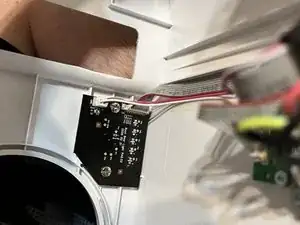
    • Switch is held in place with two screws.

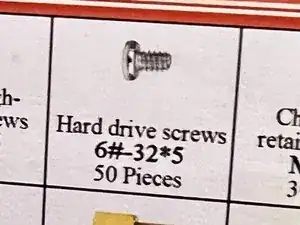
    • If the screws break lose you can replace them with HDD screws

    • Gently thread two HDD screws until tension holds the board in place and no further.

    • DO NOT OVER-TIGHTEN SCREWS.

    • Perform steps in reverse to reassemble being careful to place cables behind the heat shield.

Rafferty Vaughan

Membro desde: 05/09/22

133 Reputação

7 comentários

Is the screw a 32*5/8th. Everywhere I look I can’t find that size there is more to the sizing. Any help would greatly appreciated. Thanks so much for this post.

Amy Ward -

They are #6 HDD screws. You can find them on Amazon. Under Hard Drive screws.

Rafferty Vaughan -

Hola! Mi maquina titila el 3r led. He pasado muchas veces actualización y nada. Que podría ser? Podrías ayudarme?

Sandra Caicedo -

Thank you so much for this, I was pretty annoyed to have a power button problem just a month out of warranty. A fairly simple fix when you know what to do, and it would have taken me forever to figure out without this guide. Why wouldn't Cricut tell me this? Oh right, because then they can't sell another one.

Paul Caron -

i bought my mugg press in USA. I live in SA. Used it in USA and when i used it here in SA there was a bit of smoke. Now it comes on, after a few seconds the 3rd light flashes and then it beeps and swithches off. I presume something burnt. I need to have it fixed. It is brand new.

Elmi Thietz -

The symptoms you're describing for your Cricut mug press—particularly the smoke, the third light flashing, and the subsequent beeping and shutdown—could indicate a few potential issues:

1. Overheating: If the device is overheating, it may trigger safety protocols that cause it to shut down to prevent damage.

2. Electrical Issue: There could be a problem with the power supply or wiring, especially if the machine is not designed for the voltage in South Africa (SA). Ensure that it is compatible with the electrical specifications in your region.

3. Internal Damage: The smoke may suggest that there was internal damage, possibly to the heating element or wiring, which may need professional repair.

4. Sensor Malfunction: The flashing light could indicate a sensor error, which can occur if the machine detects an abnormal condition.

Given that your mug press is brand new, it's advisable to contact Cricut's customer support or the retailer where you purchased it for troubleshooting and repair options. They may provide warr

Rafferty Vaughan -

Thank you, thank you for your post. I received a brand new, all original wrappings and box, Cricut Mug Press as a gift. I made two mugs and when I went to use it the third time, the plug receptacle for the power cord broke away from the casing and fell into the machine. With your instructions I was able to take the machine apart and repair it. (FYI, I only had the machine two weeks when the plug failed. When I contacted Cricut for warranty coverage, I was told that my machine was 4 years old and not under warranty. 😡). Thank you again for your valuable help.

Terri Keas -