Introdução
Is your Roomba I4 Plus not moving properly due to a faulty Caster Wheel? If it is, this guide will help you replace the Caster Wheel. What you will need for this replacement is a Phillips No. 1 screwdriver for the screws and a Spudger tool for prying the Caster Wheel from its socket.
Ferramentas


-
-
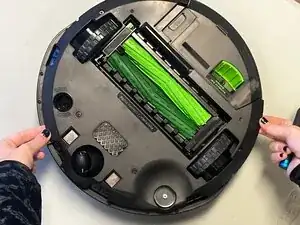
Flip the Roomba over to access the side brush.
-
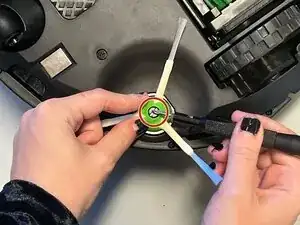
Firmly grasp the side brush with your fingers.
-
Use a Phillips #1 screwdriver to remove the single 7 mm center screw securing the side brush.
-
Pull straight up to disconnect the side brush.
-
-
-
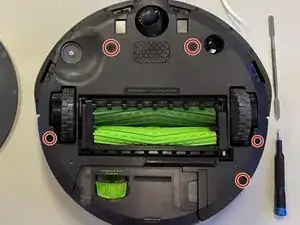
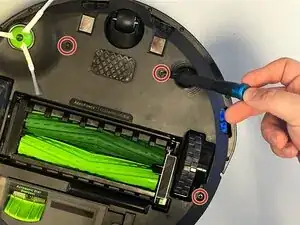
Use a Phillips #1 screwdriver to loosen the five 7 mm captive screws holding the back plate together.
-
Gently grab the edges of the back plate with your fingers and pull upwards to remove.
-
-
-
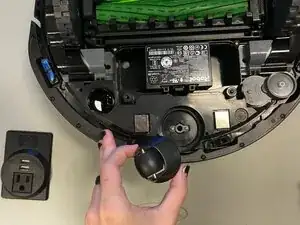
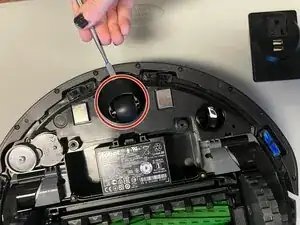
Insert a spudger under the caster.
-
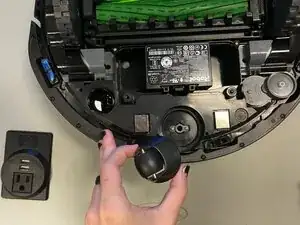
Gently pry the caster wheel straight up from its socket.
-
Remove the caster wheel.
-
To reassemble your device, follow these instructions in reverse order.