
Introdução
Had an issue where robot vacuum would not run. Whenever we started it up it would give an error message on the phone app saying "LiDar Scanner Stuck". Here is how I was able to fix the issue.
Ferramentas

-
-
Had an issue where robot vacuum would not run. Whenever we started it up it would give an error message on the phone app saying "LiDar Scanner Stuck". Here is how I was able to fix the issue.
-
-
-
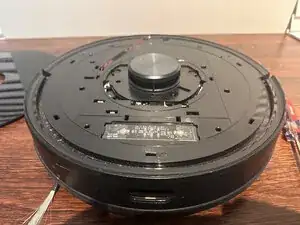
Pop the cover off of the top. I used a flat blade screwdriver to slide under the cover and then turned the screwdriver sideways. This popped the clips loose. Just work your way all the way around being careful.
-
-
-
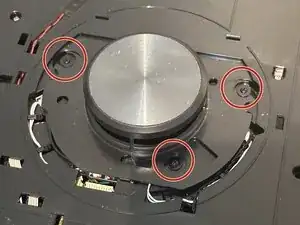
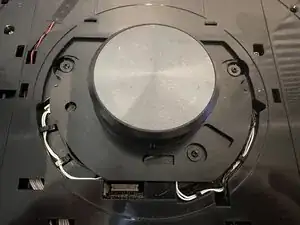
There are three screws covering the LiDar scanner. Remove these screws and take off the LiDar cover.
-
-
-
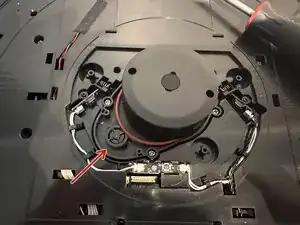
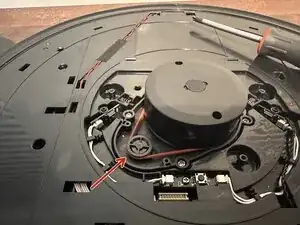
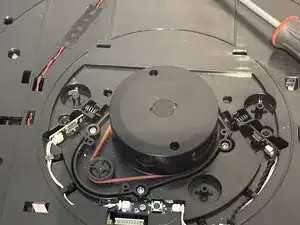
The LiDar scanner has a red rubber belt that attaches to a small wheel which makes the scanner spin. The belt had slipped off of the wheel. Just slip the belt back over the wheel.
-
-
-
At this point I tested the unit without the LiDar cover or the top cover to make sure it worked.
-
-
-
Now just reassemble the LiDar scanner cover using the three screws and replace the top cover. Be careful to line up the clips and be gentle when pushing them back down.
-


To reassemble your device, follow these instructions in reverse order.

Um comentário
Thank you! The belt was on but the tiny wheel was stiff. It freed with a little push. It's spinning freely, and vacuuming around me now.