Introdução

Need to replace something inside your Zelotes C-18 mouse? This guide will teach you how to open your device up.

  1. rRyixsJmDkMDaK6P
    rRyixsJmDkMDaK6P
    snNj2CYpRoSWOApo
    ZPOgjXdNJOBW4P1V
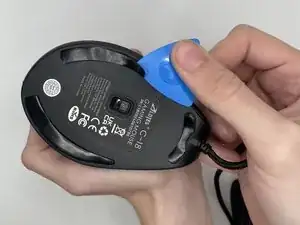
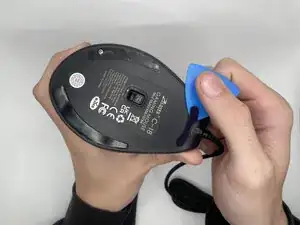
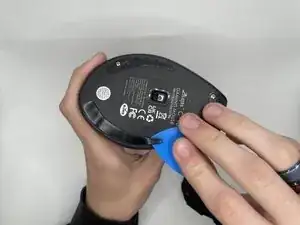
    • Use an opening pick to gently pry off the mouse feet and stickers on the bottom of the mouse to expose four hidden screws.

    • Keep the feet to reattach later, or replace them with new ones (spare pads are usually included).

  2. maTisbn2YQSGvgVK
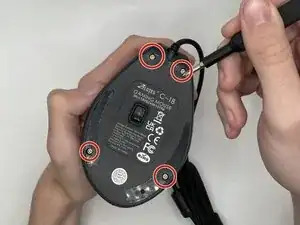
    • Using a Phillips #0 screwdriver to remove the four 9 mm-long screws on the bottom of the mouse.

  3. qTMSu5YeUPabJdsL
    qTMSu5YeUPabJdsL
    AUdOBoDxot1lhx2Q
    jfQTJLOCHWWQ4VlL
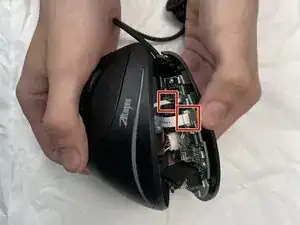
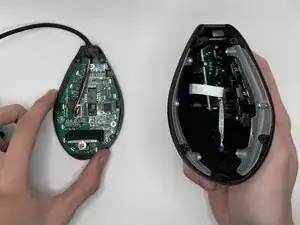
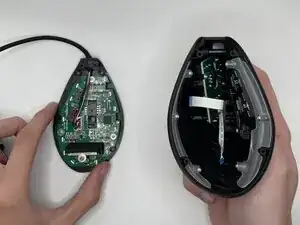
    • Carefully separate the top and bottom casing—DO NOT PULL QUICKLY, as ribbon cables connect both halves.

    • The ribbon cable connectors have small plastic locking tabs that hold them in place.

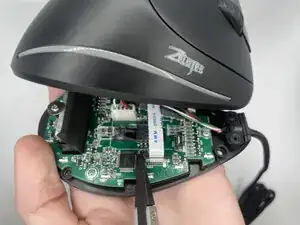
    • Using a spudger, carefully lift the locking tab by gently alternating pressure on each side until it’s in the unlocked position

    • Do not remove the tab completely, as it is attached to the connector.

    • Detach the ribbon cables by gently pulling them straight (perpendicularly) away from the motherboard.

    • You should not need much force — if you do, the tab may not be fully unlocked.

    • When reattaching, insert the cable back into its socket and press the locking tab down into place using the flat end of the spudger.

Conclusão

To reassemble your device, follow these instructions in reverse order.

MiraculousUser

Membro desde: 12/09/25

181 Reputação

0 comentários