Introdução
Guia tipo pré-requisito exclusivo para remoção dos suportes do disco rígido de um iMac 21,5" com tela Retina 4K do final de 2015.
Ferramentas

-
-
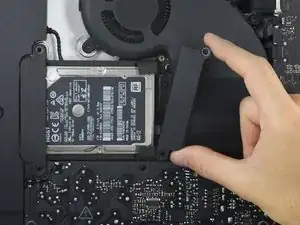
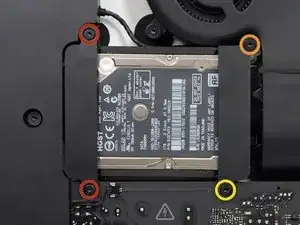
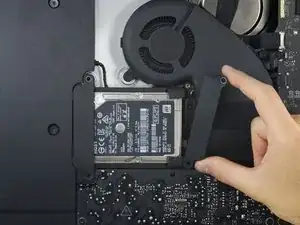
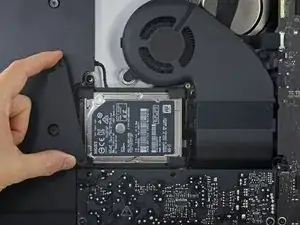
Remova os seguintes parafusos Torx T10 que fixam os suportes do disco rígido no iMac:
-
dois parafusos de 21 mm
-
um parafuso de 9 mm
-
um parafuso de 27 mm
-
Conclusão
Para a remontagem de seu dispositivo, siga essas instruções na ordem inversa.

At step 26, when reassembling, it's super easy to over-tighten the 9mm screw and strip the brass ferrule out of its hole in the plastic bracket (%#*@).
roberttrevellyan -
Mine has 4 different length screws, the two red colored 21mm screws in this guide are actually two differ lengths
anonymous 523 -
Mi imac does not have a HDrive whats the steps to follow?
Charlie -
buongiorno, l'imac del 2019, non monta alcuna ssd, ma monta una m2 direttamente sulla scheda madre!
pertanto nella guida andrebbe aggiunto il cavo sata con sensore temperatura da aggiungere sulla scheda madre, per poter collegare un nuovo hd ssd altrimenti rimarrete come me bloccati con un imac aperto e non assemblato, in attesa di ricevere il cavo acquistato su internet da amazon o terze parti.
vi consiglio inoltre di aggiungere una foto reale del ò'imac 2019 nella guida in cui manca l'ssd, renderà subito la problematica che avranno in molti!
Donato Altomare -
Hi, mine doesn’t HAVE an HD/SSD to remove, the bay is empty (yes it was fully working yesterday. So what do we do ? I see someone else with the sane issue above….
Jeroen Speak -
If you don’t have a HDD in this bay, you have a SSD on the other side of your main board for storing up to 256GB.
MEX -
I have a 500gb HDD but it too is not where the tutorial states. How do I get to it?
Khabran P -