Introdução

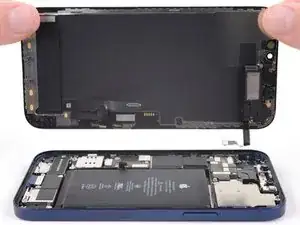
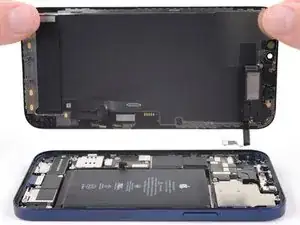
Guia tipo pré-requisito exclusivo para separar o conjunto da tela de um iPhone 12.

  1. oBBxtkV2gJcIPKkK
    • Cuidado: Antes de começar, descarregue a bateria do iPhone abaixo de 25%. Uma bateria de íons de lítio carregada pode pegar fogo e/ou explodir, se perfurada acidentalmente.

    • Desligue o iPhone antes de iniciar a desmontagem.

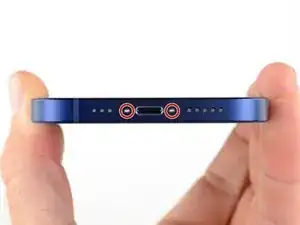
    • Remova os dois parafusos pentalobe P2 de 6,75 mm que se encontram na borda inferior do iPhone.

    • A abertura da tela do iPhone comprometerá as vedações impermeabilizantes. Tenha à mão vedações de reposição antes de prosseguir com esta etapa ou tome cuidado para evitar a exposição a líquidos se você montar o iPhone novamente sem substituir as vedações.

    Do you sell the waterproof seals separately or are they included in the kit?

    Heather Furnas -
    Do you sell the waterproof seals separately or are they included in the kit? (I would like to know this as well.)

    CaliforniaGunner -
    I just got my Fix Kit and it includes the seals. Not sure if a "part only" version would, though.

    Neal Sofge -

    When you see a blue sheet in the product picture, that’s the seal. It’s actually on the blue sheet.

    Tom Perri Vuozzo -

    Here is their guide on how to replace the waterproof seal!

    Substituição de adesivo de tela para o iPhone

    Audrey L -

  2. U6uMaQ2w3xOXGqZt
    U6uMaQ2w3xOXGqZt
    CPoII2uYnsjeyboh
    UYpZQjIJZTscr1dr
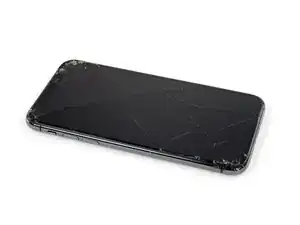
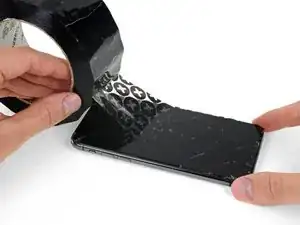
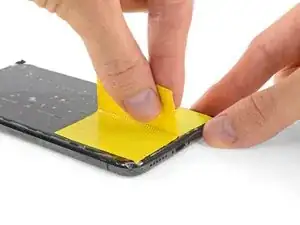
    • Se o seu iPhone tiver uma tela rachada, mantenha as rachaduras sob controle e evite danos corporais durante o reparo colocando fita adesiva sobre o vidro.

    • Coloque tiras sobrepostas de fita adesiva transparente sobre a tela do iPhone até que toda a superfície fique coberta.

    • Use óculos de segurança para proteger seus olhos de qualquer vidro que possa ser liberado durante o reparo.

    • Se não conseguir fazer com que a ventosa grude nas próximas etapas, dobre um pedaço de fita adesiva resistente (como fita adesiva vedante) na forma de uma pega e levante a tela com ela.

    • Se tudo mais falhar, você pode colar a ventosa na tela com supercola.

  3. B3jjMp2cvD5Rjabx
    B3jjMp2cvD5Rjabx
    QXAiF3sdtAYXQTQt
    FMOPQmVFrA1qxL1R
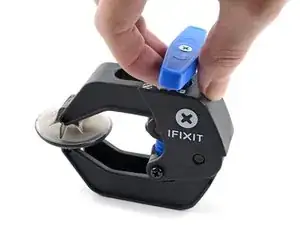
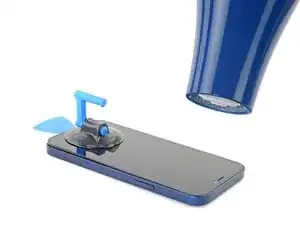
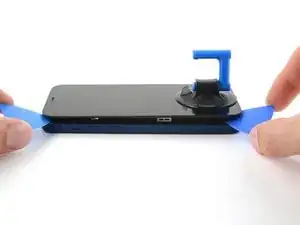
    • As próximas três etapas demonstram o Anti-Clamp, uma ferramenta que projetamos para facilitar o procedimento de abertura. Se não estiver usando o Anti-Clamp, pule três etapas para um método alternativo.

    • Para obter instruções completas sobre como usar o Anti-Clamp, consulte este guia.

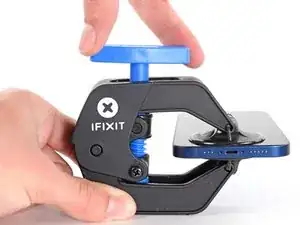
    • Puxe a pega azul para trás para destravar os braços do Anti-Clamp.

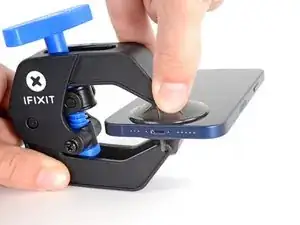
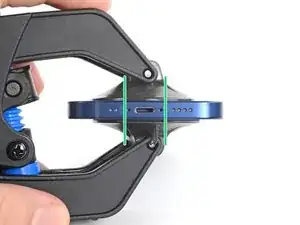
    • Deslize os braços pela borda esquerda ou direita do iPhone.

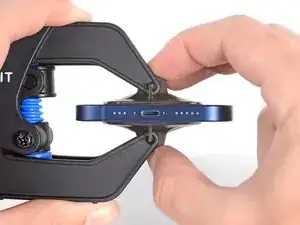
    • Posicione as ventosas próximo à borda inferior do iPhone - uma pela frente e a outra pela traseira.

    • Aperte as ventosas uma contra a outra para aplicar sucção na área desejada.

    • Se você achar que a superfície do iPhone é muito escorregadia para o Anti-Clamp se prender, você pode usar fita para deixar a superfície mais aderente.

  4. oVcZhyKbh6AqAYBD
    oVcZhyKbh6AqAYBD
    bPLD3rBQF23DDmGa
    mpAqXAZbRjfBNAkL
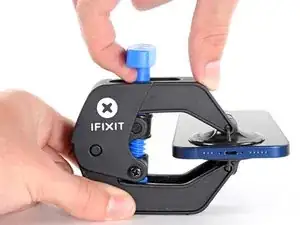
    • Puxe a pega azul para a frente para travar os braços.

    • Gire a pega 360 graus no sentido horário ou até que as ventosas comecem a se esticar.

    • Certifique-se de que as ventosas permaneçam alinhadas uma com a outra. Se elas começarem a ficar desalinhadas, solte um pouco as ventosas e realinhe os braços.

  5. u1p2GSBABb4i1qXl
    u1p2GSBABb4i1qXl
    TEVkJ3VWQ5bWEZ2G
    LMDHoJDdVkP56a4a
    • Apoie o iPhone em algo sólido, como um livro de capa dura, para que ele fique parado (sem que você precise usar uma das mãos para segurá-lo) e paralelo ao piso; isso vai facilitar o trabalho nas etapas a seguir.

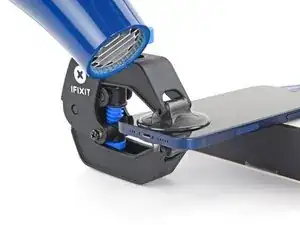
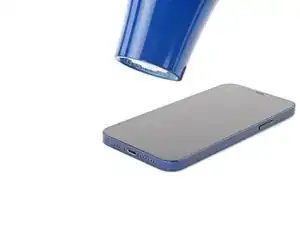
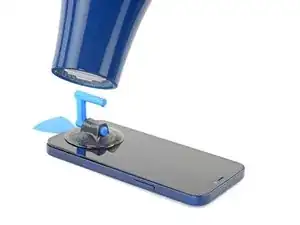
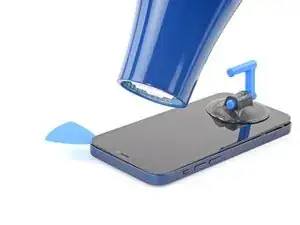
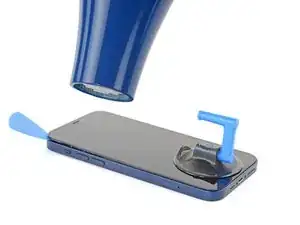
    • Com um secador de cabelo, aqueça a borda inferior do iPhone. A tela deve se sentir um pouco quente demais para ser tocada.

    • Para obter instruções completas sobre como usar um secador de cabelos, confira este guia.

    • Aguarde um minuto para que o adesivo tenha a chance de se soltar e apresentar um vão.

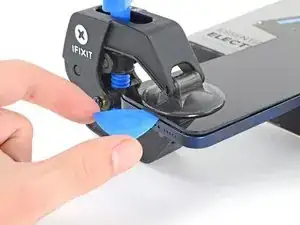
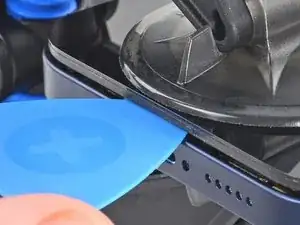
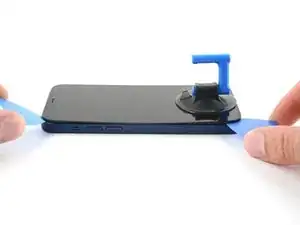
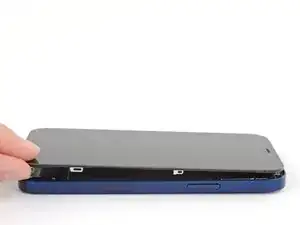
    • Introduza uma palheta de abertura sob a moldura plástica da tela quando o Anti-Clamp criar um vão suficientemente grande.

    • Se o Anti-Clamp não formar um vão grande o suficiente, aplique mais calor na área e gire a pega um quarto de volta.

    • Não gire mais do que um quarto de volta de cada vez e espere um minuto entre cada volta. Deixe que o Anti-Clamp e o tempo façam o trabalho por você.

    • Pule as próximas três etapas.

    große Vorsicht ist bei Entfernen des Displays geboten! es ist sehr empfindlich, mein ist bei der Reparatur kaputt gegangen! lieber mit mehr Hitze und öfters Öffnen und Schließen versuchen!

    NDA -

  6. OXZKWsxxXqG3arZh
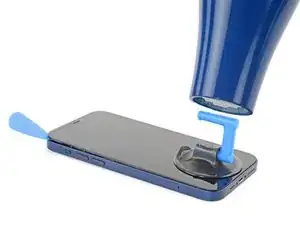
    • Com um secador de cabelos ou uma pistola de ar quente, aqueça a borda inferior do iPhone por 90 segundos ou até que a tela fique um pouco quente demais para ser tocada.

    • Nunca deixe o secador de cabelo agindo em um único ponto por um longo período de tempo.

    Also: 3D Printer's heated bed set to 70-80 degrees Celcius for a few minutes does the job, as it basically works the same way heating mats used in professional repair shops do.

    3D Printing Enthusiast -

  7. ASLAa2AJO4E5GYT1
    ASLAa2AJO4E5GYT1
    EMmHxm3YOfOoLkEG
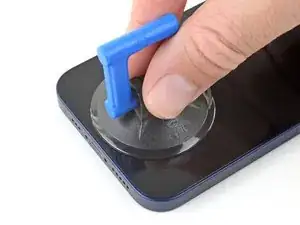
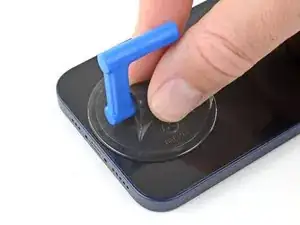
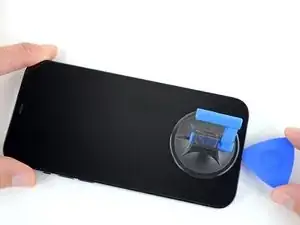
    • Se estiver usando uma ventosa de sucção simples, aplique-a na borda inferior do telefone, evitando a borda do vidro.

  8. QdfiItrQQ6MhHWbj
    QdfiItrQQ6MhHWbj
    4nKuwPf1B6TyCssL
    eU1UEGuDjKnyIdUg
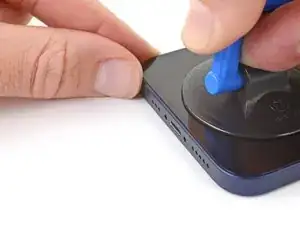
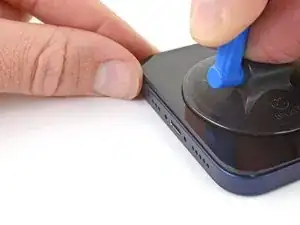
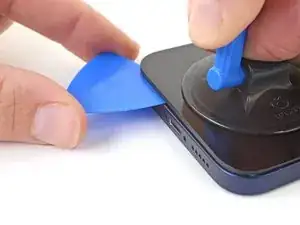
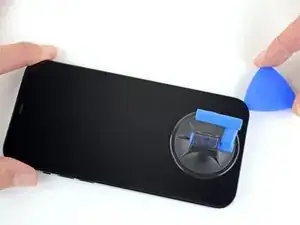
    • Puxe a ventosa para cima com pressão firme e constante para criar um pequeno vão entre a tela e a estrutura.

    • Introduza uma palheta de abertura no vão sob a moldura plástica da tela.

    • O adesivo impermeabilizante que mantém a tela no lugar é muito forte; a formação dessa abertura inicial requer uma quantidade significativa de força. Se estiver com dificuldade para abrir um vão, aplique mais calor e balance a tela para cima e para baixo para amolecer o adesivo até criar um vão grande o suficiente para a ferramenta.

    This seems impossible. I've been trying for an hour with heat and rocking, and the screen doesn't budge. :(

    Aubi Abramowitz -

    this is impossible, will take years

    Evan Z -

    Don’t give up! Use more heat and a tad more force. I know you may fear breaking it more, but as long as you don’t stick the prying tool too far or tug too hard, you can do it! I have faith that you can do it!

    Rachel Kelley -

    I'm in the same boat, this isn't coming off. I've tried the hair dryer as well as the heating pad from ifixit. Any other ideas?

    The suction cup comes off before the screen will

    Brian Melcher -

    Is there a better tool for this? Just saw a video on YouTube where a kid pryed it open with no heating/etc. in 5 seconds.

    Brian Melcher -

    I've changed the batteries in probably a half dozen iphones of different models. But 25 minutes of heating and pulling had no effect on iPhone 12

    Ryan Thornburg -

    Welp. I finally ended up breaking the screen attempting this. DO NOT ATTEMPT THIS REPAIR! Not worth the broken screen and losing the cost of shipping both ways when you return the battery.

    Ryan Thornburg -

    thx, I ll go to an apple repair center

    Ronald Geerligs -

    Back (and bad...) experience ! Even if you heat a lot, the screen is hardly sticked. Take care, before sliding the mediator under the screen, this one should be moved up, at least 2 mm. On my side i have slided around 1 mm and .... inserted the mediator between the glass screen and the screen structure ring.... result : glass break and screen to change (my initial exercise was the battery removal !). I feel that next time i will visit a repair center...

    Gilbert -

    Pro tip for anyone having trouble with this. You have to use multiple rounds of heat and pulling. Use a hair dryer and not the iOpener that comes with the fix kit and get it just too hot to touch then quickly start pulling and wiggling it up and down. Once it cools down grab the hair dryer again and repeat it a couple times until you start to get a big enough gap.

    I just did this yesterday and it took around 5 rounds of heating and pulling to get it to seperate enough from the body.

    Oliver Pressello -

    It's important to insert the pick under the bezel. I just delaminated my screen. The screen was probably fine, but it was glitching, so I wanted to check for a bad connection. Anyway, now I get a new screen.

    Under the bezel, eh.

    Chris Green -

    After reading this almost a year later to the day I last commented on it, I now know that the best way I have found to remove a screen, from pretty much any phone, not just this one, is heat (I use a heating pad on 80 degrees celsius) and before putting the phone on the heating pad, I use 91% isopropyl alcohol around the edges that you will be sliding your pry tools in, and I leave it on for 10 min. I then take it off, add more alcohol, and then put it back on the pad for another 5 min. Also, while I am sliding my tools around the screen, I continuously add more alcohol, and if it takes a really long time, then more heat as well. Heat, alcohol, and patience, lots of patience, and you should be good. Hope this helps, good luck!

    Rachel Kelley -

    Can confirm, this does indeed work. Just keep warming it up, lifting up and down, and repeat when phone goes cold. After around 10 rounds it would move enough to where I could see inside the phone when lifted. You can then insert pick

    Tip: You can also try to apply heat and lift the other corner, just enough to make it move slightly. This will ease pressure needed to separate the glue on the other side as-well.

    Thomas -

    No worries guys! it’s completely doable! You just need to be patient and keep trying multiple times

    Giordano Urettini -

    I don't doubt that you folks eventually got this open, but how on earth do you not lose your mind with the suction cup popping off every 5 seconds? Agree with Ryan above, have replaced batteries on several other iPhone generations with nowhere near this much effort. Still working on it going on 1 hr, about 10 rounds of hair dryer heat. Did Apple use a stronger adhesive for the 12?

    davidum -

    Success. iOpener doesn't get the phone nearly hot enough. Multiple rounds of hair dryer + isopropyl alcohol dribbled in b/w case and screen while pulling up on suction cup. For me, the bottom left hand corner (volume rocker side) seemed to lift up first, so I moved the suction cup to that corner while doing the heat + alcohol.

    davidum -

    When I changed the battery on a 7+ instead of the suction cup/heat method I used an Cacto blade inserted horizontally along the bottom edge to break the seal. Would this work on the 12?

    mikefunkpa_c -

    I struggled with this step, but eventually got it. Use LOTS of isopropyl alcohol, and soak the entire perimeter. Let it sit for 30 seconds after application, then heat it up, then pull with the clamp and rock back and forth. Reapply the alcohol and repeat until it works. Took me about 30 mins, but I eventually got it up just enough for the first pick. The iOpener is completely useless, I just used a shrink wrap gun and made sure to hold it 8-12 inches from the phone on the lowest heat setting.

    Wesley Kelly -

    iOpener along the bottom edge, the Anti-Clamp, and three tries about 5 minutes each worked for me. Never popped off, just needed lots of patience and 1.5 screw turns on the clamp. Bottom left corner was first, like another commenter.

    Neal Sofge -

    This is extremely bad way to describe how to open the screen. I ended up detaching screen without reaching to bevel. Now I have a broken display. Super disappointed

    Daud E -

    I was unable to remove the screen, even with my heat gun. I’ve repaired at least a dozen iPhone 6 and may five or six iPhone 7, but the 12 defeated me. I worked for about an hour varying heat from the gun and using my old IFixit iSclach custom suction cup device to no avail (even permanently broke the clamp). After an hour I was so worried I was going to either crack the screen or delaminate it, I gave up. IFixit makes this look MUCH easier than it is. :-(

    John Lipscomb -

    Practically impossible, I recommend just taking the device to a professional unless you're also replacing a broken screen while at it. Multiple rounds of hotplate and isopropyl and taking it extremely slow almost got it out safely, but in the end the screen ended up breaking (curiously, the glass is fine, it's the OLED panel itself that died). At least the replacement also from iFixit works great.

    I cannot speak for the Anti-Clamp though, since I only have the basic suction cup.

    Also, if you do end up attempting this anyway, a 3D-printer's heated build plate makes for an extremely good hotplate for more precise temperature control than a hairdryer.

    sinsinewave -

    Bro, the result of my last attempt was the same as yours, the OLED broke the glass but it was fine, I had to change the screen, it was really not worth it. It seems that the method here is still too difficult for me, and I also recommend finding a professional:(

    Shawn Sun -

  9. TLFrov6MrYfe6MLs
    TLFrov6MrYfe6MLs
    DDIYLM3VDKPF1sdb
    • Com um secador de cabelos, aqueça a borda direita do iPhone (a borda com o botão liga/desliga) por 90 segundos ou até que a tela fique um pouco quente demais para ser tocada.

  10. rGMaUZMOwp6jDZup
    rGMaUZMOwp6jDZup
    sBgqGmTWBfaWInJQ
    rxBEr5BO3bFbLaRG
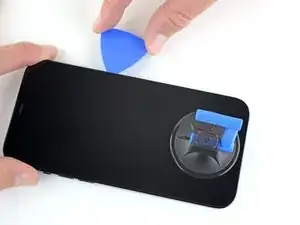
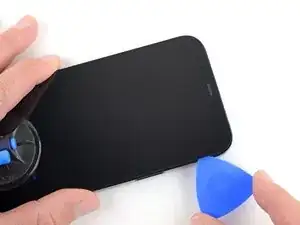
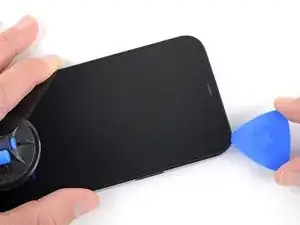
    • Passe a palheta ao redor do canto inferior direito do iPhone para separar o adesivo.

    • Continue deslizando para cima na borda direita do iPhone, até chegar ao canto superior direito.

    • Não introduza a palheta mais do que 3 mm, caso contrário você poderá danificar os componentes internos.

    • Deixe a palheta no canto superior direito antes de continuar.

    There is a spot on this side where a slight ridge in the iPhone frame makes the pick stick. Eventually I used two, one twisting a bit to open a path for the other. But if you're not expecting it you feel like you're going to break something.

    Neal Sofge -

    If you do not heat the phone enough, you may separate the digitizer from the lcd screen when the suction cups begin to pull, instead of lifting the whole lcd plus digitizer assembly. If so, you may just have destroyed your lcd. No big deal if you were going to replace the screen, but very bad news if you just wanted to change the battery.

    Robert Hoffman -

  11. EEAWPuNCXwOopd5j
    • Com um secador de cabelos, aqueça a borda superior do iPhone por 90 segundos ou até que a tela fique um pouco quente demais para ser tocada.

    温馨提示:

    ✅ 分离完成!

    • 装回时:先扣排线→装盖板→贴新防水胶→对齐屏幕→按紧→拧底部螺丝

    • 开机测试:显示、触摸、面容、原彩

    ❌ 常见坑(别踩)

    • 加热不够硬撬:断排线/碎屏

    • 螺丝装错:长螺丝顶穿屏幕/面容

    • 排线没断电:烧主板

    • 不换防水胶:进水失去保修

    x Y (Davide) -

  12. jjDP5cRJDxygaS4e
    jjDP5cRJDxygaS4e
    wfpdoWB6GTpFmSWF
    hRbFaNyEBNemtUjd
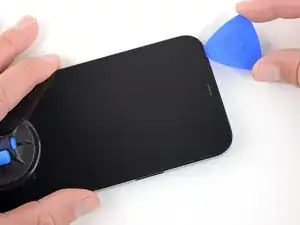
    • Passe a palheta de abertura ao redor do canto superior direito do iPhone para separar o adesivo superior.

    • Não introduza a palheta mais do que 3 mm, do contrário você poderá danificar os sensores superiores.

    • Deixe a palheta no canto superior esquerdo antes de continuar.

    Note Step 17 about being careful about the cables on the left edge!

    Neal Sofge -

  13. 1iVQp4WpwoHLdBEJ
    1iVQp4WpwoHLdBEJ
    oTaCH2yFmSQBq4A5
    • Com um secador de cabelos, aqueça a borda esquerda do iPhone por 90 segundos ou até que a tela fique um pouco quente demais para ser tocada.

    Also: 3D Printer's heated bed set to 70-80 degrees Celcius does the job - it basically works the same way professional heated mats that are used in phone repair shops.

    3D Printing Enthusiast -

  14. 1EkaRCPsl1hLCcO5
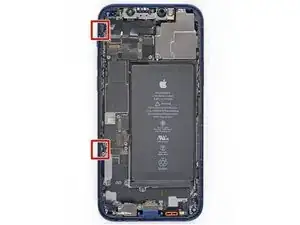
    • Há cabos sensíveis ao longo da borda esquerda do iPhone. Não introduza a palheta aqui, pois você pode danificar os cabos.

    I kinda forgot about this step when I opened my first iPhone 12.
    For the next one, I'm going to mark that edge of the phone with blue tape roughly where each cable is to help me remember.

    Also FWIW, I got the 70 cent adhesive cutting tool from Apple with my genuine battery and used that for all my display prying needs after getting the first opening propped with a guitar pick.

    It worked great and did not damage anything so no need to sweat inserting something too far and causing damage.

    Daniel Cassel -

    Could you PLEASE move this to step 13?? I tore the front sensor cable. 😭

    Renee Riley -

  15. U32XuDLs5g4YdpJX
    U32XuDLs5g4YdpJX
    P1QKu5D5XkUVQHhB
    • Insira uma segunda palheta de abertura no canto inferior esquerdo do iPhone.

    • Faça movimentos de vai-e-vem com as duas palhetas simultaneamente, até que os clipes da borda esquerda se soltem.

    • Aumente gradualmente a força do movimento.

    • Se estiver tendo dificuldades para separar o adesivo, reaqueça a borda esquerda.

    I really struggled here. Recommend a flashlight and a little alcohol to make sure you have cut through the adhesive enough on all sides while avoiding delicate parts.

    Audrey L -

  16. IWXGOEkVZMt431sG
    IWXGOEkVZMt431sG
    Qxj6lbMWEEfMw45M
    NoVbSlrJHyCMaaFN
    • Gire o iPhone de modo que a borda direita fique virada para você.

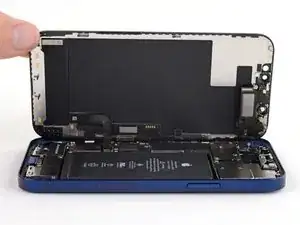
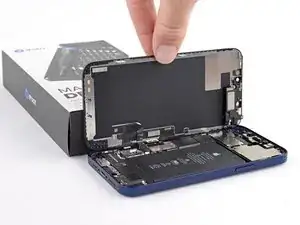
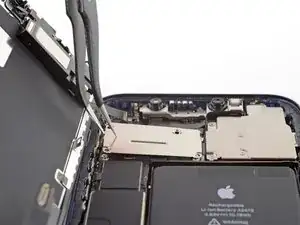
    • Abra o iPhone elevando o lado direito da tela e deixando o lado esquerdo embaixo, como se fosse virar a capa de um livro.

    • Não tente separar totalmente a tela ainda, pois vários cabos planos frágeis ainda a conectam à placa lógica do iPhone.

    • Apoie a tela em algo e deixe-a escorada enquanto executa trabalhos no telefone.

    • Durante a remontagem, retorne a tela para a posição deitada, alinhe os clipes ao longo da borda superior e pressione cuidadosamente na borda superior antes de encaixar o restante da tela. Se ela não se encaixar facilmente com um clique audível, verifique a condição dos clipes em torno da tela e certifique-se de que eles não estejam tortos.

    i did this and the shroud with the earpiece speaker still stuck with the phone so its just wedged in there i cant get it out

    lil teslas -

    Must have slid a pick in too far as the front sensor ribbon in step 27 was broken…<sigh>. Any chance that sensor is easy to replace?

    Jon -

  17. fVLd1ujMC23kPMBM
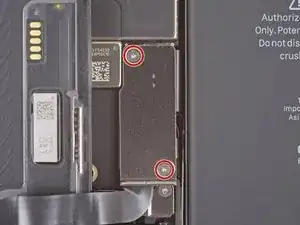
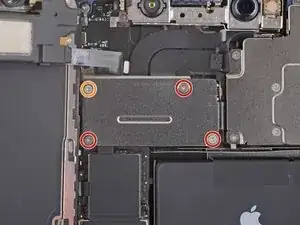
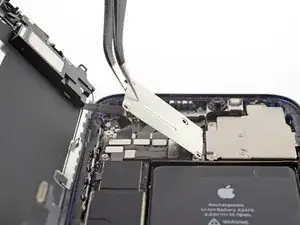
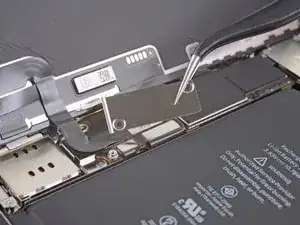
    • Remova os dois parafusos Y000 de 1,1 mm que fixam a capa do conector da bateria e da tela.

    • Durante o reparo, rastreie cada um dos parafusos e certifique-se de que eles voltem exatamente para o local de onde vieram, para evitar danos ao iPhone.

    • Durante a remontagem, este é um bom momento para ligar o iPhone e testar todas as funções antes de fechar e vedar a tela. Certifique-se de desligar o iPhone completamente antes de continuar o trabalho.

    Ouch, I see a broken flat here…

    Alessandro Sordelli -

    Can I use a y 0.6 if I don’t have y000

    kellciou cr -

    Yep! The measurements for Y000 are 0.6 mm.

    Alex Diaz-Kokaisl -

  18. nCqmqLuRyNhUsecI
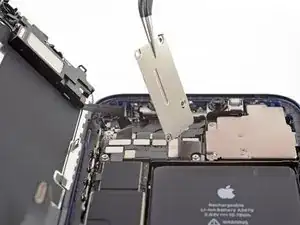
    • Remova a capa.

    Hi

    On my original display on an iPhone 12, there is no metal hinge as shown here and therefore no place for it when closing the phone. Have double-checked model and the original display - and it is just not there. Is there another model based on serial number?

    Hinge marked: https://www.dropbox.com/scl/fi/asztgi60g...

    Best regards,

    Carsten

    Carsten Feltman -

  19. q1GE6ij6DBGAtVUa
    q1GE6ij6DBGAtVUa
    UFeAbkthIglN1PdG
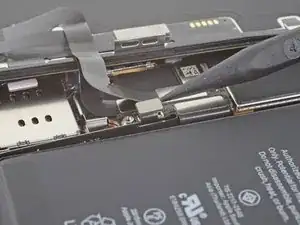
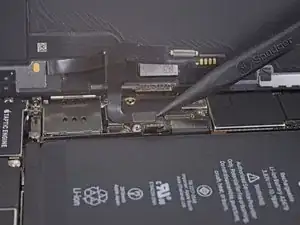
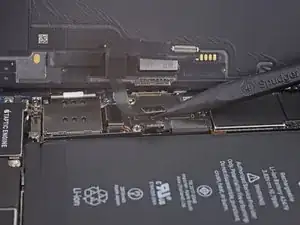
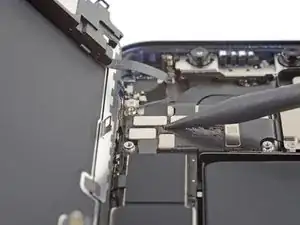
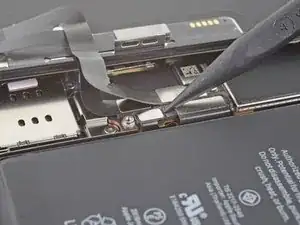
    • Com uma espátula ou uma unha limpa, retire o conector da bateria de seu soquete na placa lógica.

    • Tente não danificar a vedação de silicone preta que envolve essa e outras conexões da placa. Essas vedações oferecem proteção extra contra a entrada de água e poeira.

    • Vire o conector ligeiramente para fora da placa lógica, para evitar que ele entre acidentalmente em contato com o soquete e forneça energia elétrica ao telefone durante o reparo.

    一、前提(必须先做)

    1. 手机已经完全关机

    2. 屏幕已经撬开,立在侧边,角度<45°

    3. 你能看到顶部那几块黑色金属挡板

    x Y (Davide) -

    二、断开屏幕 3 步搞定

    1. 先断电!(最重要)

    在金属挡板里,找到电池排线(最下面那个)

    用塑料撬棒轻轻往上撬起,把电池排线断开

    x Y (Davide) -

    3. 断开屏幕排线

    你会看到 2~3 条扁扁的排线:

    • 显示排线

    • 触摸排线

    • 面容/前置排线

    用塑料撬棒,从排线底部轻轻往上挑,把它们全部挑开、断开。

    x Y (Davide) -

  20. JWGf11bubrJIQJqt
    JWGf11bubrJIQJqt
    JnsnSmZNtLSbSfID
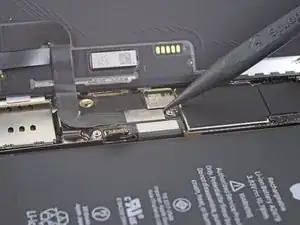
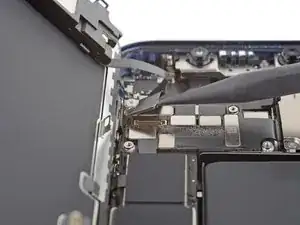
    • Com uma espátula ou uma unha, desconecte o conector do cabo da tela.

    • Para reconectar conectores press-fit como este, alinhe e pressione cuidadosamente um lado até que ele se encaixe com um clique audível e, em seguida, repita no outro lado. Não pressione no centro. Se o conector estiver desalinhado, os pinos podem ficar tortos, causando danos permanentes.

  21. FtXJDFkUoD1lyBai
    FtXJDFkUoD1lyBai
    lnDDQGdsvpfnyRjt
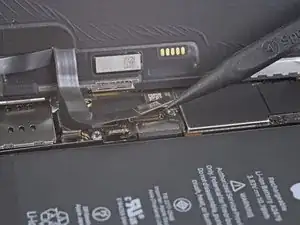
    • Com uma espátula ou uma unha, desconecte o conector do cabo do digitalizador.

    • Se alguma parte da tela não responder ao toque após o reparo, desconecte a bateria e recoloque esse conector, certificando-se de que ele se encaixe totalmente com um clique audível e de que não haja poeira nem nenhuma outra coisa obstruindo o soquete.

  22. vanQfZqXPQGekhh1
    • Com uma chave Y000, remova os quatro parafusos que fixam a capa do conector dos sensores frontais.

    • Três parafusos de 1,1 mm

    • Um parafuso de 1,4 mm

  23. KJnJAuPTwlxnICBD
    KJnJAuPTwlxnICBD
    MHdESpgJCsSSZaMy
    1qodeTMyy56DyGRv
    • Vire a capa para cima pela esquerda, até que o pequeno clipe à direita se solte.

    • Remova a capa.

    • Durante a remontagem, encaixe primeiro o clipe da borda direita e, em seguida, vire o restante da tampa para baixo.

    Parfait pour décourager un amateur taux de reparabilitee zéro pour la marque iPhone, la réparation de toutes les autres marques est un jeu d'enfant en comparaison !!!!!

    Jean louis DROBECQ -

  24. LC4oSHWw4nEIZ3H5
    LC4oSHWw4nEIZ3H5
    5PkRCF6AJnj1hYTc
    • Com uma espátula ou uma unha, desconecte o conector do cabo do conjunto de sensores frontais.

  25. XrIRhPcqOHJyMV1q
Conclusão

Para montar novamente o dispositivo, siga estas instruções na ordem inversa.

Adam O'Camb

Membro desde: 11/04/15

220314 Reputação

0 comentários