Introdução
Guia tipo pré-requisito para a desconexão da bateria
Ferramentas

-
-
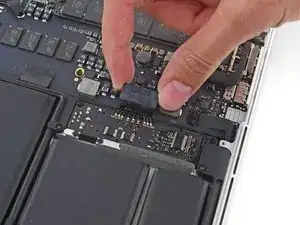
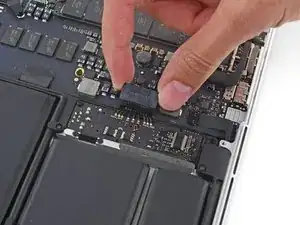
Com a ponta plana de uma espátula, levante o conector da bateria para fora de seu soquete na placa lógica.
-
Conclusão
Para montar novamente o dispositivo, siga estas instruções na ordem inversa.

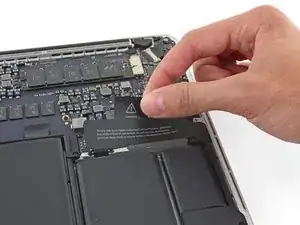
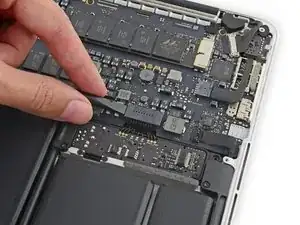
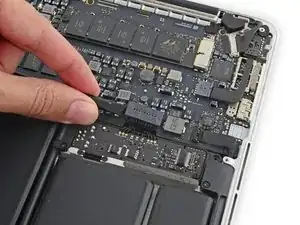
A plastic foam cover also covers plug and socket and the whole battery. It is easy to remove it from the right side to the trackpad wire that the battery plug is free like shown in the picture. I kept it to use it again later.
Daniel Brehm -
I have done tons of these battery replacements.
You don’t need to do anything on the list after you disconnect the battery, apart from carefully moving the speakers out of the way, and then prise up the battery modules. I just very carefully, and with little even motions, use a large slot screwdriver. Being careful to keep it flat, to not puncture the battery.
Easy peasy. I have never had an issue after dozens of the tasks…
davelarose -
Dear Sir,
as you seem to be very much experienced with battery replacements you might perhaps give me a hint why after having removed the battery pack successfilly, the keyboard doesn't work anymore after booting the system. The Touchpad works, the keyboard backlight works but typing does not function at all.
I only disconnected the battery connector and touched nothing else. I am quite desperate …
Gerd Uyan -
I agree with Dave la Rose, provided you use heat rather than solvent to remove the old battery (or possibly floss, haven’t done that). Please see my comment further down this thread on how to use an iOpener for correctly heating the glue joint
I. Margaronis -
After removing battery contact board plastic. My screwdriver accidentally fell and touched the battery board. And it short circuited. Now my battery doesn't charge. My laptop doesn't work without charger now. shuts after a few minutes of use. Can i fix it without sending it for repairs?
Phillip Ngwenya -
Is replacing the battery necessary?
Ralph Louis -
For speaker replacement of course not, but you still need to disconnect the battery cable to disconnect the current from the speaker circuit.
O Bana -
How do we know if it's necessary to replace the plastic cover adhered to the battery contact board?
What are the factors that would require that?
Lux -
I think this step is only necessary for battery replacements; i.e. not necessary for speaker replacements (these instructions are used for both).
Gary -
Bonjour,
Je vais changer ma batterie car mon ordinateur portable ne s'allume plus et ne se charge plus. Le clavier ne fonctionne plus non plus. Est-ce que changer la batterie suffit ?
De plus, l'intérieur de mon ordinateur est légèrement encrassé. Comment puis-je le nettoyer ?
Merci pour votre aide,
Papy_barnabe -
use the flat part, not the pointy part of the prying tool. I found it easy to wedge between the chipset and the lip of the plug, but from the other side than whats indicated in the picture. Then wobble it a little, just enough to loose the plug. Then do the same from the side indicated in the pic. No worries whatsoever. (And yes, this step is necessary, in order to disconnect the current from the speaker assembly)
O Bana -
Very new here. First timer. But why am I doing steps 4, 5, and 6, if I’m just trying to replace the SSD?
I have a 2011 13inch. My SSD crashed and won’t read anymore. I have nothing backed up and I have not updated the OS as advised above. Is there a need for steps 4, 5, and 6. And even more so, is there a point to salvaging this if nothing is backed-up and and the OS can’t be updated to macOS 10.13 High Sierra (or a later macOS)?
chrissdm@gmail.com -