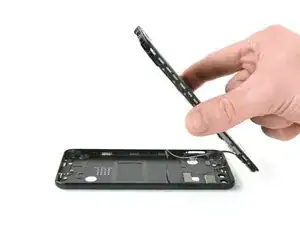
Introdução
Use este guia para substituir a tampa traseira de seu smartphone modelo Huawei P10.


-
-
Desligue o seu smartphone.
-
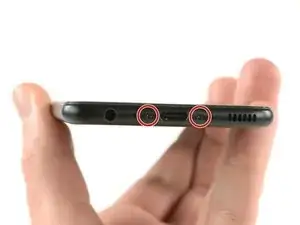
Remova os dois parafusos Pentalobe P2 da parte inferior.
-
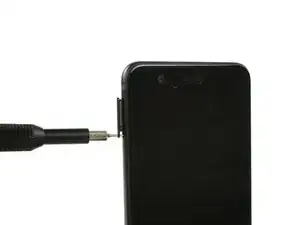
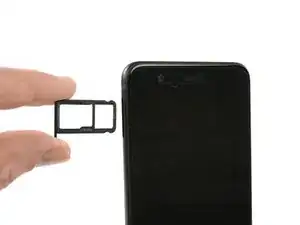
Remova a bandeja do chip SIM.
-
-
-
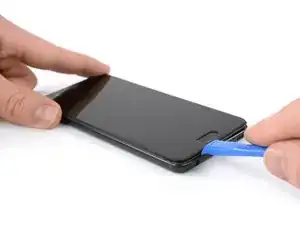
Insira uma ferramenta de abertura de plástico entre o display e o invólucro, começando pela área inferior de seu smartphone.
-
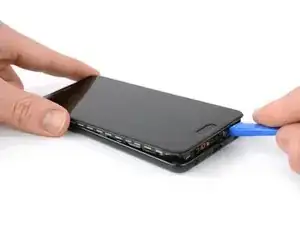
Faça alavanca cuidadosamente e libere o display e suas partes para fora do invólucro.
-
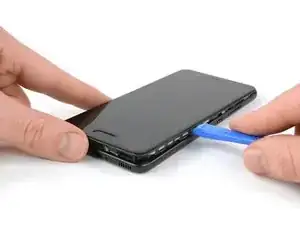
Depois de liberar a extremidade inferior, use a ferramenta de abertura para abrir os clipes em ambos os lados.
-
-
-
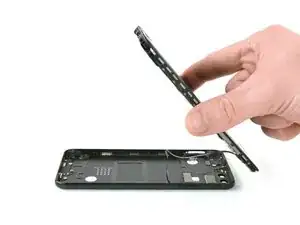
Abra o smartphone virando uma parte para trás.
-
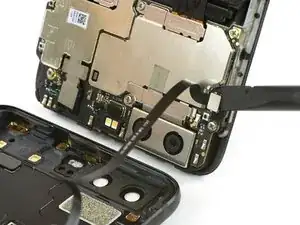
Use uma espátula para desconectar o cabo flex dos botões de ligar e volume.
-
Conclusão
Para montar novamente sue dispositivo, siga estas instruções na ordem inversa.

Das Honor 9 hat an der Unterkante keine Schrauben.
Wie ist das Honor 9 zu öffnen?
Michael Tuschek -
Vielleicht beantwortet diese Anleitung deine Frage ;)
Tobias Isakeit -
Hi, my P10 does not have screws, just two tiny holes. Do I push in here to unfasten? Einar, Norway
Einar Ryvarden -
Hi Einar Ryvarden,
in case you bought a used or refurbished phone, someone might have forgotten to put them back in. Since you have holes at the bottom edge next to the charging port this is likely. You can try to start with step 2 and see if you can lift the phone assembly (don’t forget to remove the SIM tray first). As far as I know there is no version of the regular Huawei P10 with no screws. However you there are none in the P10 lite and in the P10 plus, maybe one of the opening procedures for those phones might help you.
Dominik Schnabelrauch -