Introdução
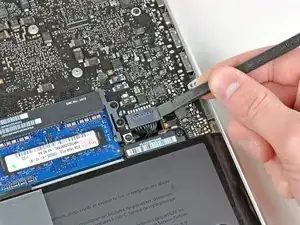
Desconexão da bateria. Guia tipo pré-requisito interno.
Ferramentas

-
-
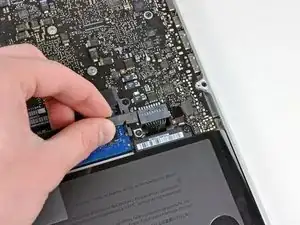
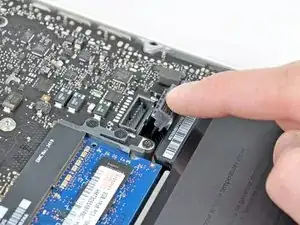
Dobre o cabo da bateria ligeiramente para fora de seu soquete na placa lógica para que ele não se conecte acidentalmente enquanto você trabalha.
-
Conclusão
Para a remontagem de seu dispositivo, siga essas instruções na ordem inversa.

Is this step of removing the battery connector required?
manodh -
yes - as with disassembly of any electronic component you have to remove any power source. You don't want to accidentally turn the Mac on
khull -
Prying the battery connector off does not take much force. I did exactly what the guide suggested (walked it off back and forth) with the spudger without any problems. Just be very gentle, much like with anything inside laptops, they are very fragile and need to be worked with carefully. A+ instructions, battery replacement was a success.
aekinaka -
Be patient on disconnecting this one. It worked for me step by step, little by little.
Phil Wagner -
I used the nails of thumb and pointer finger simultaneously - worked pretty fine
Reinhard Kaune -
I whittled down ends of two wooden strips to use, along with my fingernails to start with. I used halves of a wooden clothespin, but popsicle sticks should work too.
Mike Baker -
Can confirm. “Be careful with the corners of the connectors, they can be easily broken off.”
tkdecker -