Introdução
Use este guia para substituir uma bateria gasta. Se a bateria estiver estufada, tome as devidas precauções.


-
-
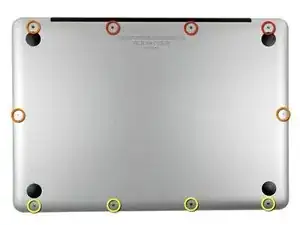
Remova os dez parafusos a seguir:
-
Três parafusos Phillips #00 de 14,4 mm
-
Três parafusos Phillips #00 de 3,5 mm
-
Quatro parafusos Phillips #00 com ressalto de 3,5 mm
-
-
-
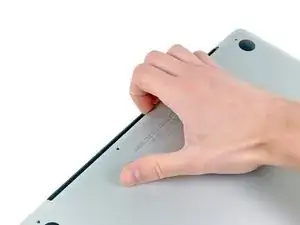
Use os dedos para afastar a estrutura inferior do corpo do MacBook perto da saída de ar.
-
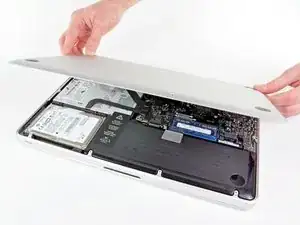
Remova a estrutura inferior.
-
-
-
Dobre o cabo da bateria ligeiramente para fora de seu soquete na placa lógica para que ele não se conecte acidentalmente enquanto você trabalha.
-
-
-
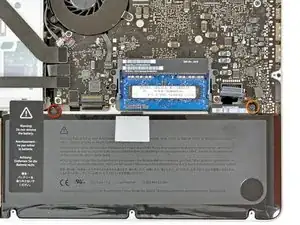
Remova os dois parafusos a seguir:
-
Um parafuso tri-point de 5,6 mm
-
Um parafuso tri-point de 13 mm
-
-
-
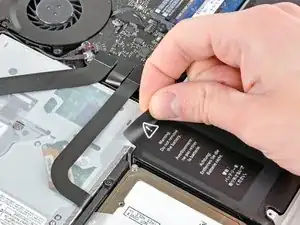
Retire cuidadosamente a etiqueta de advertência da bateria da estrutura superior, entre a bateria e a unidade óptica.
-
-
-
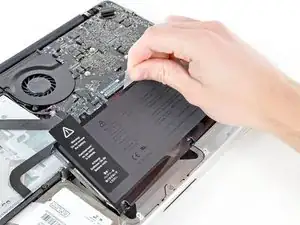
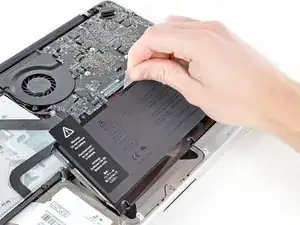
Use a aba de plástico anexada para remover a bateria da estrutura superior.
-
Carregue a 100% e deixe carregando-a por mais duas horas. A seguir, tire da tomada e use o aparelho normalmente até a bateria descarregar. Quando vir o aviso de bateria fraca, salve o trabalho e deixe o laptop ligado até ele entrar em modo espera (bateria fraca). Aguarde ao menos 5 horas e carregue o laptop ininterruptamente até 100%.
-
Se você notar algum comportamento incomum ou problemas após a instalação da nova bateria, talvez seja necessário redefinir o SMC do seu MacBook.
-
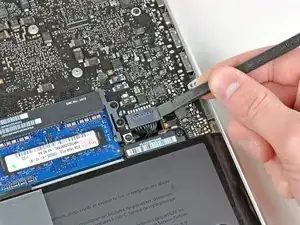
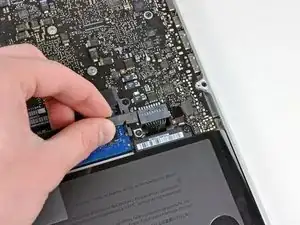
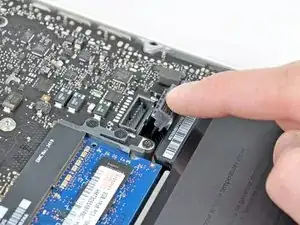
Para a remontagem de seu dispositivo, siga essas instruções na ordem inversa.

14 comentários
Just replaced the battery of MacBook Pro Early 2011. Shipment was blazing fast. I ordered on Saturday and received the battery on Monday morning. It took me just 15 minutes with the right tools to change the battery. iFixit's step by step guide helped me to accomplish the task perfectly in the right way.
I ordered a replacement battery from iFixit to squeeze some more life out of my early 2011 Macbook Pro. The new battery is great, my computer lasts way longer now which is super helpful. The guide helped me easily swap out the battery in less than 20 minutes. :)
How much weight can I save by removing the optical drive?
gunes314 -
You can save a lot of weight if lets say your installing a solid state drive or putting in a second hard drive but if you know that you use the CD/DVD disc drive a lot then you might just want to leave the drive alone.
Marshall WahlstromHelgren -
Tip: Use one of those weekday pill holders to have a cheep way to store screws you remove and each day of the week can be for different sizes or parts. It has been handy to have (much less expensive than the magnetic mat.
Robert Wacker -
Hello, where can I buy the screws I need in case I lose one of them?
taylornya -
iFixit sells a kit: MacBook Pro Unibody Lower Case Screw Set
Darrell Johnson -
I have one stripped screw... How opening without drill it?! Any suggestions please?
rodrigosady -
I also stripped a couple screws. I wasn’t able to open it up without drilling. After drilling the heads and removing the cover it was easy to hacksaw the tip and unscrew with a standard driver.
Michael Wilkens -
We have a guide for that!
How to Remove a Stripped Screw
Sam Omiotek -
My top tip - make sure you buy good quality Phillips screwdrivers and a magnetic holder. Cheap screwdrivers won’t get the screws undone safely. Without a magnetic holder you have no chance of getting the tiny crews in and out safely.
jeremyyoung -
A good Phillips 00 is your friend here. Also, when reinserting the screws, gently start anticlockwise and you wil feel a click at the start of the thread. This tells you you’re in the right place and less likely to cross-thread through force in the wrong place.
Iain Boyd -
I feel like these are 000 screws. Amazon sales describe them as such and my 000 screwdriver fits better
cam2000deluxe -
Before ordering a new Trackpad remove the existing battery and try clicking the Trackpad. If it clicks OK with the battery out the source of problem is likely a swollen battery, which should to be replaced even if it still works to some degree. From the side of the battery you will likely see the soft part of the battery bulging beyond the hard case.
Patrick Langvardt -
That’s absolutely correct as I can testify. With the battery removed I also adjusted the T6 set screw that adjusts the sensitivity of the trackpad click, evidently someone had cranked mine down tighter than the factory setting.
Gary Register -
Le quatrième paragraphe dans les instructions en français n’est pas correct : ce ne sont pas les 2 petites vis, mais les 7 petites vis qui sont inclinées. Et les 3 grandes sont bien verticales.
Degeorges -
Bonjour ! Merci de votre observation. J’ai corrigé la traduction. iFixit étant un wiki, n’hésitez pas à modifiez si vous remarquez une erreur :) Encore merci de votre attention et à bientôt !
Claire Miesch -
Tip: if you have a magnetic screw mat or similar, lay the macbook over the mat to make sure it catches any screws that may decide to fall of and hide under your table
Moritz -
Funny, it's not her hands that are doing the close ups. :)
Cinemated Man -
What's the difference between the shouldered and non shouldered screws? They look exactly the same to me.
MLNLRD -
the shouldered screws have a space where the threading stops and the head of the screw begins. i don't think the newer screw kits include them. i've lost most of my shouldered screws but the non shouldered screws will work, too. you just need to adjust everything carefully because a shouldered screw will stick out of the case instead of fitting flush if it's in a non-shouldered hole.
postjosh -
There are bateries labeled as "A1322" but marked as "High Performance" and rated 76.56WH/11.6V. Also sold as replacement for the MacBook Pro 13" mid 2012 Model A1278. Does the different rating, in particular the voltage, is compatible? Does it really provides some extra "performance" in any actual way?
Thanks
locutus -
does anyone know where to buy the shouldered 3.5mm screws? it looks like the current kit has substituted the non-shouldered version of the screw.
postjosh -
here's a comparison picture:
shouldered vs non-shouldered
postjosh -
My screws were in a slightly different configuration -- my macbook has never been opened before so I'm not sure why my screws were different from the diagram here. Anyways, the three long screws were in the same position, then, clockwise from the right-middle screw, with s = shouldered and r = regular, I had: s, s, r, s, r, r, s.
Spencer Pennington -