Introdução

  1. lvAioJBT4V3Sox4i
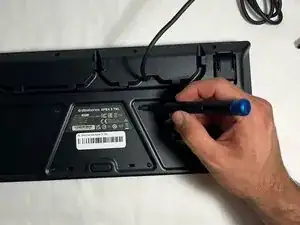
    • Use a JIS #00 screwdriver to remove all back panel screws.

  2. FtR31VqG1XaS6WSV
    FtR31VqG1XaS6WSV
    QgtZCEa56WJeKfOW
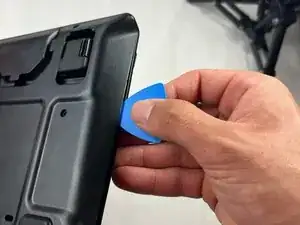
    • Use the iFixit opening pick to pry open the back panel by running it along the edges of the keyboard.

  3. XrKDKDAbUFRNxqOe
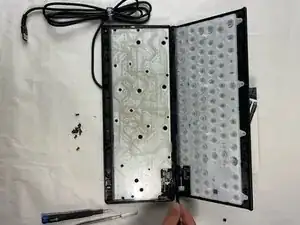
    • Release the ribbon wire connections using the metal spudger which has a more rigid tip for undoing the clips.

  4. VFgWhmnAjb255ZNo
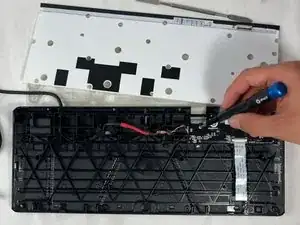
    • Use a JIS #00 screwdriver to remove the USB port cover.

  5. OWJnPHuD6VVBFdrD
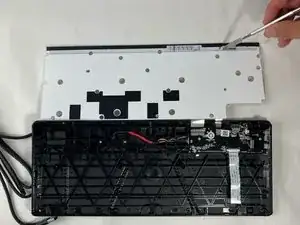
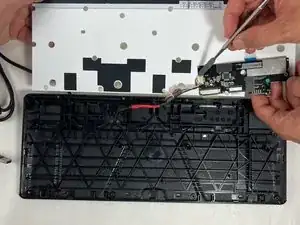
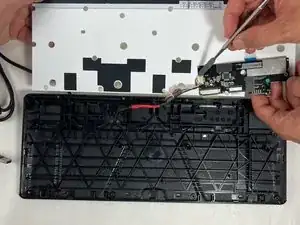
    • Flip the motherboard over and carefully use the spudger to push out the connecting wire.

    Where do you find a replacement port with wire?

    Karl S -

Conclusão

Use your new USB port insert back into the motherboard. To reassemble your device, follow these instructions in reverse order.

Tyler Pepe

Membro desde: 20/03/24

172 Reputação

0 comentários