Introdução
Keeping your Sony Handycam DCR-DVD103 powered is essential for capturing life’s important moments, and one of the most common reasons this camcorder stops working properly is a worn-out or depleted battery. Over time, rechargeable batteries naturally lose their ability to hold a charge, and you may notice shorter recording times or the camcorder shutting off unexpectedly. Fortunately, replacing the battery on this model is quick, simple, and requires no special tools, just a compatible Sony InfoLITHIUM battery pack.
Before you begin, it’s important to take a few precautions. Make sure the camcorder is completely powered off to avoid data loss or electrical damage, and if you’ve been using it recently, give it a moment to cool down. Work in a clean, dry area where the battery compartment can open freely. This guide will walk you step-by-step through removing the old battery and inserting a new or fully charged one, ensuring your Handycam stays ready whenever you need it.
-
-
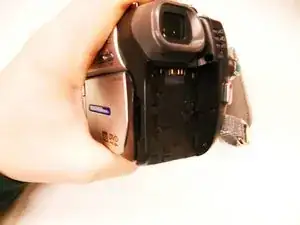
Turn the camera so the back side, beneath the viewfinder, is facing you.
-
Locate the battery pack compartment.
-
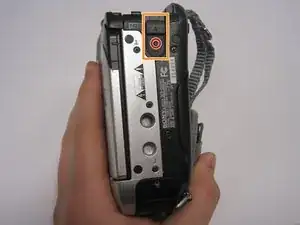
Press the small release button near the battery compartment.
-
While pressing the button, slide the switch forward to unlock the battery.
-
-
-
Carefully pull the battery pack out of the compartment.
-
To reinsert, align the battery pack with the compartment.
-
Slide the battery back into the camera until it clicks securely into place..
-
To reassemble your device, follow these instructions in reverse order.
