Introdução
If your Shark Vertex Pro IZ682H vacuum isn’t effectively picking up debris or if the brush roller has stopped spinning entirely, this guide will show you how to replace the brush roller motor belt on the power nozzle.
The brush roller belt drives the roller, helping the vacuum agitate and lift debris from floors. A worn or broken belt can lead to poor suction and decreased cleaning performance. Before beginning this repair, visually inspect the brush roller for obstructions, such as hair or threads, which can sometimes cause issues similar to a worn belt. Make sure the vacuum is powered off and disconnected from any power source.
Follow each step closely to ensure proper belt replacement and restore your vacuum’s performance.


-
-
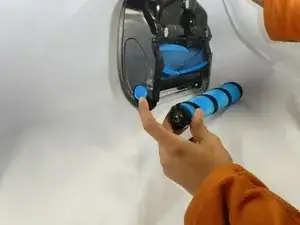
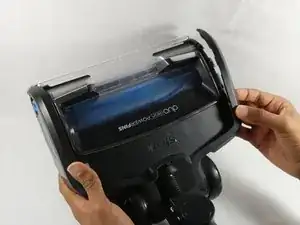
Detach the power nozzle from the vacuum and turn it so the right side is facing you. Pull down the blue tab in the direction of the arrow.
-
The brush roller should now pop out.
-
-
-
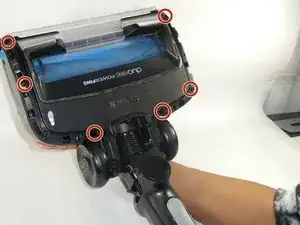
Turn the three plastic locks to the unlocked position, then remove the crevice tool.
-
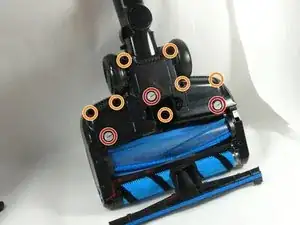
Use T9 and T15 screwdrivers to remove the seven screws.
-
-
-
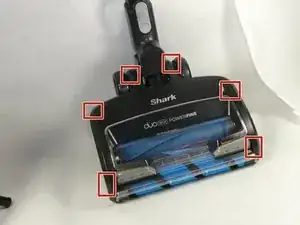
Use an opening tool to pry along the edges of the casing, then remove the thin plastic coverings on both sides.
-
Pull the plastic coverings off the powerhead.
-
-
-
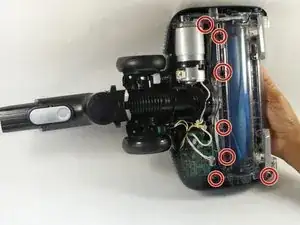
Remove the seven screws using the T10 and T15 Torx security screwdriver.
-
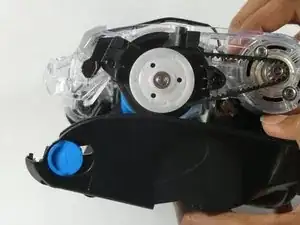
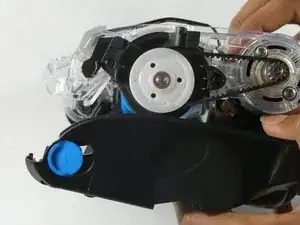
Lift the covering and motor assembly enough to see the belt.
-
To reassemble your device, follow these instructions in reverse order.

3 comentários
Yeah, it seems that shark will only sell us the entire floor nozzle, not just the power fins roller. Oh, and when they sell you that entire piece for $100 they don't include the soft brush roller! The nerve of this company. I just want to be able to remove the power fin roller and wash the darn thing. Or heaven forbid I want to clean the dirt on the inside of the top cover. It's just ridiculous. I can't seem to find instructions anywhere on the web for how to remove the power fin roller.
radtech -