Introdução
Ferramentas


-
-
Power off and unplug the monitor before starting.
-
Place the monitor face down on a soft, flat surface (such as a towel) to protect the screen.
-
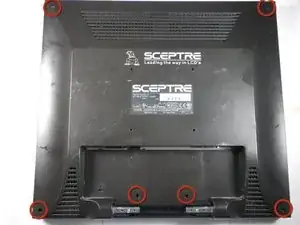
Using a Phillips #2 screwdriver, remove the four 11.5 mm screws securing the stand.
-
Gently pull the stand out to detach it from the monitor. - Caution: Do not force the stand out. If it resists, check that all screws have been fully removed before pulling.
-
-
-
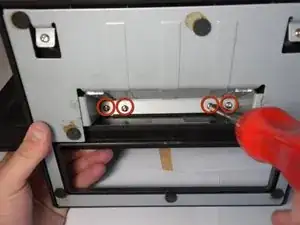
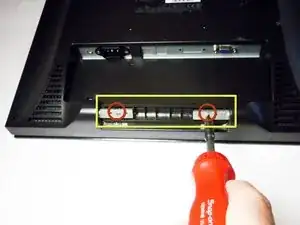
Using the same Phillips #2 screwdriver, remove the two 11.5 mm screws securing the plastic bar.
-
Lift the bar away and set it aside.
-
-
-
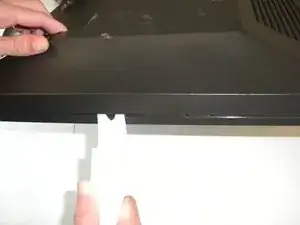
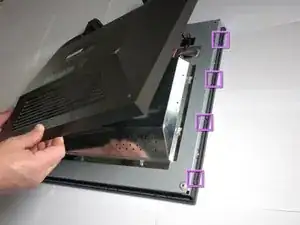
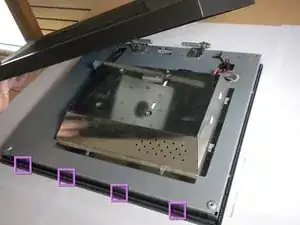
Pry the monitor using the plastic opening tool to release the clips holding the cover on.
-
Once all the clips have been released, remove the cover by pulling it up.
-
-
-
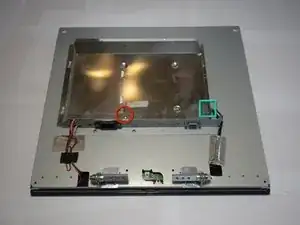
Using the #2 Phillips screwdriver, remove the one 6mm screw.
-
Unplug the indicated cable by pulling on the base.
-
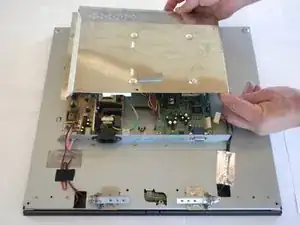
Slide the cover toward the top of the monitor.
-
Remove the cover.
-
To reassemble your device, follow these instructions in reverse order.
