Introdução
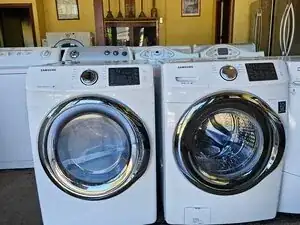
This guide walks you through the basic access points and diagnostic steps for the Samsung VRT Steam Front Load Washer. It’s designed to help you locate key components, check for common failure points, and safely open the machine for maintenance or deeper repair procedures.
Tools Required
- Phillips screwdriver
- Flathead screwdriver
- Needle-nose pliers
- Torx driver set (T15/T20)
- Flashlight
- Towels or a small drain pan
Step 1 — Power Down & Prep
- Turn off the washer and unplug it.
- If it was recently used, wait a few minutes for the internal heater and drum to cool.
- Pull the washer 1–2 feet forward from the wall to access the rear panel.
- Place a towel under the front filter area in case water drains out during later steps.
Step 2 — Remove the Top Panel
- At the back of the washer, remove the two screws securing the top panel.
- Slide the top panel backward and lift it off.
- With this removed, you gain access to:
- Main control board
- Dispenser housing
- Wiring harnesses
- Suspension top mounts
Step 3 — Access the Control Board (Main PCB)
- Locate the PCB housing on the right side under the top cover.
- Remove the small retaining screws.
- Carefully tilt the cover open to inspect the board.
- Look for:
- Burn marks
- Loose connectors
- Corroded terminals
- Moisture intrusion
- Make sure wiring harnesses are fully seated.
Step 4 — Front Lower Filter Access (Drain Pump Check)
- Open the front lower access flap.
- Place a towel underneath.
- Slowly twist the filter cap counterclockwise — water may drain out.
- Pull the filter assembly out completely.
- Inspect for:
- Coins
- Lint buildup
- Small clothing items
- Damaged impellers
- Rinse and reinstall the filter firmly.
Step 5 — Remove Rear Panel (Drum & Motor Access)
- Remove rear panel screws and lift the panel away.
- You now have visibility of:
- Drive motor
- Belt
- Pulley
- Rear drum mount
- Heating element connections (if applicable)
- Check the drive belt for wear or stretching.
- Spin the pulley by hand — it should rotate smoothly without grinding.
Additional Reference
Suppose you need model-specific documentation such as wiring diagrams, part layouts, or full user instructions. In that case, you can search for the washer model on Manualslibraryy, which provides detailed guides and diagrams helpful for deeper repairs. Visit for Samsung VRT Steam Front Loader.
Conclusão
To reassemble your device, follow these instructions in reverse order.

0 comentários