Introdução

Use this tutorial to replace the power switch if your Ryobi RS290G orbital sander won't turn on, occasionally loses power, or feels loose or sluggish.

The electrical supply to the sander's motor is managed by the power switch. The tool may not turn on or may abruptly shut off due to a malfunctioning switch.

Ensure the tool is properly plugged into a functioning outlet and inspect the power cable for any visible damage before proceeding with this tutorial. The switch itself is probably the problem if the sander still doesn't turn on .

To prevent electrical shock, unplug the sander and ensure it is completely disconnected from any power source before starting.

  1. mYxYpvHZyQTukkvy
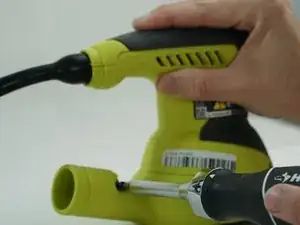
    • Remove two 20mm and one 16mm Phillips #2 screws from the housing assembly and exhaust port.

  2. ysUDNVrlFBQNsUtC
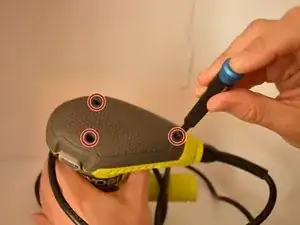
    • Remove the three 16mm Phillips #2 screws from the top cap/upper grip.

  3. rZNxxLbxNbLhr5k2
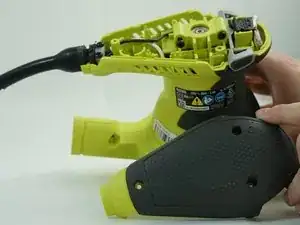
    • Remove the top cap.

  4. 56s4WtVKp2DF3EIw
    • Remove the switch trigger.

  5. PE1k4onODreigWf2
    PE1k4onODreigWf2
    KnWJYlmSq5jXfMWW
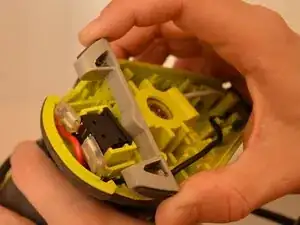
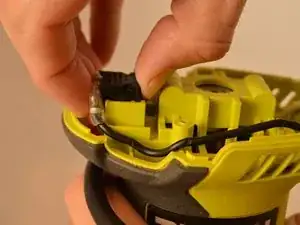
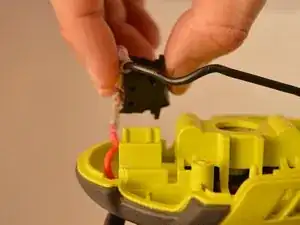
    • Slide the power switch out of the housing assembly by carefully gripping the power switch and sliding upward from the base.

  6. sWCKMGHOOZZVBRR3
    sWCKMGHOOZZVBRR3
    wwAZqg6CUkFpXEy2
    REwdB6LRPT326xvD
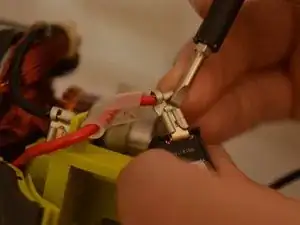
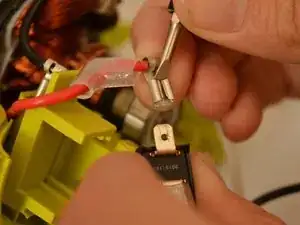
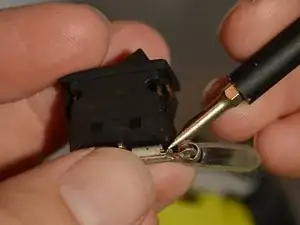
    • Slide the red and black leads from the power switch using a spudger.

    You’ll need to retake these pictures using the spudger or the plastic opening tool, rather than the screwdriver. Also, this seems like two steps — one in which the user removes the leads, and one in which the user uses the spudger to remove the disconnect terminal. Is this accurate?

    Sandy Branham -

    So now? Can you buy a new switch?

    Donna Binner -

Conclusão

To reassemble your device, follow these instructions in reverse order. After reassembling, perform an operational check before using.

Cameron Scott Williams

Membro desde: 17/09/19

136 Reputação

0 comentários