Introdução
If your Respironics REMstar Plus M Series stops working, the main board might be the problem. This guide will show you how to remove the old board and install a new one. No special skills are needed, but you will be opening the device, so follow each step carefully.
The main board (also called the motherboard) controls the machine’s power and airflow. When it fails, the CPAP may not turn on, may blow weak air, or may show error signs. If you’re not sure the board is the issue, check the Power Problems and Airflow Issues sections on your troubleshooting page.
Before starting, unplug the CPAP and let it sit for a few minutes. Be careful with the internal parts and try to avoid static electricity. Handle the new board by the edges so it doesn’t get damaged.
If you end up replacing the whole machine, make sure to recycle the old one at an e-waste center. For more basic info on this device, you can also look at Philips Respironics’ support pages.
Ferramentas

-
-
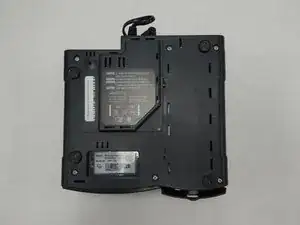
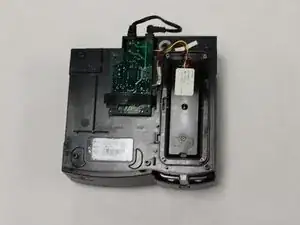
Place the device face down.
-
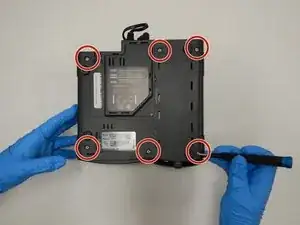
Use a T15 Torx screwdriver to remove the six screws in the base plate.
-
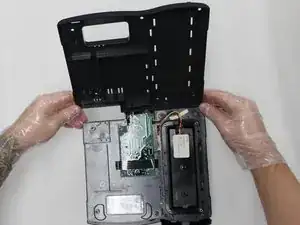
Lift the base plate off of the device.
-
-
-
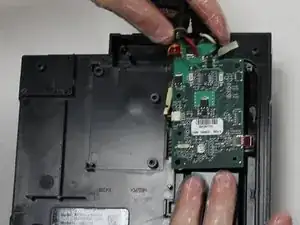
Flip the circuit board over to the right.
-
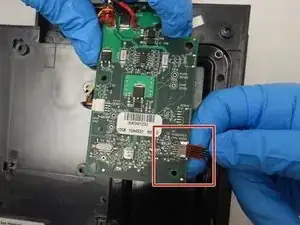
Gently pull the ribbon cable outward to disconnect it from the circuit board.
-
-
-
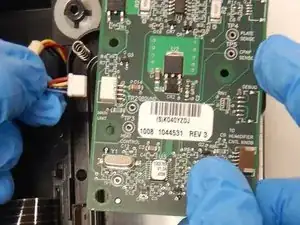
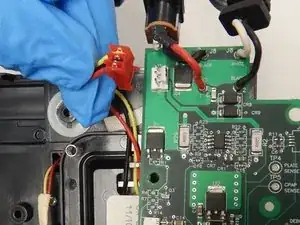
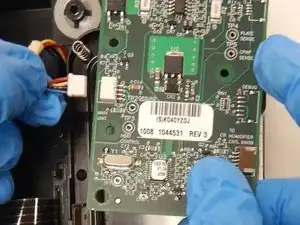
Disconnect the red 3-wire plug at the top left of the board and the white 4-wire plug at the bottom left.
-
Remove the circuit board.
-
To reassemble your device, follow these instructions in reverse order.

2 comentários
My unit stops working in the middle of the night, then beeps, & blue light flashes. Will replacing this board fix this, and where can I get one?
mert454 -
Where to find a power supply circuit board for my Remstar plus m series which just blinks blue lights. dledes@shaw.ca