Introdução

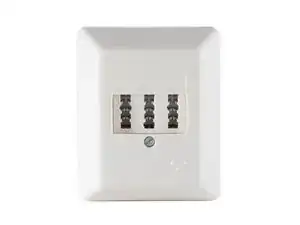
As technology advances, it's important to keep up with the latest changes to ensure your home or office network is running as efficiently as possible. The TAE socket was widely used in Germany and other European countries for connecting to DSL modems, but now the RJ45 socket is becoming the new standard. In this guide, we'll walk you through the steps to replace the TAE socket with an RJ45 socket so you can connect directly to your modern DSL modem, like the FritzBox.

Please note that the first outlet in your house typically is a special outlet with a PPA(passive testing termination) that belongs to your ISP and shouldn't be changed.

  1. 3v1QABCqQbPywGEB
    3v1QABCqQbPywGEB
    tycpRGPFLQLKlbfK
    • Unscrew and remove the cover.

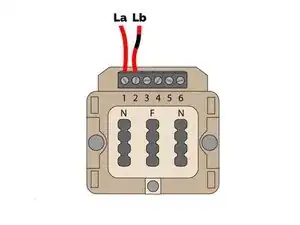
    • If you want to add an RJ45 jack but only have access to the first (non-replaceable) TAE outlet, you can mount the new RJ45 outlet next to it. Connect La on the new outlet to pin 6 of the old TAE outlet, and Lb to pin 5. You can use any type of shielded twisted pair cable for the connection.

    • Remove the the connections.

    • Keep track of La and Lb. You’ll need to know what wires to connect where in the new socket.

    • Unscrew the socket from the wall.

    Unten bei schritt 3 steht: Lege La auf Pin 4 (Blau) an und Lege Lb auf Pin 5 (Weiß-Blau) an, somit müsste der Text neben i oben korrigiert werden

    Andreas F -

  2. WlUIcpIAFwMuuGoU
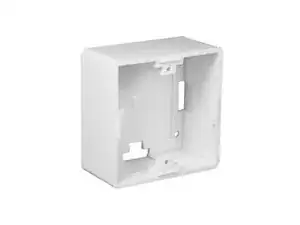
    • Screw the new socket cover to the wall.

    • Refer to the manual that came with your outlet for this step.

  3. YBuU4o6okUrXIadp
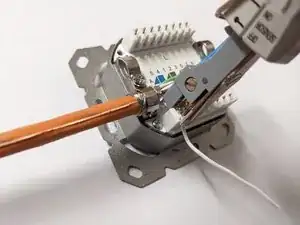
    • If you don’t know how to use a punch down tool, take a look at this guide first.

    • Connect La to pin 4 (Blue).

    • Connect Lb to pin 5 (White-Blue).

  4. bdNRo1GYOnrHhoQQ
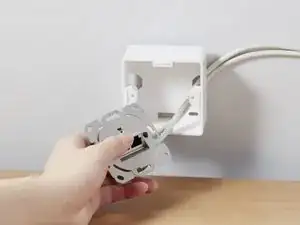
    • Mount the RJ45 socket inside the case and screw on the faceplate.

    • Refer to the manual that came with your outlet for this step.

    Außer unnötiger Kosten sehe ich im Austausch keinen wirklichen Nutzen. Ein Kabel RJ auf TAE liegt jeder Fritz!Box bei. Ein RJ- auf RJ-Kabel bringt keinen Mehrwert!

    Kurt Günter -

    Für DSL wird bei RJ45 die Pins 4 + 5 verwendet. Das entspricht a + b (1 + 2) der TAE Dose. Es kann für DSL entweder ein Netzwerkdose oder eine ISDN Dose ohne Abschluss verwendet werden. Zum Anschluss wird dann ein kurzes Netzwerkkabel verwendet.

    Jens Schröder -

Conclusão

Have fun surfing the web!

Sebastian

Membro desde: 19/08/18

32352 Reputação

0 comentários