Introdução
Vous devez déconnecter ou remplacer la pile de votre Dell XPS 13 9380, ce guide est alors fait pour vous !
Ferramentas

-
-
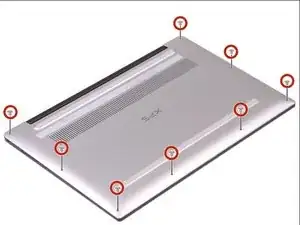
Dévisser les huit vis (Torx M2x3) qui fixent le panneau arrière.
-
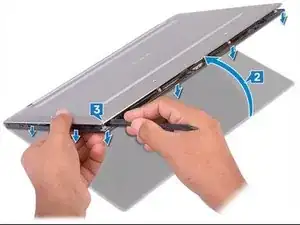
Retournez l’ordinateur, puis ouvrez-le en l’inclinant.
-
À l'aide d'un Spudger, faites levier sur le panneau arrière.
-
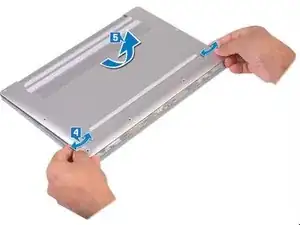
En faisant glisser le panneau arrière de gauche à droite, libérez les clips qui le fixent. Vous pouvez ainsi le retirer.
-
-
-
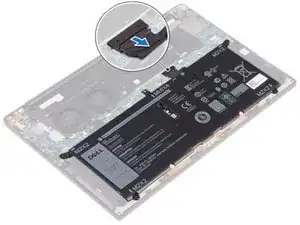
1- Déconnecter le câble de la batterie.
-
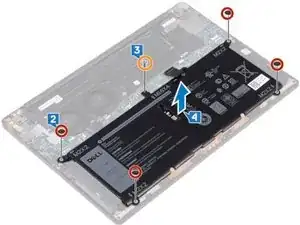
2- Retirer les quatre vis (M2 x 2) qui fixent la batterie
-
3- Retirer la vis (M1,6 x 4) qui fixe la batterie.
-
4- Retirer la batterie de son emplacement.
-
-
-
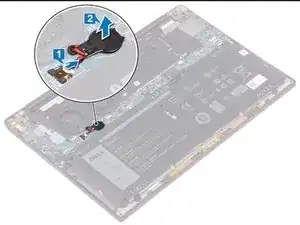
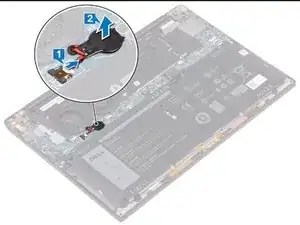
1- Déconnecter de la carte-mère le câble de la pile.
-
2- Faites levier pour retirer la pile de la carte-mère.
-
Pour réassembler votre appareil, suivez les instructions dans l'ordre inverse.

Um comentário
Note to anyone replacing this, the model is a ML-1220 3V rechargeable coin cell battery, you will need one with a Dell compatible connector or to solder said connector to battery that comes with preinstalled solder tabs.
You should be careful when removing the back panel as there also two clips on its back where the air ducts lie. If you are quick to remove it you may tear the air ducts which are quite (unreasonably) fragile given the fact they are plastic. I was unfortunate and I broke two of them so I had to use some duct tape as a minor gap would be visible between the back panel and the plastically covered air ducts. Other than that, it’s a pain to remove the back panel but not as difficult as it sounds.
Iraklis -