Introdução

This guide outlines how to remove the lithium-ion battery in the Razer Blade Stealth 2017. Battery replacement may be necessary if the battery is not charging, not powering the computer, swollen, leaking, or not lasting as long as you would like. Some tools are required for this replacement.

  1. LxXeUEUX1QsYMuo2
    LxXeUEUX1QsYMuo2
    qnJFsCybk6ZWj3fs
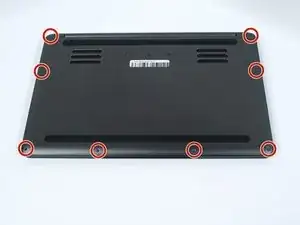
    • Before you begin, be sure to turn off your laptop and discharge the battery down to 25%.

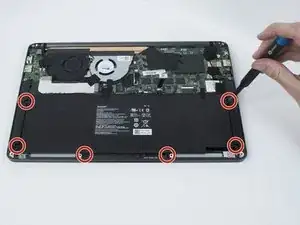
    • Use a Torx T5 screwdriver to remove the eight, 3mm screws on the bottom cover of the laptop.

    • Whenever you remove screws from the device, remember to save and label them.

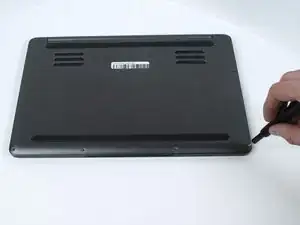
  2. qk4H6BDjtIosjQR5
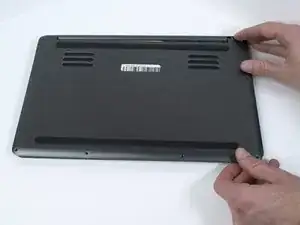
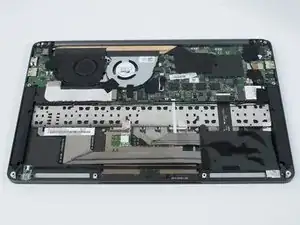
    • Remove the bottom cover of the laptop by sliding it away from the hinge.

    • Do not force the cover up!

  3. QIvH3Auj5t3CqgN5
    QIvH3Auj5t3CqgN5
    SbmLLqpMocvpYq1W
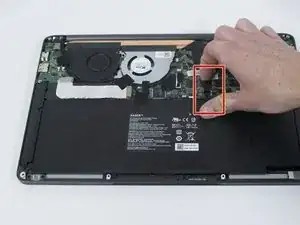
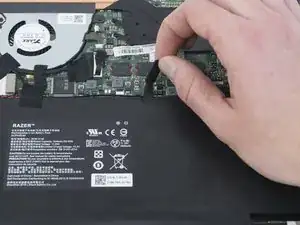
    • Use your fingernail to pry up and disconnect the battery from the motherboard.

  4. F2jGBNOC4tpmVq16
    • Use a Phillips #00 screwdriver to remove the six, 5mm screws securing the battery.

    Do you have to remove the battery before swapping the wifi card? Is disconnecting the power not enough?

    Charles Tsai -

    Hi Charles,

    If you’re swapping the Wi-Fi card, you don’t need to remove the battery. Disconnecting it will suffice.

    Arthur Shi -

    Are two of these screws shorter than the other four? And if so, where do the two shorter screws go?

    James Spinella -

    Looks like the two shorter screws go where the trackpad is!

    James Spinella -

  5. yvhnafCZb3yMYkjF
    yvhnafCZb3yMYkjF
    QrZNXNVFLGHaBM5M
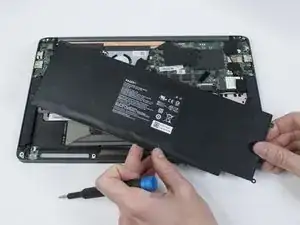
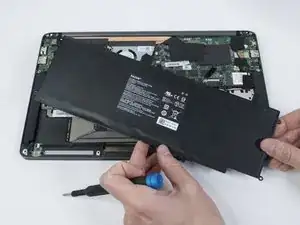
    • Remove any tape attached to the battery.

    • Use the plastic spudger to pry out the battery.

    After removing the 6 screws securing the battery, mine does not come out easily. There is resistance, and I don't wanna forcefully pull it out. Is it supposed to be easy to pick up and take out or is there some sort of tape holding it down from the bottom?

    kairos -

Conclusão

To reassemble your device, follow these instructions in reverse order.

For optimal performance, after completing this guide, calibrate your newly installed battery.

Take your e-waste to an R2 or e-Stewards certified recycler.

Repair didn’t go as planned? Try some basic troubleshooting, or ask our Answers community for help.

Ethan Schlocker

Membro desde: 10/10/19

365 Reputação

5 comentários

ive done everything correctly and laptop boots up but now I have no battery percentage information. any solutions on how to fix?

fdf -

Where did you get the replacement battery? The replacement we purchased for two Razer units about a year ago worked fine, but a replacement battery purchased online about a month and a half ago from Amazon is showing the same issue. Essentially, it's not detected by the operating system at all, or only very rarely. Looks like a bad batch of batteries from wherever these sellers are getting their supply.

DST -

The laptop powers on but when plugged in it starts then stops charging

Boogie -

Hey Boogie!

I am also having same issue, have you manage to solve it?

Andrea Torrico -

My laptop powers on, charges, holds the charge, shows battery percentage on screen, BUT now the white charge light does not turn on. Anyone know how to fix this or if this is a common issue with this part?

I tried all the solutions from Google which said to:

1. Verify Power Adapter and Connection:

- I checked all physical connections and the charger I use is an new official one from Razer that is barely about a year old.

2. Check Battery and Cable Connections:

Opened the laptop again to make sure all the connections were good.

3. Software and Driver Checks:

Battery Report: Created one and every thing looks like it checks out the new batttery read 42% when I installed it and after the calibration from iFixit everything look good.

Driver Updates: My Laptop says it is up- to-date with the last windows 10 update.

BIOS Update: Didn’t really do this one on the count of that I am scared that I might break my laptop, but if it gets updated when Windows is updated then it should be fine.

4. Power Discharge Procedure

Unplugged the battery from the motherboard, held power for 1 min., plugged laptop directly into charger without battery, powered on no issues, and then reassembled it.

Again this is not a deal breaker for me the laptop works just fine, but would just like to know if there is a fix.

Thank you iFixit for the tools and parts and thank you iFixit community for any help.

Eric Estrada -