Introdução
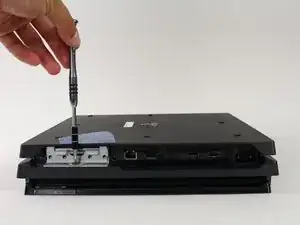
This guide will show how the Hard Drive Caddy of the PlayStation 4 Pro is removed. With nothing more than a screwdriver, the Hard Drive Caddy is one of the easier components of the PS4 Pro to remove and replace.
Ferramentas


-
-
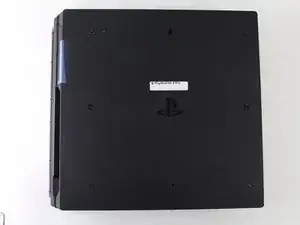
Flip the console upside down.
-
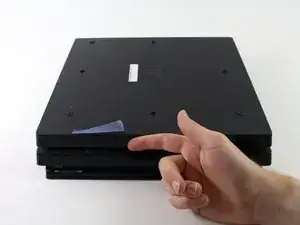
Use your finger to pull and snap off the plastic cover over the hard drive.
-
-
-
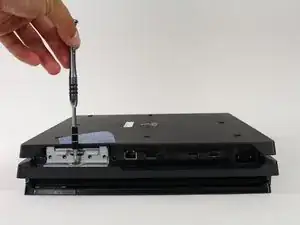
Use a Phillips #1 Screwdriver to remove the single screw securing the hard drive caddy.
-
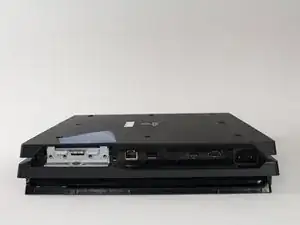
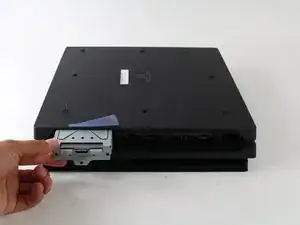
Pull the hard drive caddy straight out.
-
Conclusão
To reassemble your device, follow these instructions in reverse order.

DON’T FORGET TO HAVE THERMAL PASTE HANDY! It should be added to the “Tools Required” Section. You will NEED it!
Jaquell Chandler -
What if thermal paste is not applied again when remounting ? Will the playstation start and work anyway or not ?
Vincent Bee -
It will start and run normally until you put it under load. Then it will heat up and thermal throttle or it can overheat and destroy itself.
Jeremy Ivey -
I posted this down in another step too, but: if you have a very early North American PS4 Pro, with the exact optical drive shown here - the key way to tell is the very long data cable that’s folded a couple of times, see pictures in later steps - then the replacement drive iFixit offers WILL NOT WORK IN YOUR MACHINE. It has to be a very early model, apparently, but the model number isn’t enough to tell you.
Even if you swap the too-short cables in their replacement with the longer cables on your drive, it still will not work. At all. It’ll just sit there like the drive isn’t even getting power.
So if you do have this drive, what you probably need to do is get a replacement KES-496A Optical Pickup Assembly and replace that within your existing drive. That’s what I had to do after two different replacement drives sent by iFixit failed to work in my system. It worked immediately and I’m back online.
The optical pickup replacement is awfully fiddly, and adds a solid 20 minutes to the repair easily. But it does work.
Dara Korra'ti -
I had originally been told by several people that to properly repair the optical drive within the PS4 Pro (so that the PS4 actually works), you have to replace the Optical Pickup Assembly like you mentioned because the drive is paired with the motherboard. I was surprised to find that iFixit is pushing this repair tutorial when it has a low probability of success for many PS4 Pro models.
Instead, iFixit should be documenting replacement of the KES-496A Optical Pickup Assembly... when that repair has a near 100% chance of success, even though it's a fair bit more fiddly to complete and requires two different teardowns (one for the PS4 Pro and one for the optical drive... needed to install the replacement optical pickup assembly).
commorancy -
Follow-on note. I could be mixing up the original PS4's pairing with the PS4 Pro (which might or might not have device + motherboard pairing). Because I can't find a definitive source confirming if the drive is paired on the PS4 Pro, using a drive replacement might or might not work.
There are a number of commenters below who followed these instructions and found that the replacement drive didn't work after completing the repair. I think I'd still go with replacing the KES-496A Optical Pickup Assembly. That repair is more fiddly, but the optical assembly replacement part is a whole lot cheaper, costing less than $10 in some stores, than buying a full replacement drive at $70.
commorancy -
Hi, I was just about to give this a go but the comments above have probably saved me a lot of hastle, I tried cleaning the Lens but nothing still in fact it wont read at all now it did before with a few gentle taps on the case, so I thought I would change out the whole drive but this PS4 Pro looks like it is a North American edition as its a 'CUH-7016B' model withe big power cable not the figure 8 type but also only has the +/- PS pins no Earth pin. OK so I need to replace the actual Laser Deck inside the drive assembly then, I have done this a few times on PS2 & 3 but nothing else I guess its quite doable then any tips, I used to ajust the pots on the actual laser if cleaning didn't work is that possible on the CUH-7016B model?
Thanks all. Sean UK. 😊👍🤜🤛
Sean Goodwin -
Hello. Can someone plese help. Ichanged the thermal paste on my ps4 pro and it stoped taking the disc for some reason. I don't know if I damaged something but the consol still works but the Light bar is whit and it wont take any discs. Any tips to what it might be and how could I fix it? Than you in Advance.
Miko221 -