Introdução
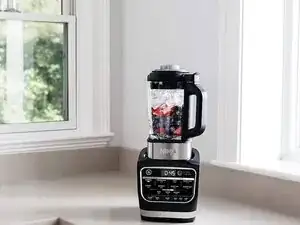
The Ninja HB152 Foodi Heat-iQ Blender combines high-speed blending with a built-in heating element for soups, sauces, and hot extractions. This guide covers simple diagnostic and maintenance techniques to keep the unit running smoothly. It’s designed for users who want quick repair insight before considering part replacement.
Tools Needed
- Soft brush or toothbrush
- Microfiber cloth
- Plastic spudger
- Food-safe descaling solution
- Small Phillips screwdriver
Step 1 — Power Check & Reset
- Unplug the blender for 5 minutes to reset internal safety sensors.
- Ensure the pitcher is properly locked; this model will not operate if misaligned.
- Inspect the outlet and try a different socket to rule out power issues.
Step 2 — Heating Plate Cleaning
- Food residue on the heating plate can trigger overheating.
- Use a damp cloth and mild detergent to wipe the plate after every use.
- If the buildup is stuck, run the Heated Clean cycle with warm water and dish soap.
Step 3 — Blade Assembly Check
- Remove the pitcher and inspect the blade assembly from underneath.
- Spin the blades manually—if they feel stiff or gritty, they may be clogged.
- Clean using a brush and warm water, avoiding contact with sharp edges.
Step 4 — Vent & Sensor Maintenance
- The lid’s steam vent can become blocked, causing safety shutoffs.
- Clean the vent with a brush and ensure the silicone gasket is seated correctly.
- If the unit stops mid-cycle, overheating from blocked vents is a likely cause.
Step 5 — Error Code Basics
- E01 / E02: Overheat — cool unit for 10 minutes and clean heating surface.
- E03: Pitcher misalignment — re-seat the pitcher firmly until it clicks.
- E04: Lid sensor fault — clean sensors and check for debris around the rim.
Step 6 — When to Perform a Deep Clean
- If the blender smells like burning, runs louder than usual, or struggles to heat:
- Descale the internal heating chamber.
- Wash the pitcher thoroughly and clear residue beneath the blade base.
- Dry all components completely before reassembly.
Step 7 — Helpful Reference
- If you need the complete user instructions, safety steps, or part diagrams, check the Ninja HB152 Foodi Heat-iQ Blender user manual available on a detailed appliance manuals resource (search for “Ninja HB152 guide on manualslibraryy” to find it).
This technique guide covers the most common maintenance and troubleshooting steps for the Ninja HB152. Most performance issues come from blocked vents, dirty sensors, or misalignment. Regular cleaning and quick resets can restore functionality without repairs.

0 comentários