Introdução

This guide provides step-by-step instructions to update the firmware of your Mitsubishi Hands Free Module (HFM). By keeping your HFM's firmware up to date, you ensure optimal performance, compatibility with new devices, and access to the latest features.

Note that once the update is completed, the system will be reset and the following information will be deleted:

  • Phone book data
  • Pairing data
  • Voice Recognition data
  1. EeXYtfrwGpJMJVeF
    EeXYtfrwGpJMJVeF
    len523DH5YMhJSys
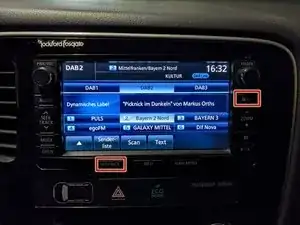
    • Enter the Service Menu by pressing and holding the SETTINGS and MAP-Buttons for 4 seconds.

  2. HlYvpwWsGreUHvQE
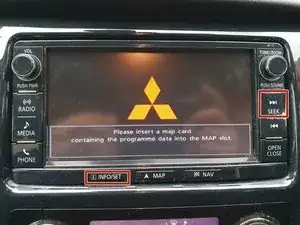
    • Enter the Service Menu by pressing and holding the INFO/SET and SEEK-Buttons for 4 seconds.

  3. VevtCyrLfVrMw1hc
    VevtCyrLfVrMw1hc
    Awi4VQGpSFGm2ZNl
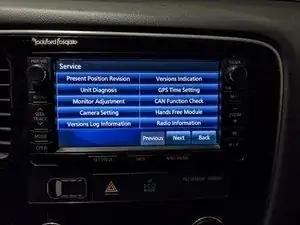
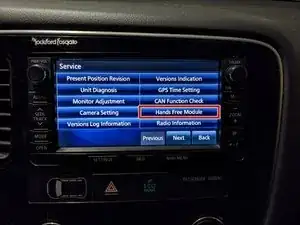
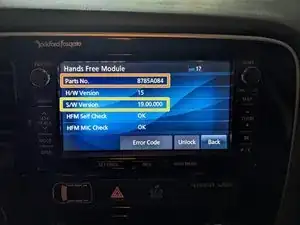
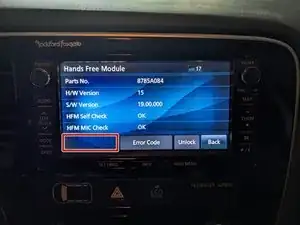
    • Press on Hands Free Module.

    • While the Hands Free Module is in diagnosis mode, the sound input to the microphone unit is output directly through the speaker.

    • Check the Parts Number.

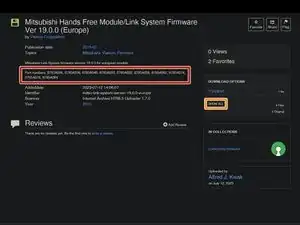
    • We'll need this later when downloading the Firmware file.

    • Check the Version Number.

    • If the Version Number is 19.00.000 or 50.00.000 you already have the last available Firmware installed and don't need to do anything.

  4. ZtULBLpjvGJDe5Td
    ZtULBLpjvGJDe5Td
    4Qn5ycSQGdtxiCOF

    downgrade to v 13.00.000 is posible?

    cali -

  5. EwICSPJZSsXVvs4K
    • The flash drive needs to be formatted to FAT32 and should not be larger than 16GB. Additionally the MMCS can be a bit picky and might not accept all flash drives. If it can't read your flash drive, just try a different one.

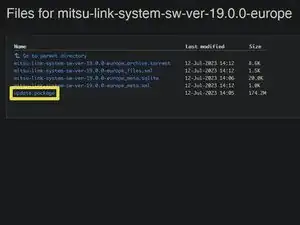
    • Copy the update.package file to the root directory of the USB flash drive.

  6. FCuFiL3efGXyEK2q
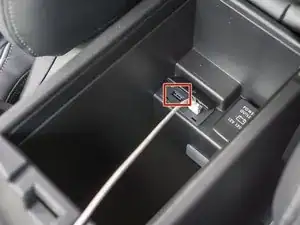
    • Insert the USB flash drive into one of the USB ports in your car.

    • You can usually find a USB port inside the center console or below the head unit.

  7. I6MnL2B5vdGhvwvg
    • Re-enter the Hands Free Module-Section of the Service Menu.

    • Press on the S/W Update-button.

    • If there is no S/W Update-button it means that the head unit didn't detect a valid file on the flash drive. This either means that you already have a version newer than the firmware file installed (as is the case for me), an incompatible firmware file, or that the system can't read the flash drive.

  8. Ux5dOcOdN2WLi6ia
    • Enter your Security PIN.

    • If you don't have one set you can just enter 1234.

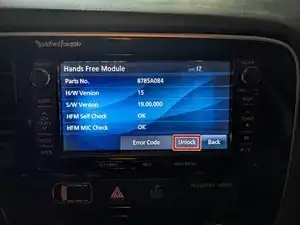
    • If you have forgotten you Security PIN, you can forcibly remove it by pressing the Unlock-Button in the Hands Free Module-Section of the Service Menu.

  9. Qy1tVCXg5geHYYiq
    Qy1tVCXg5geHYYiq
    GcpJjTaQGkS6YEKC
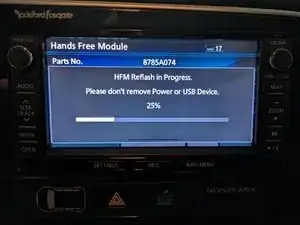
    • Wait for the update to finish. This may take some time, don't worry if the progress bar stays at 0% for some time.

    • Do not remove the flash drive or turn off the car while the update is running!

    • If the update fails and the warning message states that you should make sure that the USB port is properly powered, you can just reboot the head unit and try again.

  10. 1Pdcr4CEE5gRfqDb
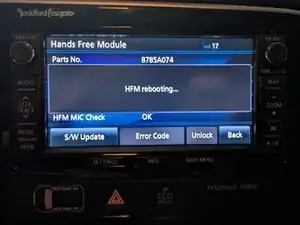
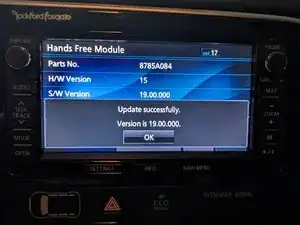
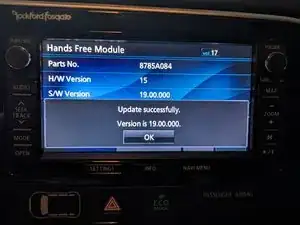
    • Press OK to finish the update.

Conclusão

Drive safe!

Sebastian

Membro desde: 19/08/18

32352 Reputação

13 comentários

gut erklärt.Aber eine frage habe ich bringt so ein update was ?????

Alex Kahle -

Ja, auf der Wiki Seite steht sogar welche Bugs gefixt wurden.

Sebastian -

Danke für deine Antwort

Frage habe die Versionsnummer 50.00.000 ist die alt ?

und bleibt mein DAB+ radio und meine lenkrad steuerung nach den update.

Alex Kahle -

Version 50 ist die neuste und letzte, du musst also kein Update machen.

Sebastian -

I had tried update firmware in my outlander 2016. Now my car doesn't even detect hands free module at all. I had removed battery power supply and tried again but hands free module doesn't show in service mode. Please support.. How can i make it work? It seems there ia firmware mismatch. How can i repair it? Is there software available to connect with this HFM? Please help.

ABD -

Have you turned off the car while the update was running? Normally the unit should just produce an error code when it fails to update.

Disconnecting the cars' battery for 15 minutes should reset the device and enable you to try again. If that doesn't work I'd advise you to consult your local mitsubishi dealer or independent repair shop.

Sebastian -

I had the same issue. I fixed it by formatting the USB stick and copying the update.package file to it. I inserted the USB stick in the car's USB port before powering on. After powering on the USB stick started blinking. After about 5 minutes the blinking stopped and the module came alive again.

Rene -

Echt super erklärt.

Habe die Seite zufällig gefunden, da mein Handy sich nicht mehr mit meinem Hands Free System verbindet.

Ich habe in meinem KFZ MMCS W-19 eingebaut. Leider komme ich mit der Tastenkombination SETTINGS + MAPS nicht in das Servicemenü.

Ist was bekannt, dass es hier eine andere Tastenkombination gibt?

hubla -

Danke für da Kompliment! Bei deinem Problem kann ich dir leider auch nicht weiterhelfen, ich kenne leider nur die zwei Methoden die in der Anleitung bereits gezeigt werden. Frag doch Mal im Antwortenforum, da kann dir evtl. jemand weiterhelfen.

Sebastian -

W-12 My module disappeared after a failed update (wrong passcode) now USB isn’t recognised and I cannot see hands free module in service menu, do I need to flash new firmware to the actual head unit as a factory reset hasn’t fixed it, thanks.

feedthefishy -

It took multiple restarts with the usb storage connected and eventually it installed the module, keep trying whoever gets the same issue.

feedthefishy -

Can you help me with the 2020 radio update? I'm not interested in the navi. I'm interested in the MCU update

8740A103 NR-201.

Thank you

Jabi Miki -

Hallo, hab im meinem L200 das oben rechts E-12 verbaut, mein neues S23 verbindet sich nicht mit Audio, Telefon bricht auch immer wieder ab mit Bluetooth.Version schon gecheckt, wäre die 19.00.000. Also demnach die Neueste.Wie kann ich das Bluetooth dauerhaft hinbringen ?

Wenn ichs über das Handy steuere und öfter den Button rechts auf on schiebe, funkts nach dem 3. Bis 4.mal und die Verbindung steht dauerhaft und stabil. Automatisch beim Starten geht mal so fast gar nüscht. Mein Vorgänger Handy S21, hat schon immer wieder mal Abbrüche spontan gehabt und wieder verbunden.Hoffe Du weist ne gute Abhilfe.Sämtliche Versuche die Chat GPT so vorgeschlagen hat, schlugen leider fehl...danke derweil

VG Alex

Alex -