Introdução

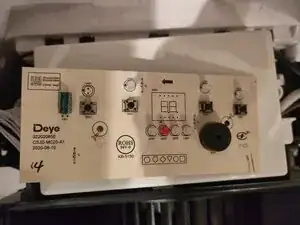
A common fault with the Arete One is for the display to stop working but showing nonsense symbols or in some cases not showing anything at all, but still responding to button presses with beeps. This seems to be caused by the two digit display component which is a very cheap component.

This issue can be diagnosed by the device not performing any of the normal functions of air purification or dehumidification, and the buttons do appear to cause beeps and changes on the display but the normal modes of operation don't cycle while pressing the buttons.

In my case, the device would beep when power was supplied, with a blank display. If I pressed the power button then as long as I held it, the display would show "L!".

I think this was a red herring as there wasn't a particular device fault code in the manual corresponding to that.

Looking at this reddit thread, there are many people experiencing issues relating to the display.

Here's my sources for how I figured this guide out: thanks to these people!

https://www.badcaps.net/forum/troublesho...

https://www.reddit.com/r/Appliances/comm...

  1. budJltvjnUXcG2bq
    budJltvjnUXcG2bq
    sMXBl1FXZhTyrDAr
    PUWB3wvFwOhKlGSy
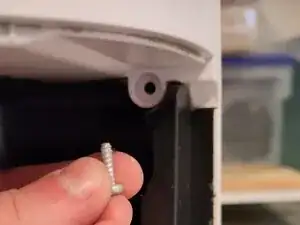
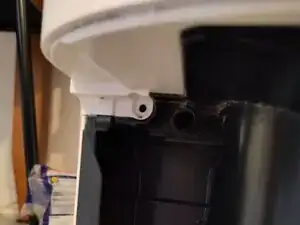
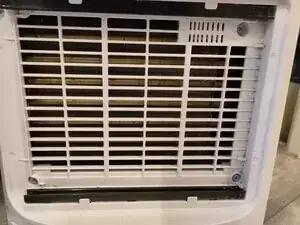
    • 4x in the vent

    • 4x after removing the water tank (2 at the top and 2 at the bottom (bottom screws not pictured)

  2. sS1ieBQZMKrEACZF
    • It's difficult to remove but you just have to pull it. This video is handy to see the full dismantle process: https://youtu.be/Oc8chhGgatQ

    Sadly, that video linked on YT IS now set to "private," so can't be viewed :(

    Damaja Xtra -

  3. uBQCVLE6mfMVLM6H
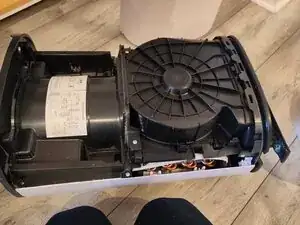
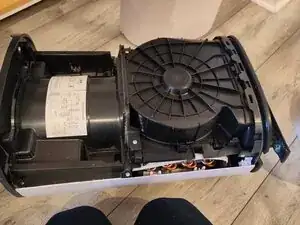
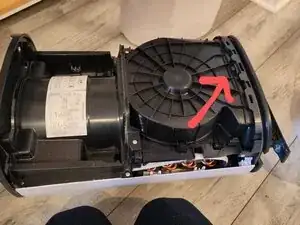
    • Approx 6-8 screws to remove. Objective is to be able to partially pull off white cover on the other side and lift off display cover from top.

    • Just enough to detach it from the display cover on the top

  4. jecLhcZAbTWrUVw6
    • Depending on which size of unit you have, you may have a plastic clip or a screw here. The clip is difficult to unclip, but a flathead screwdriver can be used to push it in, hard, with one hand while lifting the display cover up with the other

  5. SxdwX3f1p1Ry4XZC
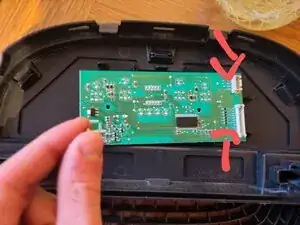
    • Detach the two connectors by squeezing the clamps and pulling them off.

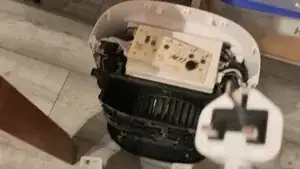
    • The whole top of the unit should now be completely detached

    • Unscrew the two Phillips screws holding the circuit board to the cover

    • Carefully unclip the circuit board

  6. P221OCFyDrcVHfSG
    P221OCFyDrcVHfSG
    vKLyEb5FPFJaMHBD
    QieRVSKgKOcrGecF
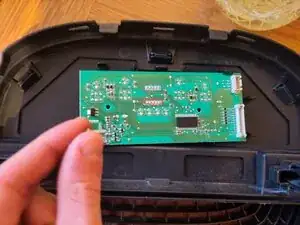
    • The highlighted 10 pins hold the display on

    • Once you've desoldered the pins, use a pair of pliers to grip the 2 digit display and pull it off the circuit board

  7. If you connect the circuit board carefully and try to only touch the power button you can see if the device works - it should be working without a screen.
    • If you connect the circuit board carefully and try to only touch the power button you can see if the device works - it should be working without a screen.

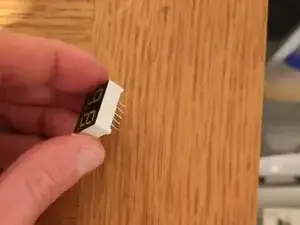
    • There are many replacement screens available. You need to find a common cathode two digit (sometimes called two bit) 7 segment 0.4 inch display with white LEDs (LED colour is probably not important)

    • 0.4 inches refers to the short edge of the display

    • I found this one: https://www.aliexpress.com/item/10050085...

    • Which is ~£1 for 5 of them

    • Make sure it's got 10 pins - 5 on each side

    You. Are an actual legend for this. Thank you for your clear and precise instructions

    Grumps -

    i have the exact same issue display is giving nonsense symbol but i do get a beep?

    vincent consenheim -

    did you fix yours ?

    vincent consenheim -

    Da ich im Besitz zweier Meaco MeacoDry Arete® 20L bin von denen eines der Geräte statt der realen Luftfeuchte im Display 20 anzeigt, ansonsten aber geht und beim 2. Gerät der Kompressor unrund läuft, habe ich mit großem Interesse gelesen, wie man das Gerät zerlegt.

    Da das Video des Demontageprozess zu sehen: https://youtu.be/Oc8chhGgatQ nicht mehr verfügbar ist hätte ich gerne gewusst, ob mir jemand diesbezüglich weiterhelfen kann? Dafür wäre ich wirklich dankbar.

    getit2210 -

    Ah, that's annoying. All I can suggest is to undo all the screws you see and pull quite hard, but not too hard until it comes apart!

    Alex Sadler -

    Thank you so much. It works now. They asked for £120 to fix this, and now my device is working. I'm waiting to receive my part from Aliexpress to replace it. You are a legend.

    Sina Mahroughi -

    Bei meinem Meaco Luftentfeuchter musste man nur insgesamt 6 Schrauben lösen

    Die beiden oberen nach Abnahme des Filters und jeweils die 2 oben nebeneinanderliegenden Schraube an der Schmalseite.

    Das weisse Befestigungsteil entfernt man am besten wenn man mit einem Schraubenzieher zwischen die Trennfuge der beiden weissen Teile die inneren Clips nach innen drückt

    Genauso verfährt man oben wenn man die Abdeckung für das Display entfernt.

    Nachdem man den Clip gedrückt hat und die Abdeckung dort angehoben hat,drückt man mit einem Schraubenzieher in die vordere Trennfuge undtrennt so die weissen Clips.

    Beides hat bei mir sehr gut funktioniert.

    Viel Erfolg

    Ralph Föhn

    Ralph Foehn -

    Thank you iFixIt! A clear guide has enabled me to repair my Dehumidifier screen.. Bravo!!

    I love repairing stuff!

    Paul Archer -

    Hello.

    did anyone try to program this display controler?

    TM1638 its programable display controler???

    Georgi Bayramski -

Conclusão

To reassemble your device, follow these instructions in reverse order.

Alex Sadler

Membro desde: 30/03/25

339 Reputação

12 comentários

Thank you for putting this together! Followed the steps exactly and rescued one of these from it's journey to landfill. Works perfectly :)

Gabriel G -

Great walk-through! Step 2 is the tricky part, the pulling force that is needed to remove the cover feels like things are going to break but all stayed in one piece. I managed to fix my Meaco Arete One which failed with exactly the same symptoms as described above. Only 1 year old and still under warranty but I decided to give it a try anyway (since the summer moist is arriving I didn't want to go through all the trouble of returning it and waiting for an unknown amount of time). It's running without display for the moment, waiting for the replacement part to arrive. Thanks again, great job!

GertE -

Thank you for this guide! I managed to fix my unit myself

Jamie -

jamie i got the same problem was going to ask if you could set me straight how to do this. please

vincent consenheim -

my display arrived today and ive taken the circuit board out from the top with allot of pulling , my friend will give me his solder iron tomorrow and then ill update you all

vincent consenheim -

Great guide, fixed my dehumidifier and it's all working now!

Laur -

Thanks for the detailed guide. Followed it exactly, including the recommended part, and it's worked a treat.

Ed K -

Thank you for this excellent guide! My unit died with the exact symptoms described, and this got me back up and running.

I wanted to add a last-resort tip for anyone without soldering tools: My unit packed up while my only bedsheets were drying, so I was desperate. I was able to snip all 10 pins of the display using a small pair of nail scissors (wire cutters would be better!). There's a tiny gap between the black display component and the circuit board. (Again, last resort and unadvisable but may help someone in a pinch like myself)

Once the display was physically cut off, the dehumidifier started up perfectly, just as the guide says. I'll deal with soldering the stumps out if I ever get a replacement, but honestly, I don't miss the display at all. Amazing that such a tiny part can bring the whole machine down!

Alfie C -

Thanks for this detailed guide, my dehumidifier works again, highly appreciated!

Hilbrand Hoogerwerf -

Very helpful - thanks. I’d recommend a set of plastic trim removal tools to assist with the case removal. I found these helped apply pressure to the securing tabs without damaging the case edges. The casing comes away a little easier if it is tilted a little (just a couple of inches) forward away from the machine at the bottom edge but as mentioned by others it does need some force.

Rob D -

Great guide works a treat. I had woked my way to the fault being the controller board and was just about to drop £80 on a new board but thankfully I found this post. 7seg display removed and unit it now working properly

Samf -

Huge thanks for these instructions! Saved me £100+ and something from landfill. Got the display off (my first ever go at soldering) and my 2 year old Meaco Dry abc 10l seems to be working again. Haven’t ordered a replacement display yet… seems to work without anlright and maybe not essential?

Helen G -