Introdução

Follow this guide to safely remove and replace the batteries in a Logitech Slim Folio iPad keyboard case.

Note: The Slim Folio requires two CR2032 coin cell batteries as replacements.

It’s natural for batteries to lose capacity as they age. If your keyboard case dies quickly and doesn't hold a charge, it may be time to replace the batteries.

  1. OWtVaSeLVmvmYVYP
    OWtVaSeLVmvmYVYP
    yOmBuAEJTV6WlHJT
    AWMNnA4akAfrdKGB
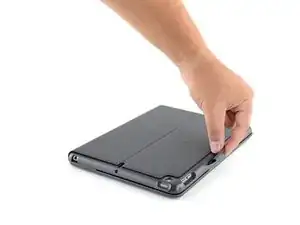
    • Open your case and lay it out flat.

  2. nW55BGDXSiHqBWEN
    nW55BGDXSiHqBWEN
    HJBEhoLSieUYNKQw
    HdWNXU5y4sANeHcd
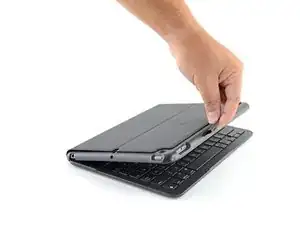
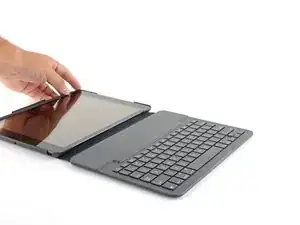
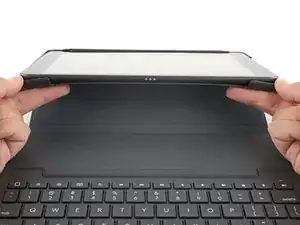
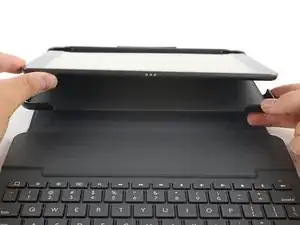
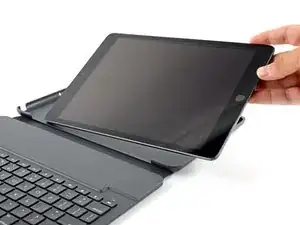
    • Grip the two case corners closest to the keyboard with your thumbs and pull them down, away from the iPad.

    • Remove the iPad from the case.

  3. sdDCDgNV5FedUMKr
    sdDCDgNV5FedUMKr
    NRGuwPtmNEt3DVNG
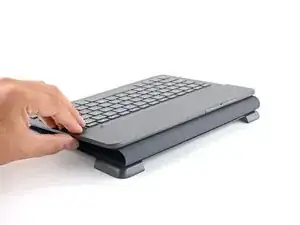
    • Fold the case in half, so the keyboard is facing up.

    • Locate the battery tray.

    My Logitech keyboard has stopped working after I wiped it down with a soft cloth. Tried new batteries, no good. I see your iPad has three dots at base - to connect to keyboard? My iPad doesn’t have those.

    J Newssid -

  4. rQAuZ22CPd3cXhkJ
    rQAuZ22CPd3cXhkJ
    fOb1sXPorOSEcYpK
    HsNoIq2gkvpM2vYJ
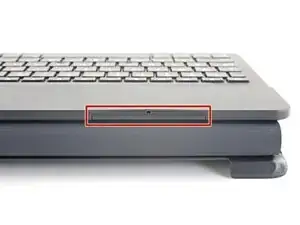
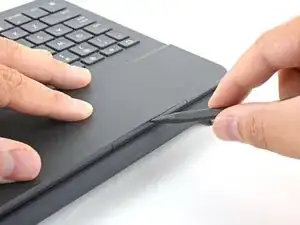
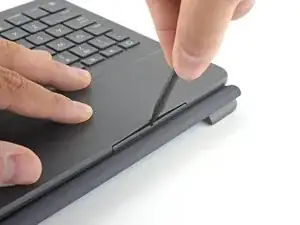
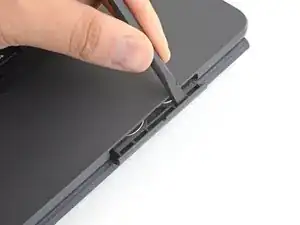
    • Insert the pointed end of a spudger or a small screwdriver into the access hole on the battery tray.

    • Push the spudger in, down, and pull the spudger towards you.

    • The battery tray should "click" open.

    Heb je geen spudger? Je kan ook een zakmes gebruiken.

    TheArcm -

    動画を載せてくれませんか?意味がわかりません

    田中悟 -

  5. HuOWjMpbvFEKvm4h
    HuOWjMpbvFEKvm4h
    WCLyvJqQPOEFufEX
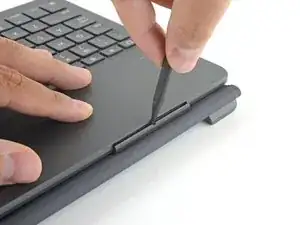
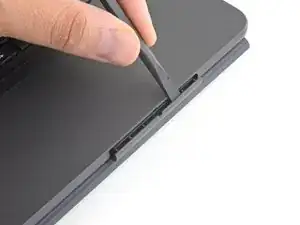
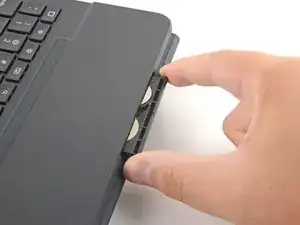
    • Insert the flat end of the spudger or a small flat head screwdriver into the top of the battery tray.

    • Push the battery tray out, away from the case, until you can grip it with your fingers.

    • If it's stuck, you may need to push on alternating sides to "walk" the tray out.

  6. h46OIoCXckHH3UVj
    h46OIoCXckHH3UVj
    mkdUrFZe54p1FwSR
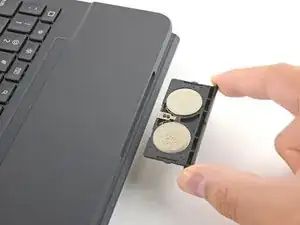
    • Remove the battery tray.

  7. tMv3RaeHOlT5OWPR
    tMv3RaeHOlT5OWPR
    GsX4yyIoyhYnxCJv
    hZGbDn4o2yl3dsSN
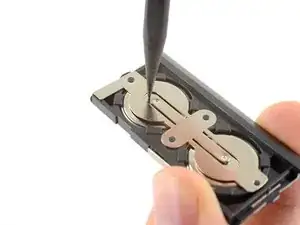
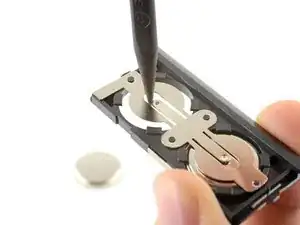
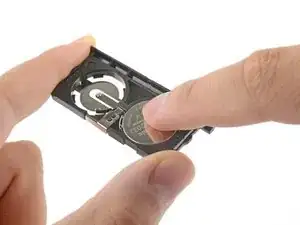
    • Flip the battery tray over.

    • Use the pointed end of the spudger to push both batteries out of the tray.

    • Remove the batteries.

    Buongiorno

    Io ho perso l’estremità metallica a forma di 8 che chiude il circuito; sapete dirmi dove comprarla?

    Grazie

    Fabio Romeo -

    Good morning

    I lost the metallic edge, 8 shaped, that close the circuit; can someone help me on where I can buy it?

    Thanks

    Fabio Romeo -

  8. EJZfJjqcutpLhwDM
    EJZfJjqcutpLhwDM
    mwarF3yKORMi4MAQ
    EUgPH4bWdJpIhaDD
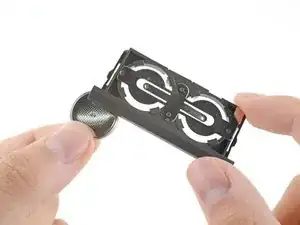
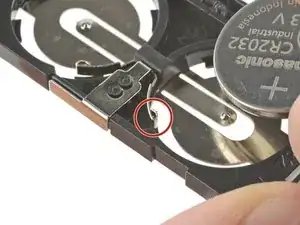
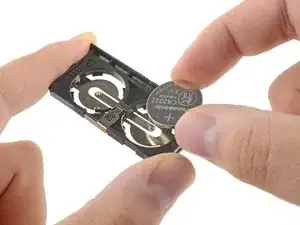
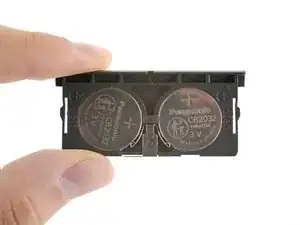
    • To install new batteries:

    • Press one edge of a CR2032 coin cell battery against the contact arm, its text and "+" sign facing up.

    • Press to fully seat the battery.

    • Repeat for the second battery.

    Super duidelijke uitleg.

    irma.smits -

    Eccellente! Magari fossero tutte le istruzioni così!

    Grazie

    maja pekarcikova -

    I put it in like that but the keyboard doesn’t work

    Ashraf Fahim -

    What is a spudger? What else can be used, mine won't open

    Leonie -

    En toen deed hij het nog niet. Ook niet na iPad opnieuw opstarten en alles schoongemaakt te hebben met zachte doek pppfff

    Irma Meijer -

    Where do I get a “spudger” ( the tool listed in this post)

    Edgar -

Conclusão

To reassemble your device, follow these instructions in reverse order.

Repair didn’t go as planned? Try some basic troubleshooting, or ask our Answers community for help.

Reuse or Recycle—Never put discarded electronic parts in household waste. Visit Logitech Recycling to find your nearest recycling points, including the option to mail back old devices to Logitech for free if there’s no convenient solution in your area. You can also take your e-waste to any R2 or e-Stewards certified recycler. And don’t let good working parts or repaired devices die a slow death in your sock drawer—pass them along to someone who can use them.

Share your experience—Leave a comment here or send your feedback directly to Logitech at repair@logitech.com to help shape future repair guides and product design.

Carsten Frauenheim

Membro desde: 10/03/20

160437 Reputação

21 comentários

Excellent instructions. So easy - you made me a hero!

edspecial -

So easy to do. I’m up and running again!

Susan Hallett -

when you put the battery tray back in, you have to push it kind of hard to get it to go all the way in. I didn’t have a spudger but was able to use an ice pick (gently) and then a small flat screw driver.

pdmd -

What if you don’t have a spider? Is there anything else that you can use to open the battery tray?

Kathy Pecsko -

You can use something pointy instead of a Spudger. For example: A pair of scissors ✂️. You can open them with the pointy blade. Thanks!

Cheryl Xu -

You can use something pointy instead of a Spudger. For example: A pair of scissors ✂️. You can open them with the pointy blade.

Cheryl Xu -

I changed the battery and still not working

Carol Garofalo -

Changed battery, the green light doesn't come on. What else can I do to make it work?

Oscar Stevens II -

Great instructions. I, def not tech savvy but I managed to replace my batteries. Would never have found the battery tray without your instructions

Gill Jory -

Exelent instructions anybody can easily follow.

Valoor Thankappan -

help please in 2023 :) I cannot open it :( is there a button or lock on the tray? thank you!

Ml Zilong -

donde puedo comprar una batería nueva??

Lola Correro -

How do you open the tray if the manufacturer installed it upside down. The hole in the tray is facing the bottom of the keyboard. The tray will not budge.

Fred Shaver -

I think i might be a bit late haha but i also had the same issue, i used a pair of dud kids scissors but im sure any would do and forced it open starting from the middle and working my way out, does leave a few scruffs and whatnot, then when its far enough out it’ll just slip out of the keyboard. Just change the batteries as normal then you put it back in but makes sure you put it in the same way you took it out in case the electrics on the inside are upside down too. Cheers!

Basically albert Einstein -

Brilliant instructions and clear easy to follow plan. I did not have a spludger but a flat 1.4mm screwdriver worked fine for opening the battery tray.

Debbie Cooper -

so easy with the clear instructions. Thank you. So good to be connected again.

Cathie Owen -

Brilliant instructions - thank you so much. Worked perfectly for me. I didn’t have a spudger so used a very small screwdriver instead.

Lou -

This was my second change of batteries. The only thing I remembered about the first time was that it was a huge, time-consuming hassle. What I’ll remember about this time was that it was no sweat at all … thanks to you.

David Wielenga -

Hi man

I am looking for battery compartment 920-008667 could you help me out

Paras Kumar -

Bonjour, je vous explique mon problème avec mon Slim Folio. J’ai acheté mon Slim Folio à peine 9 mois et depuis je change les piles au 10 jours. J’aime beaucoup le fonctionnement avec mon IPAD, mais remplacer les piles aussi souvent commence vraiment à me déranger. J’ai pensé que c’était peut-être les piles qui étaient défectueuses, alors j’ai acheté des piles de haute qualité et le problème persiste toujours. Je vais communiquer avec la compagnie pour qu’ils me remplace par un nouveau. Je suis certain qu’il est défectueux. Merci

Jaco -

Uw handleiding was voor mij niet werkzaam. Mijn batterijhouder zat muurvast. De uiteindelijke oplossing was:

De uiteinden van de batterij houder moeten met een plat metalen voorwerp —ca 1cm breed en 1mm dik— met licht geweld —3-4 mm— opgetild worden tot men een klik hoort en voelt. De batterijhouder ligt dan los en kan met lichte trek bewegingen uit de behuizing genomen worden.

Het gaat namelijk om twee nokken, die zich aan de buiten kanten aan de batterijhouder bevinden, die met licht geweld uit de vergrendeling getrokken moeten worden. Vanuit het midden lukt het nooit, tenzij er van een lichte vergrendeling sprake is,

Mvg,

Frans

Frans de Greef -