Introdução

This disassembly will show you how to get into your Logitech K860.

Ferramentas

  1. dHRnwCmuahHEhDeM
    dHRnwCmuahHEhDeM
    KltjpbfZrCd1DiG4
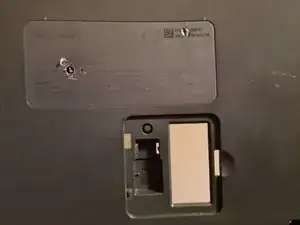
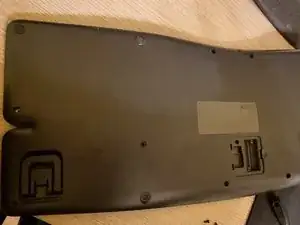
    • Remove all visible screws from the base of the keyboard.

    • Keep all of the screws together. As you remove a screw, note that it matches the other removed screws and keep the same screws together. Often times there are 2 or 3 screws which are different. Keep those separate, document where they go.

    • There will be hidden screws under the plastic feet, and underneath the serial number sticker. This is designed as an irreversible tamper protection seal. void your warranty. This screw needs to be removed.

    • As a general warning, this is a difficult item to repair and the likelihood of success is low If you are trying to access the keyboard's membrane. There are fragile plastic supports ahead, you will need to take care.

  2. DWM6hCZtGwDCCJGX
    DWM6hCZtGwDCCJGX
    EYLVEUZWKbbdZWeY
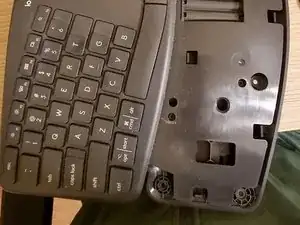
    • After removing screws from the base, you will be able to remove the wrist pad, which will reveal the other half of the battery compartment more screws to remove.

    • Anyway, you need to unclip the wrist pad and unscrew some stuff again. Like 4-5 screws here.

  3. jeqvKkFdFIECjTUI
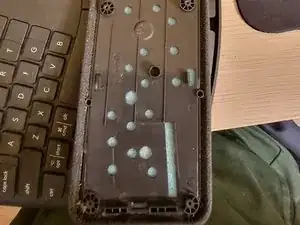
    • As the frame comes apart be mindful that they are connected via this on/off switch. Carefully wiggle one of the connectors to unplug, and set the base aside.

    • This is where it becomes difficult. Scattered around the metal sheet are dark grey plastic supports which have been melted during assembly.

    • They are essentially hot rivets, and are cheaper than screws. Each one is shaped initially as a cylinder or pillar. During assembly at the factory, after the metal plate is installed, these are all pressed down with heat to mildly melt them, resulting in a slight mushroom head which is visible to you here.

    • To unattach the plate we need to break each one with a sharp knife, by cracking and lifting away some of the flattened, mushroomed 'head'. While this is irreversible, it will not prevent the operation of the keyboard. Later, the screws which have already been removed will now bear the entire load of holding these components together.

  4. 1W16XXXdpxoc4KmX
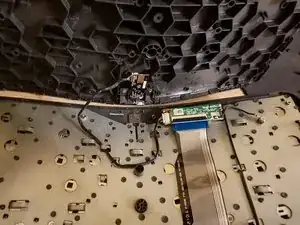
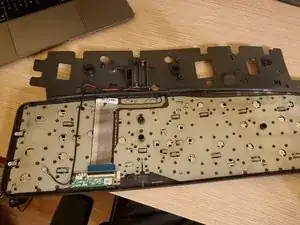
    • Now you are left with this beautiful view. You can unscrew the ground for the small board and the board itself. You can even unscrew 2 screws on either side of the keyboard.

    • What remains the the key membrane assembly, which is, arguably, designed to be non-replaceable, and non-repairable. [Which prompts the reader to ask why does this guide exist at all? -Ed.]

    Has anyone managed to go further than step 4? My wife spilled a drink, and while we dried the keyboard out sufficiently, the keys are still sticking slightly.

    Andy Bryant -

    Unfortunately I do not see any way to further disassemble this and yes, mine are also a little bit sticky still but they became much better now after a year or so

    AlexG -

    Screw logitech for placing stickers over screws and making this one of the least-cleanable keyboards I have ever experienced. I really like it apart from that, but that’s a pretty big failing.

    imixak -

    Thanks for the instructions. Very much appreciated. I missed the location of the screw hidden under the serial number when I was being all manly and just following my nose.

    Clearly I will have to be much more careful about where I spill my coffee from now on. :o(

    Martin Moleski -

    Which it's exactly THE REASON why everyone is here, and now a single key fault that will pass for warranty (and no one want's to have to open a support ticket to logitech missing a 'e' or 'a' and wait two weeks for a replacement). There is not GOOD reason to try to remove the plastics on this keyboard, NONE. It sucks but WHY putting the note in STEP FOUR. You cannot fix anything here wo breaking ALL first.

    Before falling in hell, listen my suffering first: There AT LEAST two different SKUs for the keys JUST with GERMAN (QWERTZ) layouts (long 't' & 'n' break far too easy, one older plastics doesn't 'sit' well with modern German moulding, I have none luck finding references to bought the correct one.)

    TRUST ME: If you are !#^&@@ with a glitchy keystroke, wait to find how FAST you'll tear in half ALL; FULL RAGE, bc you broke the plastic that spring propel the key up.

    Keyboard Lover -

Conclusão

To reassemble your device, follow these instructions in reverse order.

AlexG

Membro desde: 02/12/17

304 Reputação

9 comentários

Great guide! the part about the hidden screw under the serial number in particular was a life saver.

One thing that's not clear is which slots take the smaller vs the larger screws, it would help to annotate that as now I'm blindly screwing whatever fits.

michaelchirico4 -

OK so IINM, the 6 small screws all go on the upper half of the reverse side. There is also one slot for a longer screw (closest to the power switch). Anyway the longer screws don't fit in the small slots so it's easy.

michaelchirico4 -

Great guide. But I have 2 buttons that are not working, if it can not get to te membrane how can i test it or clean it?

Victor Araki Miyazono -

that's ridiculous that you can't do that. I have the same issue.

Artan Muzhaqi -

some water was dropped into keyboard and some keys is not working anymore. Indeed, if it now possible to see the membrane or too much hard to put it back, it seems does not make any sense to fix it. Logitech wins...

Ferreira -

I have the same issue, water ingress…Logitech cant Help.

Bruno Bayo -

Thanks for trying...

I got three things:

1) first and foremost, you can't get at the underside of the keys to clean contacts or anything like that;

2) the wrist pad clips off (although the guide doesn't say exactly how to do so without breaking anything). Any way, you don't need to disassemble the whole thing; and

3) (my original contribution) the smaller screw come from (and go back into) holes with metal sockets in them - or at least they did on my keyboard.

Peter Lenny -

Spilled coffee on my K860 - a lot of it. Was dripping when I stood it on end. Drained it for 10 minutes, shook it, drained another 10 minutes. Then, took it apart as much as possible and popped it into a convection oven, at 140 degrees for 1.5 hours. Works great!

To clean keys, pop buttons off the brackets underneath them. Would recommend having a bunch of extras on hand before popping keys off. The process will break quite a few of the brackets.

Dan Gage -

^ IF YOU ARE READING; STOP ANY IDEAS, THINK TWICE: 140F != 140º CELSIUS.

Far from trying to prevent you to fix anything trying, I would say: DO NOT EVEN TRY A OVEN. 140 degree for anyone outside US is 140º, 40 above the boiling point of water at 1 atm. The 140 from a USer is EXACTLY 60 degrees, or CELSIUS, which, it's so round that I am afraid to even think about the molding of the K860 surviving 90 minutes at 140 degrees of the world.

Just imagine leaving the keyboard, in your car, mid summer, at noon full sun not shadows. That's 60 degrees inside the car in 10 minutes, DO YOU THINK THE MOLDING of the K860 WOULD SURVIVE 90 MINUTES?.

1. Do not use water from the tap, it's stupid, the amount of solid residue varies from potable to 'good' enough to rinse soap in a shower, from 100km around your tap.

2. Coffee is dirty water, if you like that with sugar, using hot air in any sugar not 'drained' from the water punishment, will leave you with caramel, sweet and glued forever.

(A convection oven at 60 or 140F, my ass)

Keyboard Lover -