Introdução

Use this guide to replace the heat sink on your Lenovo V15-IIL 82C5.

  1. poD1Eoiceg4PPMtG
    poD1Eoiceg4PPMtG
    GlUsNTYODosmId3n
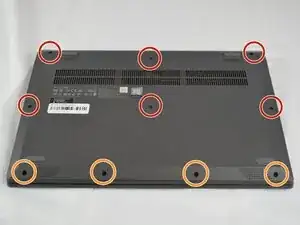
    • Power off your laptop and disconnect the charger and peripheries before beginning.

    • Flip the laptop over so that the lower case is facing up.

    • Remove the following Phillips #1 screws:

    • Six 7 mm-long

    • Four 4 mm-long

  2. qOIqUFnSkyqeOe6I
    qOIqUFnSkyqeOe6I
    WDvCPs5VS5RcBLeA
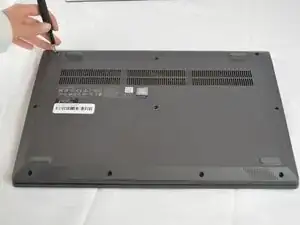
    • Insert an opening pick into the seam between the lower case and chassis.

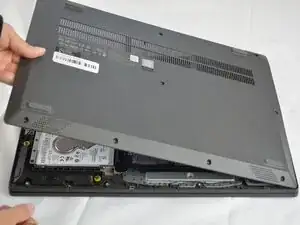
    • Slide the opening pick around the entire perimeter until all of the retaining clips are fully released.

    • Lift and remove the lower case.

  3. tYPgfpFnQIKleANf
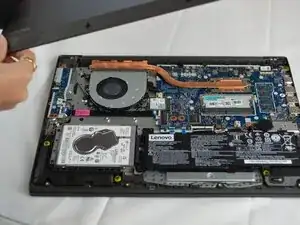
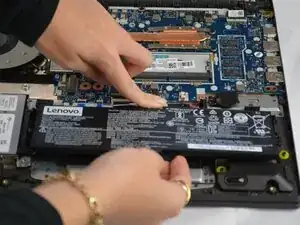
    • Use your fingernails to "walk" the battery connector out of its socket.

  4. HjOuVsNAQaE3GtLi
    HjOuVsNAQaE3GtLi
    piVefQW5djqZM1T5
    2uFmKOc2OnNPNUHK
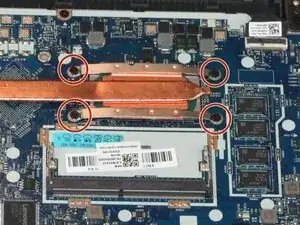
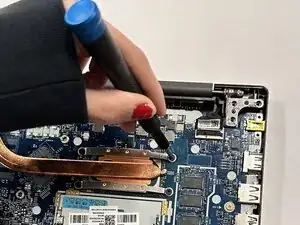
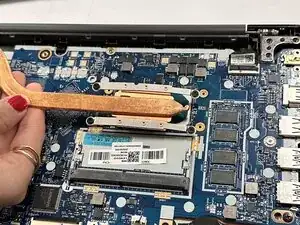
    • Remove the four 2.5 mm-long Phillips screws securing the heat sink.

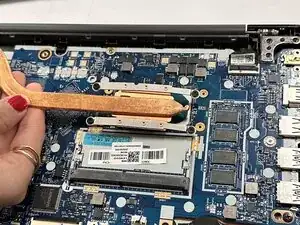
    • Remove the heat sink.

    • Reapply thermal paste before installing a new heat sink.

Conclusão

To reassemble your device, follow these instructions in reverse order.

Connor Bassolino

Membro desde: 29/03/22

21106 Reputação

0 comentários