Introdução
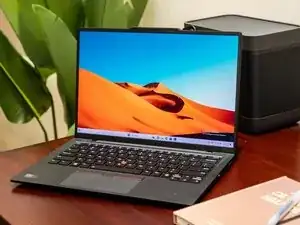
This guide explains the proper technique for opening the Lenovo ThinkPad X1 Carbon Gen 12 and safely performing basic internal maintenance.
Since the X1 Carbon uses a thin magnesium chassis and tight cable routing, careful handling is essential.
Tools Needed
- Torx T5 screwdriver
- Phillips #0 screwdriver
- Plastic spudger or opening pick
- Tweezers (optional)
- Anti-static wrist strap (recommended)
Step 1 — Power Down
- Shut down the laptop completely.
- Unplug the charger and any connected accessories.
- Hold the power button for 10 seconds to drain residual charge.
Step 2 — Remove Bottom Screws
- Flip the laptop over.
- Remove all T5 screws along the bottom panel.
- Keep the screws organized to reinstall in the same spots later.
Step 3 — Lift the Bottom Cover
- Insert a plastic pick near the rear hinge area.
- Work your way along the edges to release the clips.
- Avoid using metal tools—this cover is thin and can bend easily.
Step 4 — Disconnect the Battery
- Once opened, locate the battery connector on the motherboard.
- Use a spudger to carefully slide it out.
- This is important to prevent accidental shorts while working inside.
Step 5 — Inspect Accessible Components
With the battery disconnected, you may now safely examine or maintain:
Cooling Fan & Heat Sink: Remove dust buildup to reduce overheating.
- M.2 SSD: Reseat if you experience boot issues.
- Wireless Card: Check antenna cables for looseness.
- Speakers: Clear dust or debris.
- Ribbon Cables: Ensure keyboard and trackpad flex cables are fully seated.
This guide focuses on technique rather than full replacements, so avoid removing components unless necessary.
Step 6 — Reassemble
- Reconnect the battery.
- Align the bottom cover and press evenly until it sits flush.
- Reinstall all T5 screws.
- Power on the laptop to confirm normal operation.
- Additional Resources
For full device documents and reference material, you can check:
manualslibraryy.com — useful for locating official product guides.
To reassemble your device, follow these instructions in reverse order.

0 comentários