Introdução
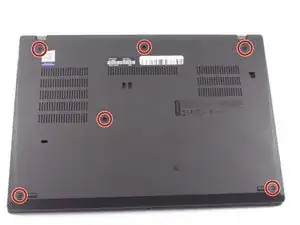
This guide is for the Lenovo ThinkPad T495, on how to replace the baseplate of the laptop. The point of the baseplate is to keep the internal pieces of the laptop safe from damages. It also keeps the laptop sturdy and structurally sound. You would likely need to replace the baseplate if it is cracked or overly damaged. This is because it could lead to the internal components getting damaged.


-
-
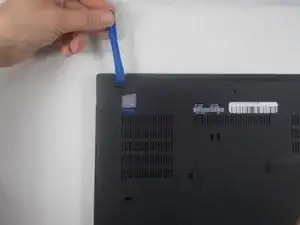
Use an iFixit opening tool to start prying under one of the hinges, between the baseplate and chassis, and work your way around the perimeter until the baseplate releases.
-
Lift off the baseplate.
-
Conclusão
To reassemble your device, follow these instructions in reverse order.