Introdução
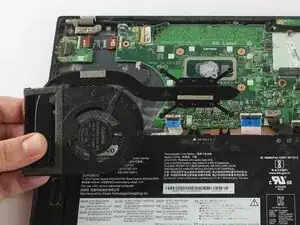
Use this guide if you are experiencing issues with the Lenovo ThinkPad T14s Gen 1 CPU Cooling Fan. If the laptop is overheating, crashing during use, fans not spinning or unusual noise such as grinding, the CPU Fan may be faulty.
Before continuing with this guide, refer to the troubleshooting pages.
This repair requires opening the device, so proceed with caution; some components may be sensitive to electrostatic discharge (ESD) or accidental damage. Consider using an anti-static mat or wrist strap to minimize ESD when repairing electronic devices.
Consider replacing the thermal paste to avoid further overheating issues or repair.
Allow the the laptop to de-energize if it has recently been charged.
Ensure it is powered off before starting repair.


-
-
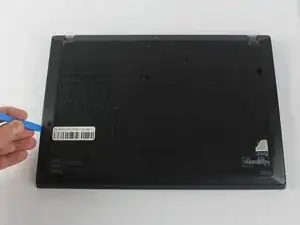
Insert the end of an iFixit opening in the space between the bottom and top case and move it around the perimeter to release the clips that hold the bottom case to the device.
-
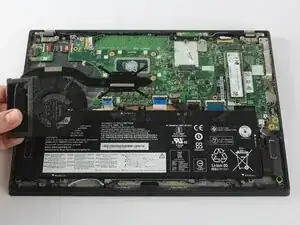
Remove the back panel.
-
-
-
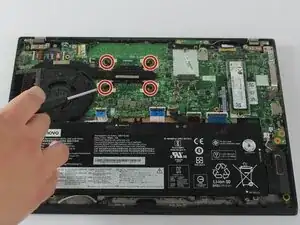
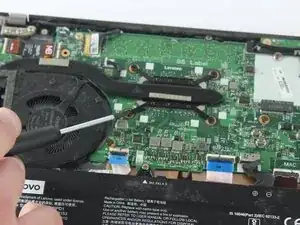
Use a Phillips #0 screwdriver to loosen the four 3.0 mm captive screws holding the heat sink in place.
-
-
-
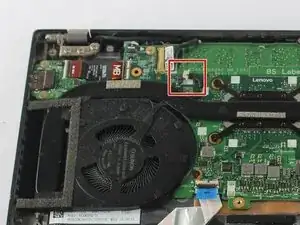
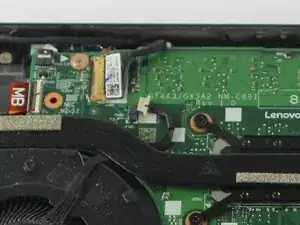
Use the point of a spudger to push on alternating sides of the connector to "walk" it out of its socket.
-
To reassemble your device, follow these instructions in reverse order. Take your e-waste to an R2 or e-Stewards certified recycler.
