Introdução
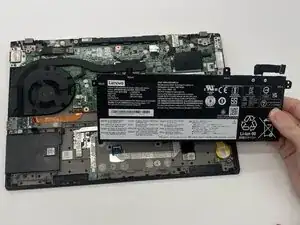
This guide shows how to replace the battery in a Lenovo ThinkPad T14 Gen 1. The battery supplies power to the laptop, and replacement may be necessary if it can no longer hold a charge.
Before you begin, completely power off the computer and disconnect the charging adapter and any external peripherals. Work on a clean, uncluttered surface to reduce the risk of damage or injury while handling internal components.


-
-
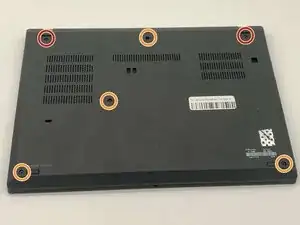
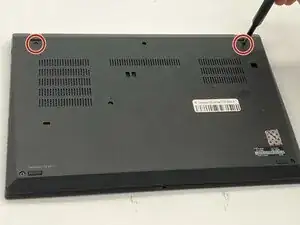
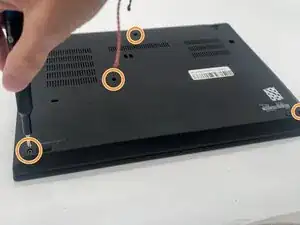
Use a Phillips #1 screwdriver to loosen the following captive screws:
-
The top two 6.8 mm corner screws
-
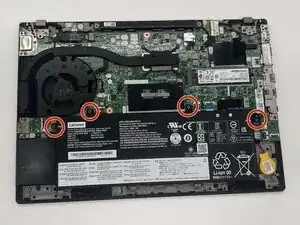
Four 5.8 mm-long screws
-
-
-
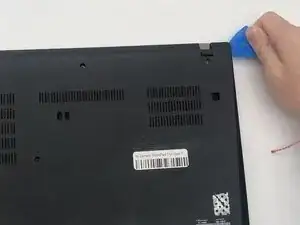
Use a plastic opening tool to pry the bottom panel.
-
Insert the end of the opening tool into the seam between the bottom and top cover.
-
Slide the opening tool around the edge of the bottom panel to release the clips holding them together.
-
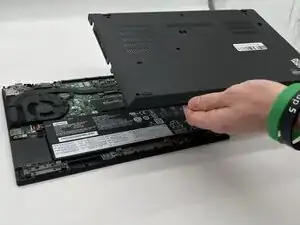
Gently remove the bottom panel.
-
-
-
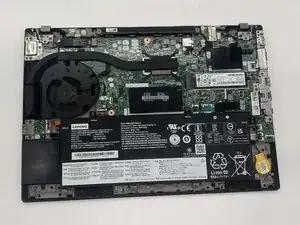
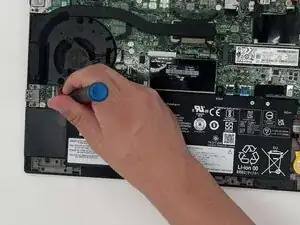
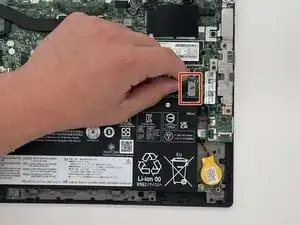
Remove the black battery connector from the motherboard by gently tugging toward the left.
-
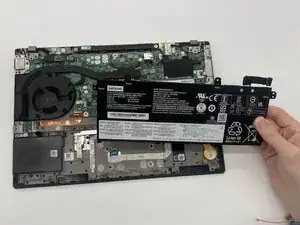
Gently lift the top of the battery to remove it from the chassis.
-
To reassemble your device, follow these instructions in reverse order. Take your e-waste to an R2 or e-Stewards certified recycler.
For optimal performance, calibrate your newly installed battery after completing this guide.

You might not need to remove the screws. My laptops back cover had all screws held in place with washers. You just need to untighten them.
Sverrir -
...also worth mentioning: Three of the screws are philips size 0, the ones near the hinges and the one closest to the center.
Sverrir -