Introdução
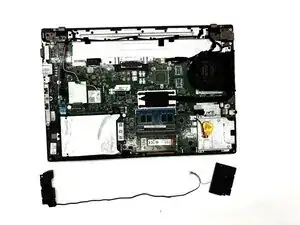
Use this guide to replace the internal speakers in a Lenovo ThinkPad L470. Speaker replacement can fix issues such as distorted audio, low volume, crackling sounds, or audio that only works through headphones. This procedure walks you through removing the bottom cover, disconnecting the speaker cables, and replacing the left and right speaker units.
What this part does
The speaker assembly provides built-in audio output for the laptop. Faulty speakers can cause audio distortion or complete sound loss.
Common symptoms of faulty speakers
- Crackling or buzzing
- Low or uneven volume
- Audio cutting in and out
- No sound unless using headphones
- Rattling or vibration noises
Before you begin
- Shut down the laptop completely.
- Unplug the AC adapter.
- Remove the external battery.
- Work on a clean, static-safe surface.
After the repair
- Play a test sound to ensure both speakers work.
- Check the audio balance settings in Windows if only one speaker outputs sound.
Ferramentas


-
-
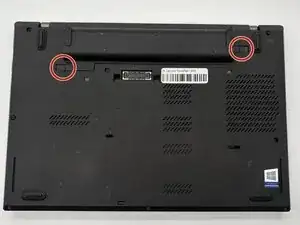
Turn off the laptop and unplug the AC adapter.
-
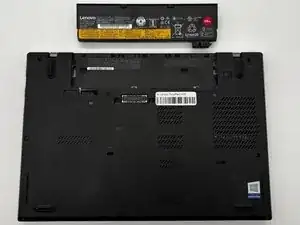
Slide the battery latch to unlock and lift out the external battery.
-
Hold the power button for 10 seconds to discharge any leftover power.
-
-
-
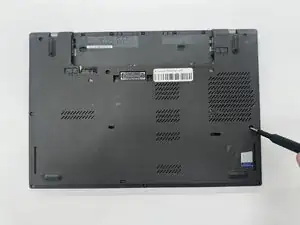
Use a Phillips #0 screwdriver to loosen the captive screws on the bottom cover.
-
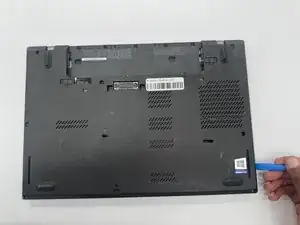
Use an opening tool to pry the back cover off of the laptop.
-
-
-
Disconnect any shielding flaps covering the speaker cables.
-
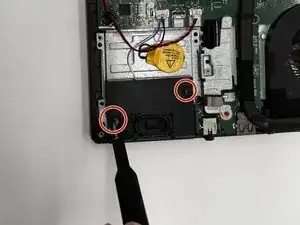
Remove the screws from the speaker using a Phillips #0 screwdriver.
-
-
-
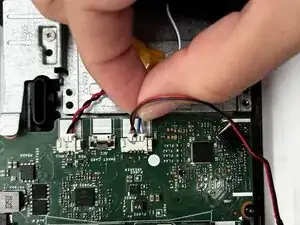
Carefully disconnect the speaker cable connectors from the motherboard by pulling straight back; do not lift or twist.
-
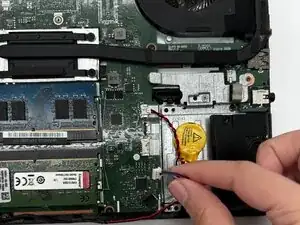
Lift the speakers straight out of their compartments.
-
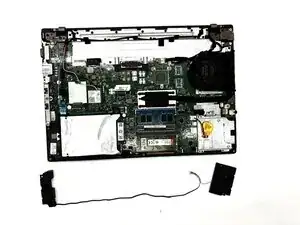
To reassemble your device, follow these instructions in reverse order.