Introdução

Use this guide to remove or replace the lower case on your Lenovo ThinkPad E15 Gen 2 (Model Numbers: 20T8, 20T9, 20TD, 20TE).

  1. L2RJGMLwnHthYFoD
    L2RJGMLwnHthYFoD
    AFCnSZNEdfwfEoFx
    Uyu55PMWFRBxZmNV
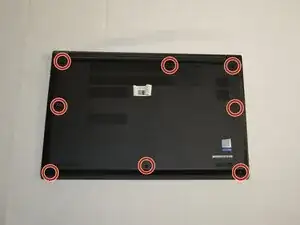
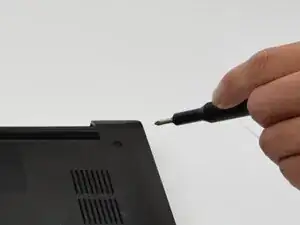
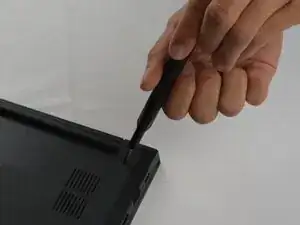
    • Use a Phillips #1 screwdriver to loosen the eight captive screws securing the lower case.

    • The screws are captive and should not have the ability to be taken out.

  2. ScZODUnvNZaoeAA5
    ScZODUnvNZaoeAA5
    WU5mVDoYrs13LPXB
    dHNsRObZulxM4TBu
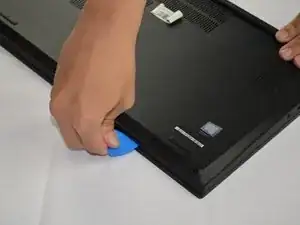
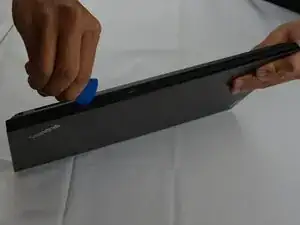
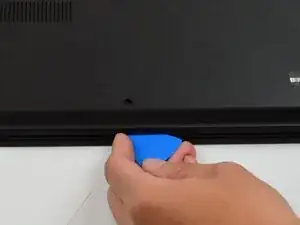
    • Insert an opening pick into the seam between the lower case and chassis.

    • Slide the pick around the entire perimeter until the lower case fully releases.

  3. tfnL32nBHONiTlt4
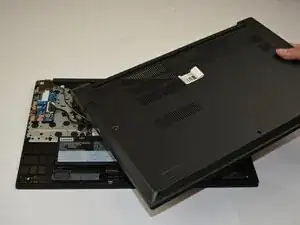
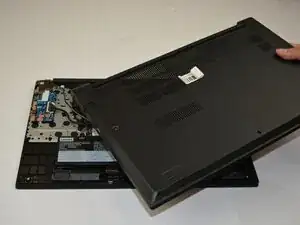
    • Remove the lower case.

    • When reassembling, place the lower case on top of all the clips and push down around the edges until all the clips are engaged.

Conclusão

To reassemble your device, follow these instructions in reverse order.

Resnu Pham

Membro desde: 30/09/25

255 Reputação

0 comentários