Introdução
This guide will show you how to replace the battery of a Lenovo Tab 4 TB-8504F. Some steps can be tricky, especially removing the internal plastic shield with the hidden screw under the blue “S” sticker and pulling the long adhesive strips under the battery. We’ve included helpful tips from users to make the process easier and safer so you can complete the repair with confidence.


-
-
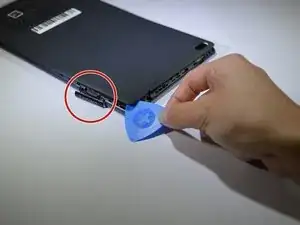
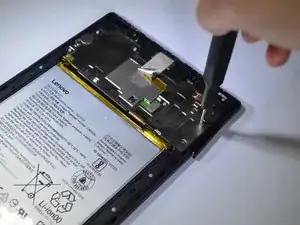
Start at the microSD slot. This is the easiest entry point.
-
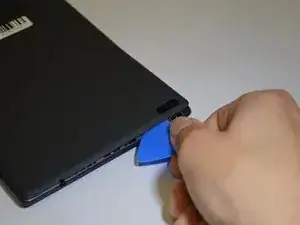
Use the opening pick gently to slide underneath the back cover of the tablet.
-
Slide the opening pick around the entire edge of the tablet. Don't force it and work slowly to release all clips.
-
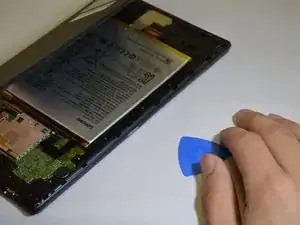
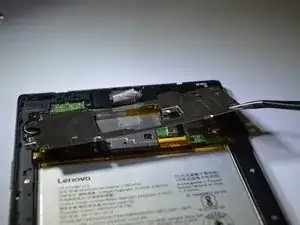
Once all clips are loose, lift and remove the back cover.
-
-
-
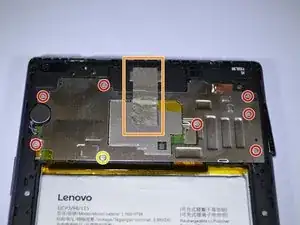
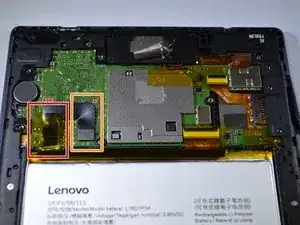
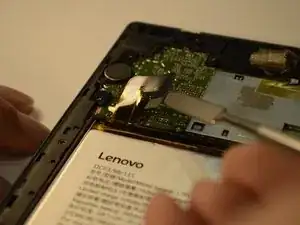
Peel back the yellow protective tape over the battery connector.
-
Use a spudger or plastic opening tool to remove the battery's ribbon cable from the motherboard.
-
-
-
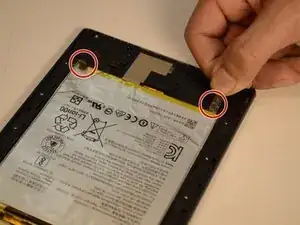
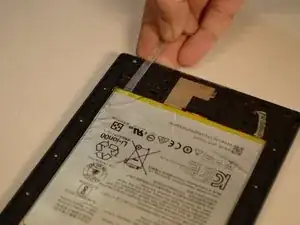
Locate the two stretch-release adhesive strips at the bottom of the battery.
-
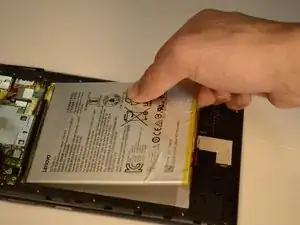
Gently pull each strip slowly and straight out under the battery.
-
Once both strips are off, lift the battery from the frame.
-
To reassemble your device, follow these instructions in reverse order.

Um comentário
Hi,
After replacing the battery, we now get an error “Temperature too high, will shut down” when we boot. We get the same error with the old battery installed. We tried a factory reset. That did not help. I’ve rechecked steps, and it is pretty straighforward. Any ideas?
Thanks,
Dave