Introdução
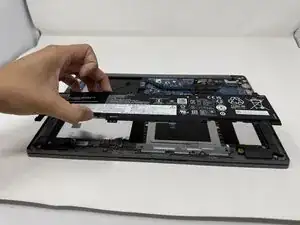
If you are experiencing issues with your Lenovo IdeaPad (model 1-15IJL7), such as unexpected shutting down or laptop not being able to turn on, the battery may be in need of a replacement. A laptop's battery life will start to deteriorate overtime, which will need to be changed.
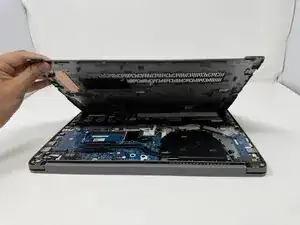
Before proceeding to this guide, refer to this Troubleshooting Page to rule out any solutions without disassembling your laptop. Make sure the laptop is completely powered off and disconnected from any charging devices. In order to access the battery, the bottom panel of the laptop should be removed, which will show the internal parts of the laptop.


-
-
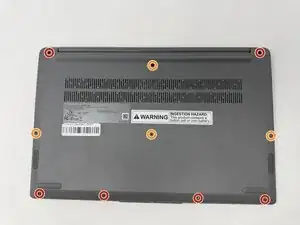
Using the T4 Screwdriver, unscrew and remove the screws that secure the lower case:
-
Six 5 mm screws
-
Four 2.5 mm screws
-
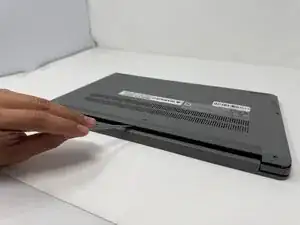
Insert a spudger into the seam between the lower case and chassis.
-
Pry around the entire perimeter until the lower case fully releases.
-
-
-
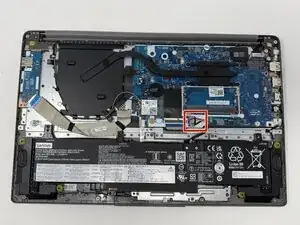
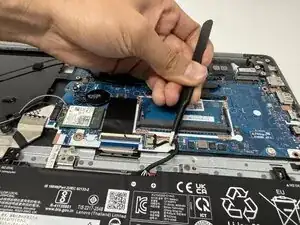
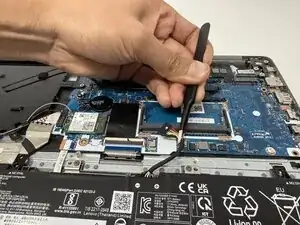
Use tweezers or your fingernails to gently disconnect the battery connector directly out of its motherboard socket.
-
-
-
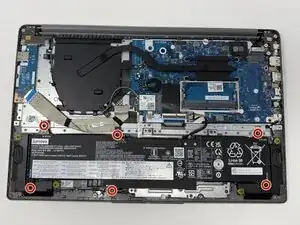
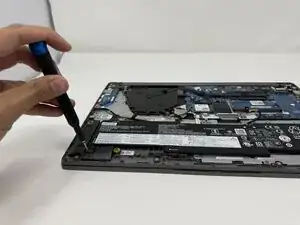
Using the Phillips #00 screwdriver, remove the six 4 mm screws that secure the battery.
-
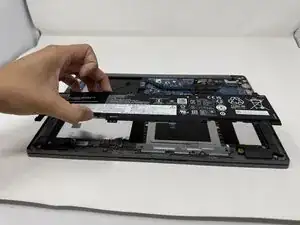
Lift the battery from its position.
-
To reassemble your device, follow these instructions in reverse order.