Introdução
If your laptop has trouble turning on, it may be due to a dead battery. Over time, battery performance deteriorates as a result of repeated charge cycles, which can eventually cause the battery to lose its ability to hold a charge. If the battery in your Lenovo IdeaPad 1-15ALC7 has died, it will need to be removed and replaced with a new one.
Before replacing the battery, check the Lenovo IdeaPad 1-15ALC7 troubleshooting pages for possible solutions.
To access the battery, you’ll need to remove the bottom panel of the laptop to expose the internal components.
Warning: Swollen batteries are fire hazards and need to be handled with caution. Follow these safety guidelines when removing swollen or corroded batteries. What to do with a swollen battery - iFixit
Make sure to power off the laptop completely and disconnect the charging adapter before beginning the battery replacement or working with any internal components.
Ferramentas


-
-
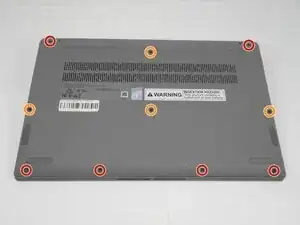
Unscrew and remove the T5 Torx screws that secure the lower case:
-
Six 6.5 mm screws
-
Four 5 mm screws
-
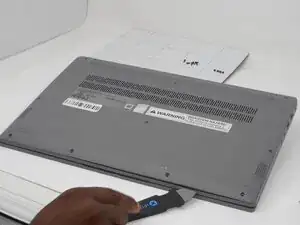
Insert a Jimmy into the seam between the lower case and chassis.
-
Pry around the entire perimeter until the lower case fully releases.
-
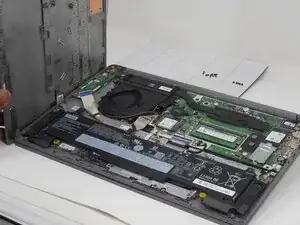
Remove the lower case.
-
-
-
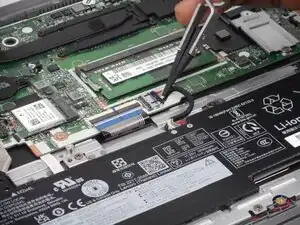
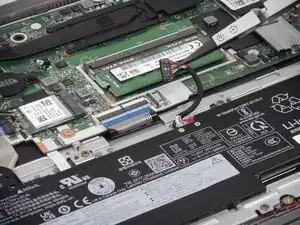
Use tweezers or your fingernails to gently "walk" the battery connector directly out of its motherboard socket.
-
-
-
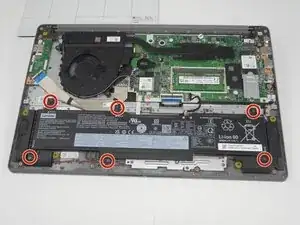
Unscrew the six 5 mm Phillips #000 screws that secure the battery.
-
Lift the battery up and out to remove it.
-
To reassemble your device, follow the above steps in reverse order.
For optimal performance, after completing this guide, calibrate your newly installed battery.
Take your e-waste to an R2 or e-Stewards certified recycler.
Repair didn’t go as planned? Try some basic troubleshooting or ask our Answers community for help.