Introdução

  1. VwBmsCs3l3Fn55iH
    VwBmsCs3l3Fn55iH
    A2rpDckLZM5mF4LV
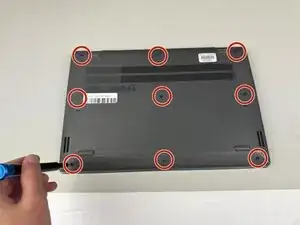
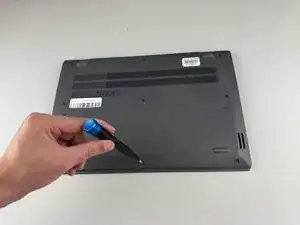
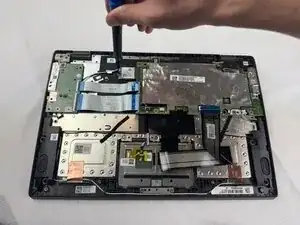
    • Use a Phillips #0 screwdriver to remove the nine 8.6 mm screws from the back cover.

  2. lMRmNhfTDEF4TE4I
    lMRmNhfTDEF4TE4I
    HGnrQI1HHBZ2ByRQ
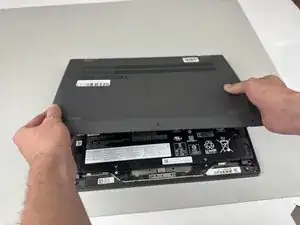
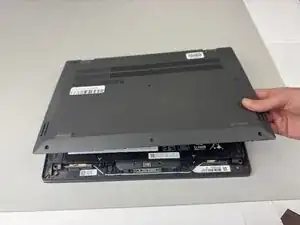
    • Carefully remove the back cover from the Chromebook.

    • You may hear clicking sounds as the cover becomes detached from the frame.

  3. wPgMIHtYDV6ruHGR
    wPgMIHtYDV6ruHGR
    B6qBK1AcRgxMSLPA
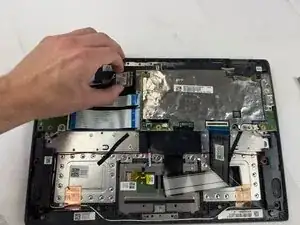
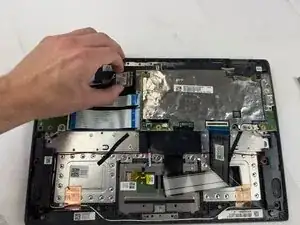
    • Using a Phillips #0 screwdriver, remove the 5.5mm screw holding the WLAN card in place.

    • Disconnect the two wires from the WLAN card.

    • Remove the WLAN card.

Conclusão

To reassemble your device, follow these instructions in reverse order.

Kristen Gismondi

Membro desde: 12/11/14

103918 Reputação

0 comentários