Introdução

  1. 2pUGwSJZpf1n4STn
    2pUGwSJZpf1n4STn
    KmXQLMxpZcNBmccK
    GDG2SnUgdpK2FPIV
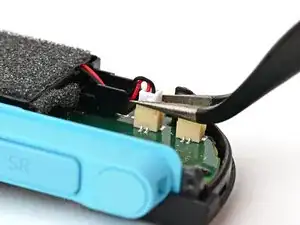
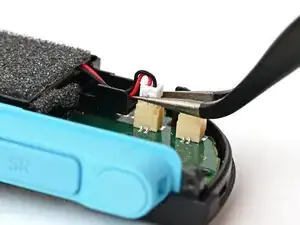
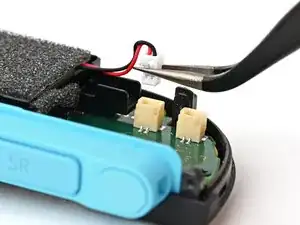
    • Use tweezers or your fingers to firmly grip the battery cable's white JST connector and pull straight away from its socket to disconnect it.

    • Once partially lifted, reposition your fingers/tweezers to beneath the connector's upper lip to increase your grip.

  2. ifXncuMq2xh5Nqnv
    ifXncuMq2xh5Nqnv
    DLHVuopLCFerAWNT
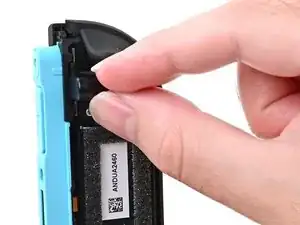
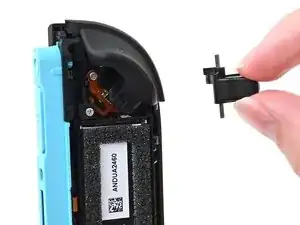
    • Pick up the release button and remove it.

  3. Le3CHfnXXpt6eXyF
    Le3CHfnXXpt6eXyF
    b3iP1ApBSPdHBkYs
    Dx5xBIaSTOjfWY2i
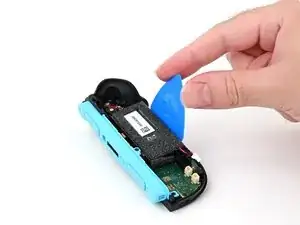
    • Insert a flat edge of an opening pick into the gap between the battery and the battery well.

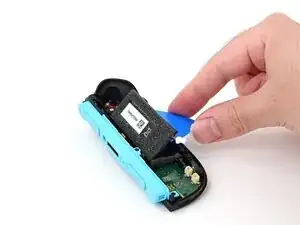
    • Pry the battery up slowly with steady force to release the adhesive.

    • Don't bend or crease the battery—apply steady force and give the adhesive time to release.

    • If it feels stubborn, apply a few drops of adhesive remover or high-concentration (90% or higher) isopropyl alcohol to the battery side of the pick while it's inserted and allow it to run under the battery. Be careful not to spill it elsewhere in the controller.

    • If you're using adhesive remover, follow these preparation steps first.

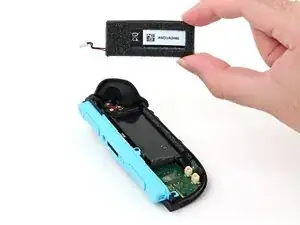
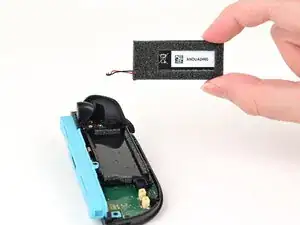
    • Remove the battery.

Conclusão

To reassemble your device, follow these instructions in reverse order.

Nick Schultz

Membro desde: 24/03/24

45909 Reputação

0 comentários